
Note
Go to the end to download the full example code.
ICON Cell-centered quiver plots
This example draws ICON cell-centered wind vectors with
easyclimate.plot.icon.plot_cell_quiver.
The helper thins irregular ICON cell vectors into longitude-latitude bins before passing them to Matplotlib’s quiver machinery.
import xarray as xr
import numpy as np
import cartopy.crs as ccrs
import matplotlib.pyplot as plt
import easyclimate as ecl

from easyclimate.plot.icon import plot_cell_quiver
Open a sample ICON model-level file and select the horizontal wind components stored on cell centers.
icon_native_ml_20080909T000000Z.nc ━━━━━━━ 100.0% • 1.8/1.8 • 19.1     • 0:00:00
                                                    MB        MB/s
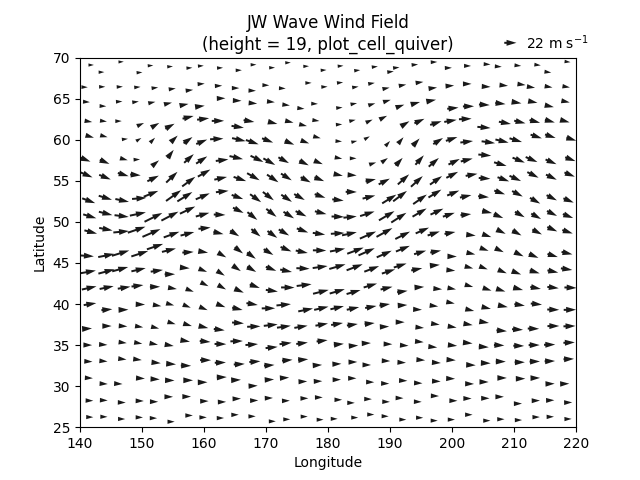
Draw thinned vectors over a regional window on plain Matplotlib axes.
fig, ax = plt.subplots()
q = plot_cell_quiver(
    data, u, v,
    ax=ax,

    lon_min=140,
    lon_max=220,
    lat_min=25,
    lat_max=70,

    nx_bins=30,
    ny_bins=20,
    thin_method="nearest_center",
    scale=900,
    width = 0.004,
    headaxislength = 5,
)

ax.set_title("JW Wave Wind Field\n(height = 19, plot_cell_quiver)")
Text(0.5, 1.0, 'JW Wave Wind Field\n(height = 19, plot_cell_quiver)')
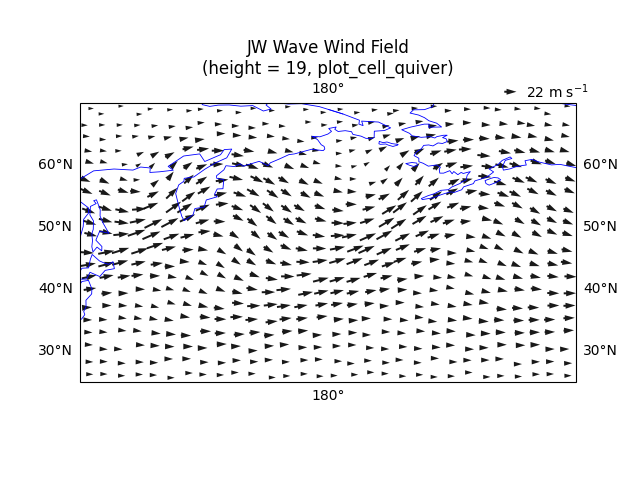
Draw the same vectors on a shifted PlateCarree map. The transform keyword
identifies the input wind locations as geographic coordinates.
sphinx_gallery_thumbnail_number = -1
fig, ax = plt.subplots(
    subplot_kw={"projection": ccrs.PlateCarree(180)}
)
q = plot_cell_quiver(
    data, u, v,
    ax=ax,

    lon_min=140,
    lon_max=220,
    lat_min=25,
    lat_max=70,

    nx_bins=30,
    ny_bins=20,
    thin_method="nearest_center",
    scale=900,
    width = 0.004,
    headaxislength = 5,
    transform=ccrs.PlateCarree(),
)

ax.set_title("JW Wave Wind Field\n(height = 19, plot_cell_quiver)")
ax.coastlines(resolution="110m", linewidth=0.6, color="b")
ax.gridlines(draw_labels=True, alpha=0)
<cartopy.mpl.gridliner.Gridliner object at 0x7a8799db7d10>
Total running time of the script: (0 minutes 2.790 seconds)