
Note
Go to the end to download the full example code.
ICON Cell-centered curved quiver plots
This example draws ICON cell-centered vector winds as curved arrows with
easyclimate.plot.icon.plot_cell_curved_quiver.
The helper interpolates irregular ICON cell vectors to a regular plotting grid inside the requested longitude-latitude window before drawing the curved arrows.
import xarray as xr
import numpy as np
import cartopy.crs as ccrs
import matplotlib.pyplot as plt
import easyclimate as ecl

from easyclimate.plot.icon import plot_cell_curved_quiver
Open a sample ICON model-level file and select the horizontal wind components stored on cell centers.
icon_native_ml_20080909T000000Z.nc ━━━━━━━ 100.0% • 1.8/1.8 • 22.8     • 0:00:00
                                                    MB        MB/s
Draw curved arrows over a regional North Pacific window. The helper builds the interpolation grid from the requested longitude-latitude bounds.
fig, ax = plt.subplots()

q = plot_cell_curved_quiver(
    data, u, v,
    ax=ax,

    lon_min=140,
    lon_max=220,
    lat_min=25,
    lat_max=70,
    color = "k",

    transform=ccrs.PlateCarree(),
)

ax.set_title("JW Wave Wind Field\n(height = 19, plot_cell_curved_quiver)")
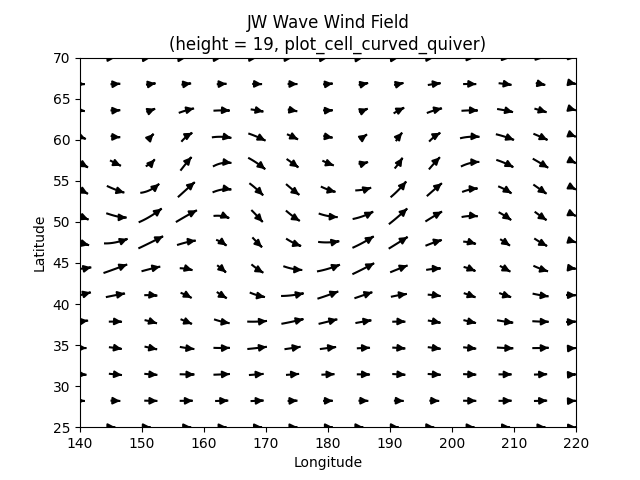
Text(0.5, 1.0, 'JW Wave Wind Field\n(height = 19, plot_cell_curved_quiver)')
The same curved-arrow plot can be drawn on Cartopy axes. The visible extent stays on the requested window while interpolation uses nearby source cells. sphinx_gallery_thumbnail_number = -1
fig, ax = plt.subplots(
    subplot_kw={"projection": ccrs.PlateCarree(180)}
)
q = plot_cell_curved_quiver(
    data, u, v,
    ax=ax,

    lon_min=140,
    lon_max=220,
    lat_min=25,
    lat_max=70,
    color = "k",

    transform=ccrs.PlateCarree(),
)

ax.set_title("JW Wave Wind Field\n(height = 19, plot_cell_curved_quiver)")
ax.coastlines(resolution="110m", linewidth=0.6, color="b")
ax.gridlines(draw_labels=True, alpha=0)
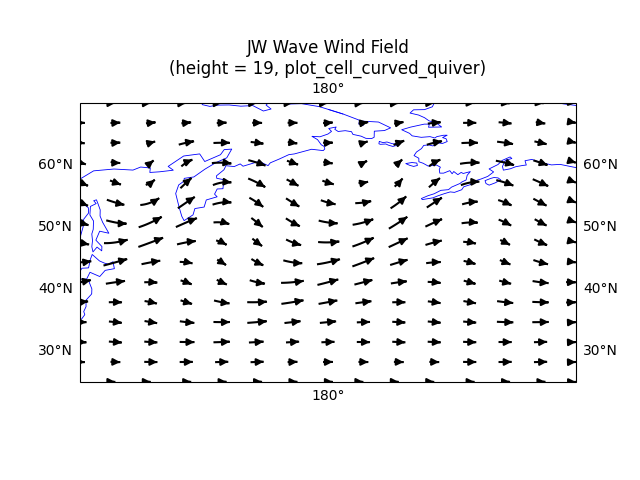
<cartopy.mpl.gridliner.Gridliner object at 0x73548b77fa40>
Total running time of the script: (0 minutes 5.992 seconds)