
Note
Go to the end to download the full example code.
ICON Cell-centered contour plots
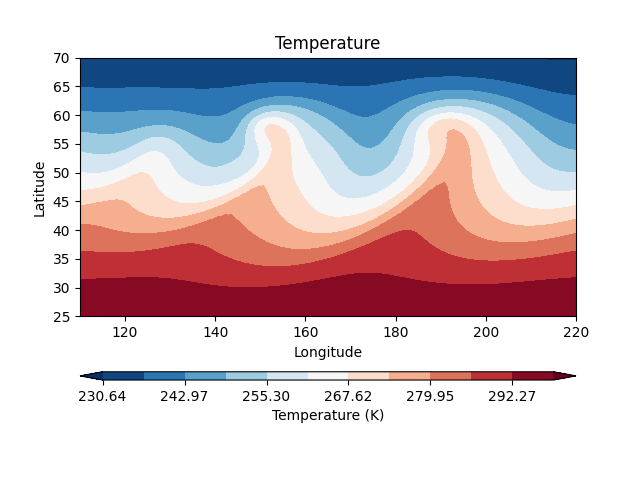
This example demonstrates filled and line contours for ICON cell-centered scalar fields.
easyclimate.plot.icon.plot_cell_contourf
draws filled contours from values located on ICON cells. The companion
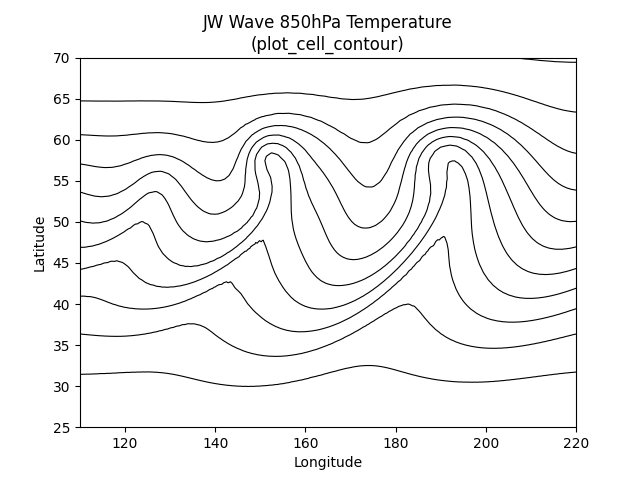
easyclimate.plot.icon.plot_cell_contour
draws contour lines using the same ICON cell coordinates.
import xarray as xr
import numpy as np
import cartopy.crs as ccrs
import matplotlib.pyplot as plt
import easyclimate as ecl

from easyclimate.plot.icon import plot_cell_contourf, plot_cell_contour
Open a sample ICON pressure-level file. The temperature variable is defined at ICON cell centers, so one time and pressure level are selected below.
data = ecl.open_tutorial_dataset("icon_native_pl_20080909T000000Z")
data
Draw filled contours over a longitude-latitude subset. The helper constructs a triangulation from the ICON cell centers.
cf = plot_cell_contourf(
    data,
    data.temp.isel(time=0, plev=0),
    lon_min=110,
    lon_max=220,
    lat_min=25,
    lat_max=70,
    levels=12,
    cmap="RdBu_r",
    cbar_kwargs={"location": "bottom", "aspect": 60},
)
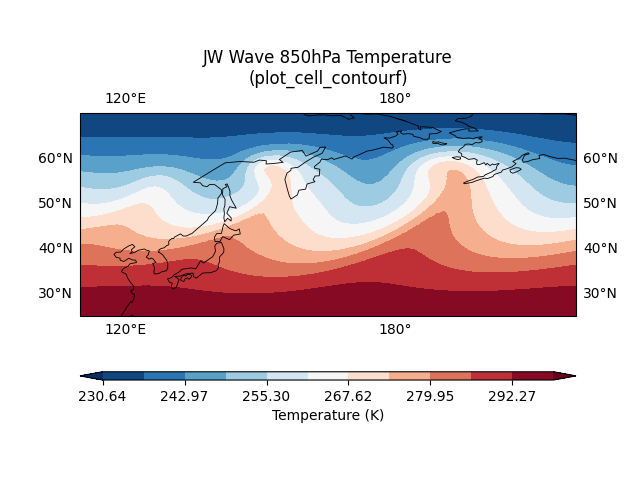
Pass an existing Cartopy axes when the contour should be combined with map decorations.
fig, ax = plt.subplots(
    subplot_kw={"projection": ccrs.PlateCarree(-120)}
)

cf = plot_cell_contourf(
    data,
    data.temp.isel(time=0, plev=0),
    ax=ax,
    transform=ccrs.PlateCarree(),
    lon_min=110,
    lon_max=220,
    lat_min=25,
    lat_max=70,
    levels=12,
    cmap="RdBu_r",
    cbar_kwargs={"location": "bottom", "aspect": 60},
)

ax.set_title("JW Wave 850hPa Temperature\n(plot_cell_contourf)")
ax.coastlines(resolution="110m", linewidth=0.6, color="k")
ax.gridlines(draw_labels=True, alpha=0)
<cartopy.mpl.gridliner.Gridliner object at 0x7354940a6f60>
Use plot_cell_contour when contour lines are preferred over filled
contours.
fig, ax = plt.subplots()

cs = plot_cell_contour(
    data,
    data.temp.isel(time=0, plev=0),
    ax=ax,
    lon_min=110,
    lon_max=220,
    lat_min=25,
    lat_max=70,
    levels=12,
    colors="k",
)

ax.set_title("JW Wave 850hPa Temperature\n(plot_cell_contour)")
Text(0.5, 1.0, 'JW Wave 850hPa Temperature\n(plot_cell_contour)')
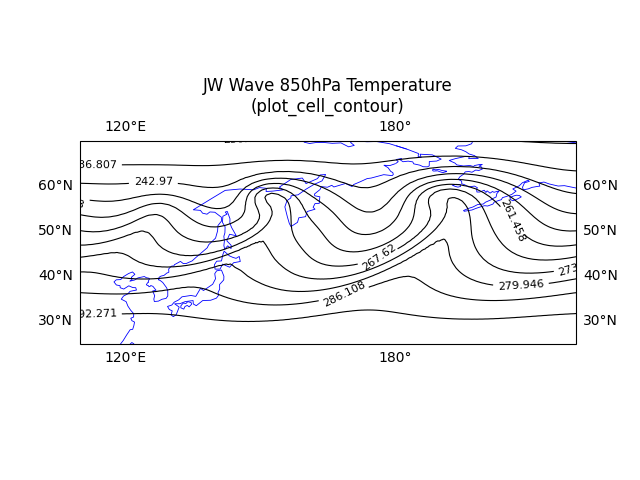
Contour labels and Cartopy map features can be added to the returned contour set in the usual Matplotlib style.
fig, ax = plt.subplots(
    subplot_kw={"projection": ccrs.PlateCarree(-120)}
)

cs = plot_cell_contour(
    data,
    data.temp.isel(time=0, plev=0),
    ax=ax,
    transform=ccrs.PlateCarree(),
    lon_min=110,
    lon_max=220,
    lat_min=25,
    lat_max=70,
    levels=12,
    colors="k",
)
ax.clabel(cs, inline=True, fontsize=8, fmt="%g")

ax.set_title("JW Wave 850hPa Temperature\n(plot_cell_contour)")
ax.coastlines(resolution="110m", linewidth=0.6, color="b")
ax.gridlines(draw_labels=True, alpha=0)
<cartopy.mpl.gridliner.Gridliner object at 0x73549420f260>
Total running time of the script: (0 minutes 4.456 seconds)