
easyclimate
Submodules
Attributes
Classes
A hierarchical data structure that dynamically manages attributes and nested nodes. |
Functions
|
|
|
Compute the gradient along the coordinate dim direction. |
|
Calculate the zonal gradient of the input data in physical units (meters). |
Calculate the gradient of the input data with respect to longitude in radians. |
|
Calculate the gradient of the input data with respect to longitude in degrees. |
|
|
Calculate the meridional gradient of the input data in physical units (meters). |
Calculate the gradient of the input data with respect to latitude in radians. |
|
Calculate the gradient of the input data with respect to latitude in degrees. |
|
|
Calculation of the second-order partial derivative term (Laplace term) along longitude. |
|
Calculation of the second-order partial derivative term (Laplace term) along latitude. |
Calculation of second-order mixed partial derivative terms along longitude and latitude. |
|
|
Calculate the gradient along the barometric pressure direction in the p-coordinate system. |
|
Calculate the gradient along the time direction. |
|
Calculate the horizontal Laplace term. |
|
|
|
Calculate the maximum Eady growth rate. |
|
Calculate the apparent heat source. |
|
Calculate the total diabatic heating. |
|
Calculate the apparent moisture sink. |
|
Calculate Plumb wave activity horizontal flux. |
|
Calculate TN wave activity horizontal flux. |
|
Calculate horizontal Eliassen–Palm Flux. |
|
Calculate the Rossby wave source following Sardeshmukh and Hoskins (1988). |
|
Slicing and extracting the part of the data containing the specified year based on an array of given integer years. |
Slicing and extracting the part of the data containing the specified year based on an array of given integer months. |
|
|
Slicing and extracting the part of the data containing the specified year based on an array of given integer days. |
|
Slicing and extracting the part of the data containing the specified year based on an array of given integer hours. |
|
Slicing and extracting the part of the data containing the specified year based on an array of given integer minutes. |
|
Slicing and extracting the part of the data containing the specified year based on an array of given integer seconds. |
|
Slicing and extracting the part of the data containing the specified year based on an array of given integer microseconds. |
|
Slicing and extracting the part of the data containing the specified year based on an array of given integer nanoseconds. |
|
Slicing and extracting the part of the data containing the specified year based on an array of given integer dayofweek. |
|
Get the annual average of certain months. |
|
Extract the years under the specified threshold (upper bound) in the annual average index (one-dimensional data with only a time dimension). |
|
Extract the years under the specified threshold (lower bound) in the annual average index (one-dimensional data with only a time dimension). |
|
Extract the time under the specified threshold (upper bound) in the annual average index (one-dimensional data with only a time dimension). |
|
Extract the time under the specified threshold (lower bound) in the annual average index (one-dimensional data with only a time dimension). |
|
Open multiple netCDF files without the need for xarray's necessary dimension checks |
|
Calculate a linear least-squares regression (trend) for spatial data of time. |
|
Remove linear trend along axis from data. |
|
Calculate Pearson correlation coefficients and corresponding p-values between spatial data |
|
Calculate Pearson correlation coefficients and corresponding p-values between spatial data |
|
Apply multiple linear regression to dataset across spatial dimensions. |
|
Calculate the T-test for the means of two independent sptial samples along with other axis (i.e. 'time') of scores. |
|
Generate a significance mask for T-tests on the means of two independent spatial zonal (u) and meridional (v) wind samples, |
|
Perform Levene test for equal variances of two independent sptial samples along with other axis (i.e. 'time') of scores. |
|
Calculate the skewness of the spatial field on the time axis and its significance test. |
|
Calculate the kurtosis of the spatial field on the time axis and its significance test. |
Computes the Theil-Sen estimator. |
|
|
Compute lead-lag correlation coefficients for specified pairs of indexes. |
|
Calculate the correlation matrix between multiple DataArray time series. |
|
Compute the non-centered (uncentered) correlation coefficient between two xarray DataArrays. |
|
Compute the pattern correlation (non-centered) between two xarray DataArrays over their common |
|
Remove the global mean SST anomaly trend from the SST anomaly field |
|
Remove linear trend along time dimension from spatio-temporal data. |
|
Calculate monthly mean. |
|
Calculate monthly sum. |
|
Calculate monthly standard deviation. |
|
Calculate monthly variance. |
|
Calculate monthly maximum. |
|
Calculate monthly minimum. |
|
Calculate yearly mean. |
|
Calculate yearly sum. |
|
Calculate yearly standard deviation. |
|
Calculate yearly standard deviation. |
|
Calculate yearly standard deviation. |
|
Calculate yearly standard deviation. |
|
Calculation of the climatological mean over the entire time range. |
|
Calculation of the seasonal climatological mean over the entire time range. |
|
Calculation of the seasonal cycle means over the entire time range. |
|
Calculation of the seasonal cycle standard deviation over the entire time range. |
|
Calculation of the seasonal cycle standard deviation over the entire time range. |
|
Calculation of the seasonal means per year over the entire time range. |
|
Remove of the seasonal cycle means over the entire time range. |
|
Calculate the standard deviation of monthly data anomalies over the entire time range. |
|
Calculate the variance of monthly data anomalies over the entire time range. |
|
Calculates a smooth mean daily annual cycle for an array nominally dimensioned. |
|
Calculation of the daily means per year over the entire time range. |
|
Calculation of the daily standard deviation per year over the entire time range. |
|
Calculation of the daily variance per year over the entire time range. |
|
Removes the smooth daily annual cycle mean from the input data. |
|
Calculate the standard deviation of vector wind speed and direction. |
|
Calculate the horizontal wind speed from zonal and meridional wind components in a |
|
Calculate the horizontal wind speed from zonal and meridional wind components in |
|
Populate the data of each month using the monthly mean state of the data_monthly or given dataset. |
|
Populate the data of each day using the daily mean state of the data_daily or given dataset. |
Calulate daily anomaly using the given dataset of climatological mean state . |
|
|
Remove low-frequency signal by subtracting the running mean from a time series. |
|
Open a dataset from the online repository (requires internet). |
|
Load a DataNode object from native location. |
|
Compute the unit conversion factor from input units to output units. |
Convert data units for multiplicative transitions (e.g., m to km). |
|
Convert data units for difference-based transitions (e.g., adjustments requiring offset). |
|
Convert temperature data from one unit to another, supporting aliases. |
|
|
Convert data units for any type of transition using Pint. |
|
Calculate the horizontal divergence term using the Rust backend. |
|
Calculate the horizontal relative vorticity term using the Rust backend. |
|
Calculate the horizontal divergence term using the NCL-compatible backend. |
|
Calculate the horizontal relative vorticity term using the NCL-compatible backend. |
|
Calculate the horizontal divergence term. |
|
Calculate the horizontal relative vorticity term. |
|
Calculate the geostrophic wind. |
|
Calculate the geostrophic vorticity. |
|
Calculate zonal temperature advection at each vertical level. |
|
Calculate meridional temperature advection at each vertical level. |
|
Calculate vertical temperature transport at each vertical level. |
|
Calculate horizontal water vapor flux at each vertical level. |
|
Calculate vertical water vapor flux. |
|
Calculate the water vapor flux across the vertical level. |
|
Calculate water vapor flux divergence at each vertical level. |
Calculate water vapor flux divergence across the vertical level. |
Package Contents
- easyclimate.__version__ = '2026.5.0'
- easyclimate.calc_gradient(data_input: xarray.DataArray | xarray.Dataset, dim: str, varargs: int = 1, edge_order: int = 2) xarray.DataArray | xarray.Dataset
Compute the gradient along the coordinate dim direction.
The gradient is computed using second order accurate central differences in the interior points and either first or second order accurate one-sides (forward or backwards) differences at the boundaries. The returned gradient hence has the same shape as the input array.
Parameters
- data_input
xarray.DataArrayorxarray.Dataset. The spatio-temporal data to be calculated.
- dim
str. Dimension(s) over which to apply gradient. By default gradient is applied over the time dimension.
- varargs:
listof scalar or array, optional Spacing between f values. Default unitary spacing for all dimensions. Spacing can be specified using:
Single scalar to specify a sample distance for all dimensions.
N scalars to specify a constant sample distance for each dimension. i.e. \(\mathrm{d}x, \mathrm{d}y, \mathrm{d}z, ...\)
N arrays to specify the coordinates of the values along each dimension of F. The length of the array must match the size of the corresponding dimension.
Any combination of N scalars/arrays with the meaning of 2. and 3.
- edge_order: {1, 2}, optional
Gradient is calculated using N-th order accurate differences at the boundaries. Default: 2.
Returns
The gradient along the coordinate dim direction (
xarray.DataArrayorxarray.Dataset).See also
- data_input
- easyclimate.calc_dx_gradient(data_input: xarray.DataArray | xarray.Dataset, lon_dim: str = 'lon', lat_dim: str = 'lat', min_dx: float = 1.0, edge_order: int = 2, R: float = 6371200.0) xarray.DataArray | xarray.Dataset
Calculate the zonal gradient of the input data in physical units (meters).
This function computes the partial derivative \(\partial F / \partial x\), where \(x\) is the eastward distance along a parallel (in meters). It is the full physical zonal gradient on a sphere, given by:
\[\frac{\partial F}{\partial x} = \frac{1}{R \cos \varphi} \cdot \frac{\partial F}{\partial \lambda}\]where \(R\) is the Earth’s radius, \(\varphi\) is latitude, and \(\lambda\) is longitude in radians. This is essential for dynamical calculations like advection or wave propagation in atmospheric/oceanic models.
The computation uses finite differences along the longitude dimension: \(\partial F / \partial x = (\partial F / \partial i) / (\partial x / \partial i)\), where \(i\) is the grid index. Longitude is assumed in degrees and converted to radians; latitude is broadcasted for the cosine factor.
Parameters
- data_input
xarray.DataArrayorxarray.Dataset The spatio-temporal data to be calculated. If a Dataset, the gradient is applied to all data variables.
- lon_dim:
str, default: lon. Longitude coordinate dimension name. By default, the gradient is applied over the lon dimension.
- lat_dim:
str, default: lat. Latitude coordinate dimension name. Used to compute the cosine factor; broadcasted if necessary.
- min_dx:
float, default: 1.0 (\(\mathrm{m}\)). The minimum acceptable value of dx (zonal spacing in meters), below which the output is set to NaN to avoid numerical instabilities from very small grid spacings. Set to a negative value to disable this check.
- edge_order: {1, 2}, optional
Order of the finite difference used at the boundaries. 1 uses first-order accurate one-sided differences; 2 uses second-order accurate one-sided differences. Default: 2.
- R:
float, default: 6370000 (\(\mathrm{m}\)). Radius of the Earth in meters (approximate mean radius). Can be adjusted for specific models.
Returns
xarray.DataArrayorxarray.DatasetThe zonal gradient \(\partial F / \partial x\), with the same shape and coordinates as the input. Units are those of the input data divided by meters (e.g., if F is in K, output is K/m). Invalid regions (dx < min_dx) are NaN.
- data_input
- easyclimate.calc_dlon_radian_gradient(data_input: xarray.DataArray | xarray.Dataset, lon_dim: str = 'lon', edge_order: int = 2) xarray.DataArray | xarray.Dataset
Calculate the gradient of the input data with respect to longitude in radians.
This function computes the partial derivative \(\partial F / \partial \lambda\), where \(\lambda\) is the longitude in radians. It is useful for spherical coordinate calculations, such as in wave activity flux (WAF) formulations, where angular gradients must be in radians for consistency with trigonometric functions and the Earth’s radius.
The computation uses finite differences:
\[\frac{\partial F}{\partial \lambda} = \frac{\partial F}{\partial i } / \frac{\partial \lambda}{\partial i},\]where \(i\) is the grid index along the longitude dimension. Longitude values are assumed to be in degrees initially and converted to radians for the denominator.
Parameters
- data_input
xarray.DataArrayorxarray.Dataset The spatio-temporal data to be calculated. If a Dataset, the gradient is applied to all data variables.
- lon_dim:
str, default: lon. Longitude coordinate dimension name. By default, the gradient is applied over the lon dimension.
- edge_order: {1, 2}, optional
Order of the finite difference used at the boundaries. 1 uses first-order accurate one-sided differences; 2 uses second-order accurate one-sided differences. Default: 2.
Returns
xarray.DataArrayorxarray.DatasetThe gradient \(\partial F / \partial \lambda\) (in radians), with the same shape and coordinates as the input. Units are inherited from the input data divided by radians (e.g., if F is in K, output is K/rad).
- data_input
- easyclimate.calc_dlon_degree_gradient(data_input: xarray.DataArray | xarray.Dataset, lon_dim: str = 'lon', edge_order: int = 2) xarray.DataArray | xarray.Dataset
Calculate the gradient of the input data with respect to longitude in degrees.
This function computes the partial derivative \(\partial F / \partial \lambda\), where \(\lambda\) is the longitude in degrees. It is suitable for general-purpose gradient calculations where degree units are preferred for interpretability.
The computation uses finite differences:
\[\frac{\partial F}{\partial \lambda} = \frac{\partial F}{\partial i} / \frac{\partial \lambda}{\partial i},\]where \(i\) is the grid index along the longitude dimension. Longitude values remain in degrees for the denominator.
Parameters
- data_input
xarray.DataArrayorxarray.Dataset The spatio-temporal data to be calculated. If a Dataset, the gradient is applied to all data variables.
- lon_dim:
str, default: lon. Longitude coordinate dimension name. By default, the gradient is applied over the lon dimension.
- edge_order: {1, 2}, optional
Order of the finite difference used at the boundaries. 1 uses first-order accurate one-sided differences; 2 uses second-order accurate one-sided differences. Default: 2.
Returns
xarray.DataArrayorxarray.DatasetThe gradient \(\partial F / \partial \lambda\) (in degrees), with the same shape and coordinates as the input. Units are inherited from the input data divided by degrees (e.g., if F is in K, output is K/deg).
- data_input
- easyclimate.calc_dy_gradient(data_input: xarray.DataArray | xarray.Dataset, lat_dim: str = 'lat', min_dy: float = 1.0, edge_order: int = 2, R: float = 6371200.0) xarray.DataArray | xarray.Dataset
Calculate the meridional gradient of the input data in physical units (meters).
This function computes the partial derivative \(\partial F / \partial y\), where \(y\) is the northward distance along a meridian (in meters). It is the full physical meridional gradient on a sphere, given by:
\[\frac{\partial F}{\partial y} = \frac{1}{R} \cdot \frac{\partial F}{\partial \varphi}\]where \(R\) is the Earth’s radius and \(\varphi\) is latitude in radians. This is essential for dynamical calculations like advection or vorticity in models.
The computation uses finite differences along the latitude dimension: \(\partial F / \partial y = (\partial F / \partial j) / (\partial y / \partial j)\), where \(j\) is the grid index. Latitude is assumed in degrees and converted to radians.
Parameters
- data_input
xarray.DataArrayorxarray.Dataset The spatio-temporal data to be calculated. If a Dataset, the gradient is applied to all data variables.
- lat_dim:
str, default: lat. Latitude coordinate dimension name. By default, the gradient is applied over the lat dimension.
- min_dy:
float, default: 1.0. The minimum acceptable value of dy (meridional spacing in meters), below which the output is set to NaN to avoid numerical instabilities from very small grid spacings. Set to a negative value to disable this check. Unit: meters.
- edge_order: {1, 2}, optional
Order of the finite difference used at the boundaries. 1 uses first-order accurate one-sided differences; 2 uses second-order accurate one-sided differences. Default: 2.
- R:
float, default: 6370000. Radius of the Earth in meters (approximate mean radius). Can be adjusted for specific models.
Returns
xarray.DataArrayorxarray.DatasetThe meridional gradient \(\partial F / \partial y\), with the same shape and coordinates as the input. Units are those of the input data divided by meters (e.g., if F is in K, output is K/m). Invalid regions (dy < min_dy) are NaN.
- data_input
- easyclimate.calc_dlat_radian_gradient(data_input: xarray.DataArray | xarray.Dataset, lat_dim: str = 'lat', edge_order: int = 2) xarray.DataArray | xarray.Dataset
Calculate the gradient of the input data with respect to latitude in radians.
This function computes the partial derivative \(\partial F / \partial \phi\), where \(\phi\) is the latitude in radians. It is useful for spherical coordinate calculations, such as in wave activity flux (WAF) formulations.
The computation uses finite differences:
\[\frac{\partial F}{\partial \phi} = \frac{\partial F}{\partial j} / \frac{\partial \phi}{\partial j},\]where \(j\) is the grid index along the latitude dimension. Latitude values are assumed to be in degrees initially and converted to radians for the denominator.
Parameters
- data_input
xarray.DataArrayorxarray.Dataset The spatio-temporal data to be calculated. If a Dataset, the gradient is applied to all data variables.
- lat_dim:
str, default: lat. Latitude coordinate dimension name. By default, the gradient is applied over the lat dimension.
- edge_order: {1, 2}, optional
Order of the finite difference used at the boundaries. 1 uses first-order accurate one-sided differences; 2 uses second-order accurate one-sided differences. Default: 2.
Returns
xarray.DataArrayorxarray.DatasetThe gradient \(\partial F / \partial \phi\) (in radians), with the same shape and coordinates as the input. Units are inherited from the input data divided by radians (e.g., if F is in K, output is K/rad).
- data_input
- easyclimate.calc_dlat_degree_gradient(data_input: xarray.DataArray | xarray.Dataset, lat_dim: str = 'lat', edge_order: int = 2) xarray.DataArray | xarray.Dataset
Calculate the gradient of the input data with respect to latitude in degrees.
This function computes the partial derivative \(\partial F / \partial \phi\), where \(\phi\) is the latitude in degrees. It is suitable for general-purpose gradient calculations where degree units are preferred.
The computation uses finite differences:
\[\frac{\partial F}{\partial \phi} = \frac{\partial F}{\partial j} / \frac{\partial \phi}{\partial j},\]where \(j\) is the grid index along the latitude dimension. Latitude values remain in degrees for the denominator.
Parameters
- data_input
xarray.DataArrayorxarray.Dataset The spatio-temporal data to be calculated. If a Dataset, the gradient is applied to all data variables.
- lat_dim:
str, default: lat. Latitude coordinate dimension name. By default, the gradient is applied over the lat dimension.
- edge_order: {1, 2}, optional
Order of the finite difference used at the boundaries. 1 uses first-order accurate one-sided differences; 2 uses second-order accurate one-sided differences. Default: 2.
Returns
xarray.DataArrayorxarray.DatasetThe gradient \(\partial F / \partial \phi\) (in degrees), with the same shape and coordinates as the input. Units are inherited from the input data divided by degrees (e.g., if F is in K, output is K/deg).
- data_input
- easyclimate.calc_dx_laplacian(data_input: xarray.DataArray | xarray.Dataset, lon_dim: str = 'lon', lat_dim: str = 'lat', min_dx2: float = 1000000000.0, edge_order: int = 2, R: float = 6371200.0) xarray.DataArray | xarray.Dataset
Calculation of the second-order partial derivative term (Laplace term) along longitude.
\[\frac{\partial^2 F}{\partial x^2} = \frac{1}{(R \cos\varphi)^2} \cdot \frac{\partial^2 F}{\partial \lambda^2}\]Parameters
- data_input
xarray.DataArrayorxarray.Dataset The spatio-temporal data to be calculated.
- lon_dim:
str, default: lon. Longitude coordinate dimension name. By default extracting is applied over the lon dimension.
- lat_dim:
str, default: lat. Latitude coordinate dimension name. By default extracting is applied over the lat dimension.
- min_dx2:
float, default: 1e9. The minimum acceptable value of \((\mathrm{d}x)^2\), below which parts will set nan to avoid large computational errors. The unit is m. You can set it to a negative value in order to remove this benefit.
- edge_order: {1, 2}, optional
Gradient is calculated using N-th order accurate differences at the boundaries. Default: 1.
- R:
float, default: 6370000. Radius of the Earth.
Returns
The second-order partial derivative term (Laplace term) along longitude (
xarray.DataArrayorxarray.Dataset).See also
- data_input
- easyclimate.calc_dy_laplacian(data_input: xarray.DataArray | xarray.Dataset, lat_dim: str = 'lat', min_dy2: float = 1.0, edge_order: int = 2, R: float = 6371200.0) xarray.DataArray | xarray.Dataset
Calculation of the second-order partial derivative term (Laplace term) along latitude.
\[\frac{\partial^2 F}{\partial y^2} = \frac{1}{R^2} \cdot \frac{\partial^2 F}{\partial \varphi^2}\]Parameters
- data_input
xarray.DataArrayorxarray.Dataset The spatio-temporal data to be calculated.
- lat_dim:
str, default: lat. Latitude coordinate dimension name. By default extracting is applied over the lat dimension.
- min_dy2:
float, default: 1.0. The minimum acceptable value of \((\mathrm{d}y)^2\), below which parts will set nan to avoid large computational errors. The unit is m. You can set it to a negative value in order to remove this benefit.
- edge_order: {1, 2}, optional
Gradient is calculated using N-th order accurate differences at the boundaries. Default: 1.
- R:
float, default: 6370000. Radius of the Earth.
Returns
The second-order partial derivative term (Laplace term) along latitude (
xarray.DataArrayorxarray.Dataset).See also
- data_input
- easyclimate.calc_dxdy_mixed_derivatives(data_input: xarray.DataArray | xarray.Dataset, lon_dim: str = 'lon', lat_dim: str = 'lat', min_dxdy: float = 10000000000.0, edge_order: int = 2, R: float = 6371200.0) xarray.DataArray | xarray.Dataset
Calculation of second-order mixed partial derivative terms along longitude and latitude.
\[\frac{\partial^2 F}{\partial x \partial y} = \frac{1}{R^2 \cos\varphi} \cdot \frac{\partial^2 F}{\partial \lambda \partial \varphi}\]Parameters
- data_input
xarray.DataArrayorxarray.Dataset The spatio-temporal data to be calculated.
- lon_dim:
str, default: lon. Longitude coordinate dimension name. By default extracting is applied over the lon dimension.
- lat_dim:
str, default: lat. Latitude coordinate dimension name. By default extracting is applied over the lat dimension.
- min_dxdy:
float, default: 1e10. The minimum acceptable value of \(\mathrm{d}x\mathrm{d}y\), below which parts will set nan to avoid large computational errors. The unit is m. You can set it to a negative value in order to remove this benefit.
- edge_order: {1, 2}, optional
Gradient is calculated using N-th order accurate differences at the boundaries. Default: 1.
- R:
float, default: 6370000. Radius of the Earth.
Returns
The second-order mixed partial derivative terms along longitude and latitude (
xarray.DataArrayorxarray.Dataset).See also
- data_input
- easyclimate.calc_p_gradient(data_input: xarray.DataArray, vertical_dim: str, vertical_dim_units: Literal['hPa', 'Pa', 'mbar']) xarray.DataArray
Calculate the gradient along the barometric pressure direction in the p-coordinate system.
\[\frac{\partial F}{\partial p}\]Parameters
- data_input
xarray.DataArrayorxarray.Dataset The spatio-temporal data to be calculated.
- vertical_dim:
str. Vertical coordinate dimension name.
- vertical_dim_units:
str. The unit corresponding to the vertical p-coordinate value. Optional values are hPa, Pa, mbar.
Returns
The gradient along the barometric pressure direction in the p-coordinate system (
xarray.DataArrayorxarray.Dataset).See also
- data_input
- easyclimate.calc_time_gradient(data_input: xarray.DataArray, time_units: str, time_dim: str = 'time') xarray.DataArray
Calculate the gradient along the time direction.
\[\frac{\partial F}{\partial t}\]Parameters
- data_input
xarray.DataArrayorxarray.Dataset The spatio-temporal data to be calculated.
- time_units:
str. The unit corresponding to the time dimension value. Optional values are seconds, months, years and so on.
- time_dim:
str, default: time. The time coordinate dimension name.
Returns
The gradient along the time direction (
xarray.DataArrayorxarray.Dataset).Caution
The units for partial derivative of time are \(\mathrm{s^{-1}}\).
See also
- data_input
- easyclimate.calc_dxdy_laplacian(data_input: xarray.DataArray, lon_dim: str = 'lon', lat_dim: str = 'lat', R: float = 6371200.0, spherical_coord: bool = True) xarray.DataArray
Calculate the horizontal Laplace term.
rectangular coordinates
\[\nabla^2 F = \frac{\partial^2 F}{\partial x^2} + \frac{\partial^2 F}{\partial y^2}\]Spherical coordinates
\[\nabla^2 F = \frac{\partial^2 F}{\partial x^2} + \frac{\partial^2 F}{\partial y^2} - \frac{1}{R} \frac{\partial F}{\partial y} \tan \varphi\]Parameters
- data_input:
xarray.DataArray. The spatio-temporal data to be calculated.
- lon_dim:
str, default: lon. Longitude coordinate dimension name. By default extracting is applied over the lon dimension.
- lat_dim:
str, default: lat. Latitude coordinate dimension name. By default extracting is applied over the lat dimension.
- R:
float, default: 6370000. Radius of the Earth.
- spherical_coord:
bool, default: True. Whether or not to compute the horizontal Laplace term in spherical coordinates.
Returns
The horizontal Laplace term. (
xarray.DataArray).- data_input:
- easyclimate.calc_shear_stretch_deform(u_data: xarray.DataArray, v_data: xarray.DataArray, lon_dim: str = 'lon', lat_dim: str = 'lat', edge_order: {1, 2} = 2, R: float = 6371200.0)
https://www.ncl.ucar.edu/Document/Functions/Contributed/shear_stretch_deform_cfd.shtml
Spensberger, C., & Spengler, T. (2014). A New Look at Deformation as a Diagnostic for Large-Scale Flow. Journal of the Atmospheric Sciences, 71(11), 4221-4234. https://doi.org/10.1175/JAS-D-14-0108.1
- easyclimate.calc_eady_growth_rate(u_daily_data: xarray.DataArray, z_daily_data: xarray.DataArray, temper_daily_data: xarray.DataArray, vertical_dim: str, vertical_dim_units: Literal['hPa', 'Pa', 'mbar'], lat_dim: str = 'lat') xarray.Dataset
Calculate the maximum Eady growth rate.
\[\sigma = 0.3098 \frac{f}{N} \frac{\mathrm{d} U}{\mathrm{d} z}\]Caution
Eady growth rate (EGR) is a non-linear quantity. Hence, calc_eady_growth_rate should NOT be directly applied to monthly means variables. If a monthly climatology of EGR is desired, the EGR values at the high frequency temporal time steps should be calculated; then, use calculate monthly mean.
Parameters
- u_daily_data:
xarray.DataArray. The zonal wind daily data.
- z_daily_data:
xarray.DataArray. Daily atmospheric geopotential height.
Attention
The unit of z_daily_data should be meters, NOT \(\mathrm{m^2 \cdot s^2}\) which is the unit used in the representation of potential energy.
- temper_data:
xarray.DataArray. Daily air temperature.
- vertical_dim:
str. Vertical coordinate dimension name.
- vertical_dim_units:
str. The unit corresponding to the vertical p-coordinate value. Optional values are hPa, Pa, mbar.
- lat_dim:
str, default: lat. Latitude coordinate dimension name. By default extracting is applied over the lat dimension.
Returns
The maximum Eady growth rate (
xarray.Dataset).eady_growth_rate: The maximum Eady growth rate.
dudz: \(\frac{\mathrm{d} U}{\mathrm{d} z}\)
brunt_vaisala_frequency: Brunt-väisälä frequency.
See also
Eady, E. T. (1949). Long Waves and Cyclone Waves. Tellus, 1(3), 33–52. https://doi.org/10.3402/tellusa.v1i3.8507, https://www.tandfonline.com/doi/abs/10.3402/tellusa.v1i3.8507
Lindzen, R. S. , & Farrell, B. (1980). A Simple Approximate Result for the Maximum Growth Rate of Baroclinic Instabilities. Journal of Atmospheric Sciences, 37(7), 1648-1654. https://journals.ametsoc.org/view/journals/atsc/37/7/1520-0469_1980_037_1648_asarft_2_0_co_2.xml
Simmonds, I., and E.-P. Lim (2009), Biases in the calculation of Southern Hemisphere mean baroclinic eddy growth rate, Geophys. Res. Lett., 36, L01707, https://doi.org/10.1029/2008GL036320.
Sloyan, B. M., and T. J. O’Kane (2015), Drivers of decadal variability in the Tasman Sea, J. Geophys. Res. Oceans, 120, 3193–3210, https://doi.org/10.1002/2014JC010550.
- u_daily_data:
- easyclimate.calc_apparent_heat_source(u_data: xarray.DataArray, v_data: xarray.DataArray, omega_data: xarray.DataArray, temper_data: xarray.DataArray, vertical_dim: str, vertical_dim_units: Literal['hPa', 'Pa', 'mbar'], time_units: str, lon_dim='lon', lat_dim='lat', time_dim='time', c_p=1005.7) xarray.DataArray
Calculate the apparent heat source.
\[Q_1 = C_p \frac{T}{\theta} \left( \frac{\partial \theta}{\partial t} + u \frac{\partial \theta}{\partial x} + v \frac{\partial \theta}{\partial y} + \omega \frac{\partial \theta}{\partial p} \right)\]Parameters
- u_data:
xarray.DataArray. The zonal wind data.
- v_data:
xarray.DataArray. The meridional wind data.
- omega_data:
xarray.DataArray. The vertical velocity data (\(\frac{\mathrm{d} p}{\mathrm{d} t}\)).
- temper_data:
xarray.DataArray. Air temperature.
- vertical_dim:
str. Vertical coordinate dimension name.
- vertical_dim_units:
str. The unit corresponding to the vertical p-coordinate value. Optional values are hPa, Pa, mbar.
- time_units:
str. The unit corresponding to the time dimension value. Optional values are seconds, months, years and so on.
- lon_dim:
str, default: lon. Longitude coordinate dimension name. By default extracting is applied over the lon dimension.
- lat_dim:
str, default: lat. Latitude coordinate dimension name. By default extracting is applied over the lat dimension.
- time_dim:
str. The time coordinate dimension name.
- c_p:
float, default: 1005.7. The specific heat at constant pressure of dry air.
Returns
The apparent heat source (
xarray.DataArray).See also
- u_data:
- easyclimate.calc_total_diabatic_heating(u_data: xarray.DataArray, v_data: xarray.DataArray, omega_data: xarray.DataArray, temper_data: xarray.DataArray, vertical_dim: str, vertical_dim_units: Literal['hPa', 'Pa', 'mbar'], time_units: str, lat_dim='lat', lon_dim='lon', time_dim='time', c_p=1005.7) xarray.DataArray
Calculate the total diabatic heating.
Calculated in exactly the same way as for the apparent heat source.
Parameters
- u_data:
xarray.DataArray. The zonal wind data.
- v_data:
xarray.DataArray. The meridional wind data.
- omega_data:
xarray.DataArray. The vertical velocity data (\(\frac{\mathrm{d} p}{\mathrm{d} t}\)).
- temper_data:
xarray.DataArray. Air temperature.
- vertical_dim:
str. Vertical coordinate dimension name.
- vertical_dim_units:
str. The unit corresponding to the vertical p-coordinate value. Optional values are hPa, Pa, mbar.
- time_units:
str. The unit corresponding to the time dimension value. Optional values are seconds, months, years and so on.
- lon_dim:
str, default: lon. Longitude coordinate dimension name. By default extracting is applied over the lon dimension.
- lat_dim:
str, default: lat. Latitude coordinate dimension name. By default extracting is applied over the lat dimension.
- time_dim:
str, default: time. The time coordinate dimension name.
- c_p:
float, default: 1005.7 (\(\mathrm{J \cdot kg^{-1} \cdot K^{-1}}\)). The specific heat at constant pressure of dry air.
Returns
The total diabatic heating (
xarray.DataArray).See also
- u_data:
- easyclimate.calc_apparent_moisture_sink(u_data: xarray.DataArray, v_data: xarray.DataArray, omega_data: xarray.DataArray, specific_humidity_data: xarray.DataArray, vertical_dim: str, vertical_dim_units: Literal['hPa', 'Pa', 'mbar'], time_units: str, specific_humidity_data_units: str, lon_dim='lon', lat_dim='lat', time_dim='time', latent_heat_of_condensation=2501000.0) xarray.DataArray
Calculate the apparent moisture sink.
\[Q_2 = -L \left( \frac{\partial q}{\partial t} + u \frac{\partial q}{\partial x} + v \frac{\partial q}{\partial y} + \omega \frac{\partial q}{\partial p} \right)\]Parameters
- u_data:
xarray.DataArray. The zonal wind data.
- v_data:
xarray.DataArray. The meridional wind data.
- omega_data:
xarray.DataArray. The vertical velocity data (\(\frac{\mathrm{d} p}{\mathrm{d} t}\)).
- specific_humidity_data:
xarray.DataArray. The absolute humidity data.
- vertical_dim:
str. Vertical coordinate dimension name.
- vertical_dim_units:
str. The unit corresponding to the vertical p-coordinate value. Optional values are hPa, Pa, mbar.
- time_units:
str. The unit corresponding to the time dimension value. Optional values are seconds, months, years and so on.
- specific_humidity_data_units:
str. The unit corresponding to specific_humidity value. Optional values are kg/kg, g/kg and so on.
- lon_dim:
str, default: lon. Longitude coordinate dimension name. By default extracting is applied over the lon dimension.
- lat_dim:
str, default: lat. Latitude coordinate dimension name. By default extracting is applied over the lat dimension.
- time_dim:
str, default: time. The time coordinate dimension name.
- latent_heat_of_condensation:
float, default: 2.5008e6 (\(\mathrm{J \cdot kg^{-1}}\)). Latent heat of condensation of water at 0°C.
Returns
The apparent moisture sink (
xarray.DataArray).See also
- u_data:
- easyclimate.calc_Plumb_wave_activity_horizontal_flux(z_prime_data: xarray.DataArray, vertical_dim: str, vertical_dim_units: Literal['hPa', 'Pa', 'mbar'], lon_dim='lon', lat_dim='lat', omega=7.292e-05, g=9.8, R=6370000) xarray.Dataset
Calculate Plumb wave activity horizontal flux.
Parameters
- z_prime_data:
xarray.DataArray. The anormaly of atmospheric geopotential height.
- vertical_dim:
str. Vertical coordinate dimension name.
- vertical_dim_units:
str. The unit corresponding to the vertical p-coordinate value. Optional values are hPa, Pa, mbar.
- lon_dim:
str, default: lon. Longitude coordinate dimension name. By default extracting is applied over the lon dimension.
- lat_dim:
str, default: lat. Latitude coordinate dimension name. By default extracting is applied over the lat dimension.
- omega:
float, default: 7.292e-5. The angular speed of the earth.
- g:
float, default: 9.8. The acceleration of gravity.
- R:
float, default: 6370000. Radius of the Earth.
Returns
The Plumb wave activity horizontal flux (
xarray.DataArray).- z_prime_data:
- easyclimate.calc_TN_wave_activity_horizontal_flux(z_prime_data: xarray.DataArray | None, u_climatology_data: xarray.DataArray, v_climatology_data: xarray.DataArray, vertical_dim: str, vertical_dim_units: Literal['hPa', 'Pa', 'mbar'], psi_prime_data: xarray.DataArray | None = None, lon_dim: str = 'lon', lat_dim: str = 'lat', time_dim: str = 'time', omega: float = 7.292e-05, g: float = 9.8, R: float = 6371200.0) xarray.Dataset
Calculate TN wave activity horizontal flux.
\[\begin{split}\mathbf{W_h} = \frac{p\cos\varphi}{2\lvert \mathbf{U_c} \rvert}\begin{pmatrix} \frac{U_c}{R^2 \cos^2 \varphi} \left[ \left( \frac{\partial \psi'}{\partial \lambda} \right)^2 - \psi'\frac{\partial^2 \psi'}{\partial \lambda^2} \right] + \frac{V_c}{R^2 \cos \varphi} \left[ \frac{\partial \psi'}{\partial \lambda} \frac{\partial \psi'}{\partial \varphi} - \psi' \frac{\partial^2 \psi'}{\partial \lambda \partial \varphi} \right] \\ \frac{U_c}{R^2 \cos \varphi} \left[ \frac{\partial \psi'}{\partial \lambda} \frac{\partial \psi'}{\partial \varphi} - \psi' \frac{\partial^2 \psi'}{\partial \lambda \partial \varphi} \right] + \frac{V_c}{R^2} \left[ \left( \frac{\partial \psi'}{\partial \varphi} \right)^2 - \psi'\frac{\partial^2 \psi'}{\partial \varphi^2} \right] \\ \end{pmatrix}\end{split}\]Parameters
- z_prime_data:
xarray.DataArray. The anormaly of atmospheric geopotential height.
Attention
The unit of z_prime_data should be meters, NOT \(\mathrm{m^2 \cdot s^2}\) which is the unit used in the representation of potential energy.
- u_climatology_data:
xarray.DataArray. The climatology of zonal wind data.
- v_climatology_data:
xarray.DataArray. The climatology of meridional wind data.
- vertical_dim:
str. Vertical coordinate dimension name.
- vertical_dim_units:
str. The unit corresponding to the vertical p-coordinate value. Optional values are hPa, Pa, mbar.
- psi_prime_data:
xarray.DataArray. Perturbation stream function. Geostrophic stream function perturbation calculated from geopotential height anomaly.
- lon_dim:
str, default: lon. Longitude coordinate dimension name. By default extracting is applied over the lon dimension.
- lat_dim:
str, default: lat. Latitude coordinate dimension name. By default extracting is applied over the lat dimension.
- omega:
float, default: 7.292e-5. The angular speed of the earth.
- g:
float, default: 9.8. The acceleration of gravity.
- R:
float, default: 6370000. Radius of the Earth.
Returns
The TN wave activity horizontal flux (
xarray.Dataset).Reference
Takaya, K., & Nakamura, H. (2001). A Formulation of a Phase-Independent Wave-Activity Flux for Stationary and Migratory Quasigeostrophic Eddies on a Zonally Varying Basic Flow. Journal of the Atmospheric Sciences, 58(6), 608-627. https://journals.ametsoc.org/view/journals/atsc/58/6/1520-0469_2001_058_0608_afoapi_2.0.co_2.xml
- z_prime_data:
- easyclimate.calc_EP_horizontal_flux(u_prime_data: xarray.DataArray, v_prime_data: xarray.DataArray, time_dim: str = 'time', lat_dim: str = 'lat') xarray.Dataset
Calculate horizontal Eliassen–Palm Flux.
Parameters
- u_prime_data:
xarray.DataArray. The anormaly of zonal wind data.
- v_prime_data:
xarray.DataArray. The anormaly of meridional wind data.
- time_dim:
str, default: time. The time coordinate dimension name.
- lat_dim:
str, default: lat. Latitude coordinate dimension name. By default extracting is applied over the lat dimension.
Returns
The Eliassen–Palm Flux (
xarray.DataArray).- u_prime_data:
- easyclimate.calc_monthly_rossby_wave_source(u_data: xarray.DataArray, v_data: xarray.DataArray, u_climatology_data: xarray.DataArray, v_climatology_data: xarray.DataArray, lat_dim: str = 'lat', omega: float = 7.292e-05, R: float = 6371200.0) xarray.DataArray
Calculate the Rossby wave source following Sardeshmukh and Hoskins (1988).
The Rossby wave source (RWS) represents the forcing term for stationary Rossby waves and is widely used to diagnose atmospheric teleconnections. It is decomposed into five terms representing different physical mechanisms:
\[S' = -\nabla \cdot (\mathbf{v}_\chi \zeta)' = \text{term1a} + \text{term1b} + \text{term2a} + \text{term2b} + \text{term3} + \text{term4} + \text{term5}\]where:
term1a: \(-\bar{\zeta} \nabla \cdot \mathbf{v}'_\chi\) (stretching of climatological vorticity by divergent wind anomalies)
Term1b: \(-f \nabla \cdot \mathbf{v'_\chi}\) (Stretching of planetary vorticity by anomalous divergence)
term2a: \(-\mathbf{v}'_\chi \cdot \nabla\bar{\zeta}\) (advection of climatological vorticity by divergent wind anomalies)
term2b: \(-\beta v'_\chi\) (planetary vorticity advection, where \(\beta = \partial f/\partial y\))
term3: \(-\zeta' \nabla \cdot \bar{\mathbf{v}}_\chi\) (stretching of vorticity anomalies by climatological divergent wind)
term4: \(-\bar{\mathbf{v}}_\chi \cdot \nabla\zeta'\) (advection of vorticity anomalies by climatological divergent wind)
term5: \(-\nabla \cdot (\mathbf{v}'_\chi \zeta')\) (nonlinear term: divergence of transient vorticity flux)
where \(\mathbf{v}_\chi = (u_\chi, v_\chi)\) is the divergent (irrotational) wind component, \(\zeta\) is relative vorticity, overbar denotes climatology, and prime denotes anomaly.
Note
Anomalies are computed as deviations from the monthly climatology.
The planetary term (term6) represents the beta effect, which is important for Rossby wave propagation, especially in the tropics and subtropics.
Terms 1, 2, and 6 typically dominate the Rossby wave source.
Positive RWS indicates a cyclonic wave source; negative indicates anticyclonic.
Parameters
- u_data
xarray.DataArray(\(\mathrm{m/s}\)) Zonal wind component. Must contain a ‘time’ dimension with monthly or higher frequency data. Expected dimensions:
(time, lat, lon)or(time, level, lat, lon).- v_data
xarray.DataArray(\(\mathrm{m/s}\)) Meridional wind component. Must have the same dimensions as u_data.
- u_climatology_data
xarray.DataArray(\(\mathrm{m/s}\)) Monthly climatology of zonal wind. Expected dimensions:
(time, lat, lon)or(time, level, lat, lon), where time/month ranges from 1 to 12.- v_climatology_data
xarray.DataArray(\(\mathrm{m/s}\)) Monthly climatology of meridional wind. Must have the same dimensions as u_climatology_data.
Returns
- result
xarray.Dataset Dataset containing the Rossby wave source and its five decomposed terms:
RWS: Total Rossby wave source (sum of all terms)
term1a: Vorticity stretching by anomalous divergence
term1b: Stretching of planetary vorticity by anomalous divergence
term2a: Vorticity advection by anomalous divergent wind
term2b: Planetary vorticity advection (beta effect)
term3: Anomalous vorticity stretching by climatological divergence
term4: Anomalous vorticity advection by climatological divergent wind
term5: Nonlinear transient eddy term
All variables have units of \(\mathrm{s^{-2}}\) and retain the spatial/temporal dimensions of the input data.
See also
Sardeshmukh, P. D., & Hoskins, B. J. (1988). The generation of global rotational flow by steady idealized tropical divergence. Journal of the Atmospheric Sciences, 45(7), 1228-1251. https://journals.ametsoc.org/view/journals/atsc/45/7/1520-0469_1988_045_1228_tgogrf_2_0_co_2.xml, https://doi.org/10.1175/1520-0469(1988)045<1228:TGOGRF>2.0.CO;2
Examples
>>> # Calculate monthly climatology
>>> u_clim = u.groupby('time.month').mean('time')
>>> v_clim = v.groupby('time.month').mean('time')
>>>
>>> # Compute Rossby wave source
>>> rws_result = calc_rossby_wave_source(u, v, u_clim, v_clim)
>>>
>>> # Visualize the dominant terms
>>> rws_result['RWS'].sel(time='2015-12').plot()
>>> (rws_result['term1'] + rws_result['term2']).sel(time='2015-12').plot()
- easyclimate.get_specific_years_data(data_input: xarray.DataArray | xarray.Dataset, year_array: np.array(int) | List[int], dim: str = 'time') xarray.DataArray | xarray.Dataset
Slicing and extracting the part of the data containing the specified year based on an array of given integer years.
Parameters
- data_input
xarray.DataArray xarray.DataArrayto be extracted.- year_array:
list[int] Year(s) to be extracted.
- dim
str Dimension(s) over which to apply extracting. By default extracting is applied over the time dimension.
Returns
- data_input
- easyclimate.get_specific_months_data(data_input: xarray.DataArray | xarray.Dataset, month_array: numpy.array, dim: str = 'time') xarray.DataArray | xarray.Dataset
Slicing and extracting the part of the data containing the specified year based on an array of given integer months.
Parameters
- data_input
xarray.DataArray xarray.DataArrayto be extracted.- month_array:
list[int] Month(s) to be extracted.
- dim
str Dimension(s) over which to apply extracting. By default extracting is applied over the time dimension.
Returns
- data_input
- easyclimate.get_specific_days_data(data_input: xarray.DataArray | xarray.Dataset, day_array: np.array(int) | List[int], dim: str = 'time') xarray.DataArray | xarray.Dataset
Slicing and extracting the part of the data containing the specified year based on an array of given integer days.
Parameters
- data_input
xarray.DataArray xarray.DataArrayto be extracted.- day_array:
list[int] Days(s) to be extracted.
- dim
str Dimension(s) over which to apply extracting. By default extracting is applied over the time dimension.
Returns
- data_input
- easyclimate.get_specific_hours_data(data_input: xarray.DataArray | xarray.Dataset, hour_array: np.array(int) | List[int], dim: str = 'time') xarray.DataArray | xarray.Dataset
Slicing and extracting the part of the data containing the specified year based on an array of given integer hours.
Parameters
- data_input
xarray.DataArray xarray.DataArrayto be extracted.- hour_array:
list[int] Hour(s) to be extracted.
- dim
str Dimension(s) over which to apply extracting. By default extracting is applied over the time dimension.
Returns
- data_input
- easyclimate.get_specific_minutes_data(data_input: xarray.DataArray | xarray.Dataset, minute_array: np.array(int) | List[int], dim: str = 'time') xarray.DataArray | xarray.Dataset
Slicing and extracting the part of the data containing the specified year based on an array of given integer minutes.
Parameters
- data_input
xarray.DataArray xarray.DataArrayto be extracted.- minute_array:
list[int] Minute(s) to be extracted.
- dim
str Dimension(s) over which to apply extracting. By default extracting is applied over the time dimension.
Returns
- data_input
- easyclimate.get_specific_seconds_data(data_input: xarray.DataArray | xarray.Dataset, second_array: np.array(int) | List[int], dim: str = 'time') xarray.DataArray | xarray.Dataset
Slicing and extracting the part of the data containing the specified year based on an array of given integer seconds.
Parameters
- data_input
xarray.DataArray xarray.DataArrayto be extracted.- second_array:
list[int] Second(s) to be extracted.
- dim
str Dimension(s) over which to apply extracting. By default extracting is applied over the time dimension.
Returns
- data_input
- easyclimate.get_specific_microseconds_data(data_input: xarray.DataArray | xarray.Dataset, microsecond_array: np.array(int) | List[int], dim: str = 'time') xarray.DataArray | xarray.Dataset
Slicing and extracting the part of the data containing the specified year based on an array of given integer microseconds.
Parameters
- data_input
xarray.DataArray xarray.DataArrayto be extracted.- microsecond_array:
list[int] Microsecond(s) to be extracted.
- dim:
str Dimension(s) over which to apply extracting. By default extracting is applied over the time dimension.
Returns
- data_input
- easyclimate.get_specific_nanoseconds_data(data_input: xarray.DataArray | xarray.Dataset, nanosecond_array: np.array(int) | List[int], dim: str = 'time') xarray.DataArray | xarray.Dataset
Slicing and extracting the part of the data containing the specified year based on an array of given integer nanoseconds.
Parameters
- data_input
xarray.DataArray xarray.DataArrayto be extracted.- nanosecond_array:
list[int] Nanosecond(s) to be extracted.
- dim:
str Dimension(s) over which to apply extracting. By default extracting is applied over the time dimension.
Returns
- data_input
- easyclimate.get_specific_dayofweek_data(data_input: xarray.DataArray | xarray.Dataset, dayofweek_array: np.array(int) | List[int], dim: str = 'time') xarray.DataArray | xarray.Dataset
Slicing and extracting the part of the data containing the specified year based on an array of given integer dayofweek.
Parameters
- data_input
xarray.DataArray xarray.DataArrayto be extracted.- dayofweek_array:
list[int] The days of the week to be extracted.
The integer numbers correspond to the days of the week as follows.
Day of the week
Integer numbers
Monday
0
Tuesday
1
Wednesday
2
Thursday
3
Friday
4
Saturday
5
Sunday
6
- dim:
str Dimension(s) over which to apply extracting. By default extracting is applied over the time dimension.
Returns
- data_input
- easyclimate.get_yearmean_for_specific_months_data(data_input: xarray.DataArray | xarray.Dataset, month_array: np.array(int) | List[int], dim: str = 'time', **kwargs) xarray.DataArray | xarray.Dataset
Get the annual average of certain months.
Parameters
- data_input
xarray.DataArray xarray.DataArrayto be extracted.- month_array:
list[int] Month(s) to be extracted.
- dim:
str Dimension(s) over which to apply extracting. By default extracting is applied over the time dimension.
- **kwargs:
Additional keyword arguments passed on to the appropriate array function for calculating mean on this object’s data. These could include dask-specific kwargs like split_every.
Returns
- data_input
- easyclimate.get_year_exceed_index_upper_bound(data_input: xarray.DataArray, thresh: float, time_dim: str = 'time') numpy.array
Extract the years under the specified threshold (upper bound) in the annual average index (one-dimensional data with only a time dimension).
Parameters
- data_input
xarray.DataArray The one-dimensional data with only a time dimension.
- thresh:
float. The threshold value.
- time_dim:
str. The time coordinate dimension name.
Returns
numpy.array.- data_input
- easyclimate.get_year_exceed_index_lower_bound(data_input: xarray.DataArray, thresh: float, time_dim: str = 'time') numpy.array
Extract the years under the specified threshold (lower bound) in the annual average index (one-dimensional data with only a time dimension).
Parameters
- data_input
xarray.DataArray The one-dimensional data with only a time dimension.
- thresh:
float. The threshold value.
- time_dim:
str. The time coordinate dimension name.
Returns
numpy.array.- data_input
- easyclimate.get_time_exceed_index_upper_bound(data_input: xarray.DataArray, thresh: float, time_dim: str = 'time') numpy.array
Extract the time under the specified threshold (upper bound) in the annual average index (one-dimensional data with only a time dimension).
Parameters
- data_input
xarray.DataArray The one-dimensional data with only a time dimension.
- thresh:
float. The threshold value.
- time_dim:
str. The time coordinate dimension name.
Returns
Time array.
- data_input
- easyclimate.get_time_exceed_index_lower_bound(data_input: xarray.DataArray, thresh: float, time_dim: str = 'time') numpy.array
Extract the time under the specified threshold (lower bound) in the annual average index (one-dimensional data with only a time dimension).
Parameters
- data_input
xarray.DataArray The one-dimensional data with only a time dimension.
- thresh:
float. The threshold value.
- time_dim:
str. The time coordinate dimension name.
Returns
Time array.
- data_input
- easyclimate.open_muliti_dataset(files: str, dim: str, **kwargs) xarray.Dataset
Open multiple netCDF files without the need for xarray’s necessary dimension checks
Parameters
ver1: Version number 1
ver2: Version number 2
Returns
int.Note
If ver1<ver2, return -1; If ver1=ver2, return 0; If ver1>ver2, return 1.
Examples
>>> import easyclimate as ecl
>>> result = assert_compared_version("10.12.2.6.5", "10.12.2.6")
>>> print(result)
1
- easyclimate.calc_linregress_spatial(data_input: xarray.DataArray | xarray.Dataset, dim: str = 'time', x: numpy.array = None, alternative: str = 'two-sided', returns_type: {'dataset_returns', 'dataset_vars'} = 'dataset_returns') xarray.Dataset | xarray.DataTree
Calculate a linear least-squares regression (trend) for spatial data of time.
Parameters
- data_input:
xarray.DataArrayorxarray.Dataset xarray.DataArrayorxarray.Datasetto be regression.- dim:
str, default time. Dimension(s) over which to apply linregress. By default linregress is applied over the time dimension.
- x:
numpy.array Independent variable. If None, use np.arange(len(data_input[‘time’].shape[0])) instead.
- returns_type:
str, default ‘dataset_returns’. Return data type.
Returns
- result
LinregressResultDataset The return Dataset have following data_var:
- slope:
float Slope of the regression line.
- intercept:
float Intercept of the regression line.
- rvalue:
float The Pearson correlation coefficient. The square of
rvalueis equal to the coefficient of determination.- pvalue:
float The p-value for a hypothesis test whose null hypothesis is that the slope is zero, using Wald Test with t-distribution of the test statistic. See alternative above for alternative hypotheses.
- stderr:
float Standard error of the estimated slope (gradient), under the assumption of residual normality.
- intercept_stderr:
float Standard error of the estimated intercept, under the assumption of residual normality.
- slope:
See also
- data_input:
- easyclimate.calc_detrend_spatial(data_input: xarray.DataArray | xarray.Dataset, time_dim: str = 'time') xarray.DataArray | xarray.DataTree
Remove linear trend along axis from data.
Parameters
- data_input:
xarray.DataArray The spatio-temporal data of
xarray.DataArrayto be detrended.- time_dim:
str Dimension(s) over which to detrend. By default dimension is applied over the time dimension.
Returns
See also
- data_input:
- easyclimate.calc_corr_spatial(data_input: xarray.DataArray, x: xarray.DataArray | numpy.ndarray, time_dim: str = 'time', method: Literal['scipy', 'xarray'] = 'xarray') xarray.Dataset
Calculate Pearson correlation coefficients and corresponding p-values between spatial data and a time series using
scipy.stats.pearsonr.Parameters
- data_input
xarray.DataArray Input spatial data with dimensions
(time, ...).Note
NaN values are automatically skipped in calculations.
- x
xarray.DataArrayornumpy.ndarray Time series data with dimension
(time,). Must have the same length as data_input’s time dimension.Note
NaN values are automatically skipped in calculations.
- time_dim:
str Dimension(s) over which to detrend. By default dimension is applied over the time dimension.
- method{‘scipy’, ‘xarray’}, optional
Method used to compute correlations:
‘scipy’: Uses
scipy.stats.pearsonrfor direct calculation‘xarray’: Uses xarray’s built-in correlation with t-test conversion (faster)
Default is ‘xarray’.
Returns
reg_coeff, corr & pvalue (
xarray.Dataset)- reg_coeff:
xarray.DataArray Regression coefficient, in units of
data_inputper standard deviation of the index.- corr
xarray.DataArray Pearson correlation coefficients with dimensions. Values range from -1 to 1 where:
1: perfect positive correlation
-1: perfect negative correlation
0: no correlation
- pvalue
xarray.DataArray Two-tailed p-values with dimensions. Small p-values (<0.05) indicate statistically significant correlations.
Examples
>>> data_input = xr.DataArray(np.random.rand(10, 3, 4),
...                           dims=['time', 'lat', 'lon'],
...                           coords={'time': pd.date_range('2000-01-01', periods=10)})
>>> x = xr.DataArray(np.random.rand(10), dims=['time'])
>>> corr_dataset = ecl.calc_corr_spatial(data_input, x)
See also
scipy.stats.pearsonr: The underlying correlation function used for calculations.Example(s) related to the function
- data_input
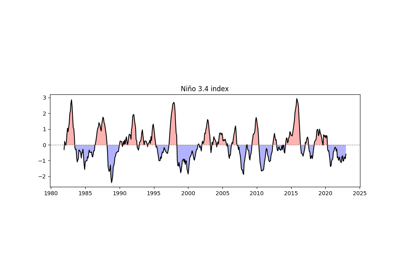
- easyclimate.calc_leadlag_corr_spatial(data_input: xarray.DataArray, x: xarray.DataArray | numpy.ndarray, leadlag_array: numpy.array | List[int], time_dim: str = 'time', method: Literal['scipy', 'xarray'] = 'xarray')
Calculate Pearson correlation coefficients and corresponding p-values between spatial data and a time series with specified lead or lag shifts, using
scipy.stats.pearsonror xarray methods.Parameters
- data_input
xarray.DataArray Input spatial data with dimensions
(time, ...)representing spatial fields over time.Note
NaN values are automatically skipped in calculations.
- x
xarray.DataArrayornumpy.ndarray Time series data with dimension
(time,). Must have the same length asdata_input’s time dimension.Note
NaN values are automatically skipped in calculations.
- leadlag_array
numpy.ndarrayorList[int] Array or list of integers specifying the lead or lag shifts (in time steps) to apply to the time series x relative to data_input.
Positive values indicate a lag: the time series x is shifted forward in time (e.g., a value of +2 means x is delayed by 2 time steps relative to data_input).
Negative values indicate a lead: the time series x is shifted backward in time (e.g., a value of -2 means x leads data_input by 2 time steps).
A value of 0 means no shift (synchronous correlation).
Example: If
leadlag_array = [-2, 0, 2], correlations are computed for \(x\) leading by 2 time steps, no shift, and lagging by 2 time steps, respectively.- time_dim
str Name of the time dimension in data_input and x. Default is “time”.
- method{‘scipy’, ‘xarray’}, optional
Method used to compute correlations:
‘scipy’: Uses
scipy.stats.pearsonrfor direct calculation, which may be more precise but slower.‘xarray’: Uses xarray’s built-in correlation function with t-test conversion, which is typically faster.
Default is ‘xarray’.
Returns
- result
xarray.Dataset Dataset containing two variables:
- corr
xarray.DataArray Pearson correlation coefficients with dimensions
(leadlag, ...). Values range from -1 to 1, where: - 1 indicates a perfect positive correlation. - -1 indicates a perfect negative correlation. - 0 indicates no correlation.
- corr
- pvalue
xarray.DataArray Two-tailed p-values with dimensions
(leadlag, ...). Small p-values (<0.05) indicate statistically significant correlations.
- pvalue
Notes
The function iterates over each lead/lag value in leadlag_array, computes the correlation between the shifted x and data_input, and concatenates results along a new leadlag dimension.
Shifting x may introduce NaN values at the edges of the time series, which are handled automatically during correlation calculations.
Ensure data_input and x have compatible time dimensions to avoid errors.
Examples
>>> import xarray as xr
>>> import numpy as np
>>> data = xr.DataArray(np.random.rand(100, 10, 10), dims=["time", "lat", "lon"])
>>> ts = xr.DataArray(np.random.rand(100), dims=["time"])
>>> leadlag = [-2, 0, 2]
>>> result = calc_leadlag_corr_spatial(data, ts, leadlag, time_dim="time", method="xarray")
>>> print(result)
Processing leadlag: 2 ━━━━━━━━━━━━━━━━━━━━━━━━━━━━━━━━━━━━━━━━ 100% 0:00:00
<xarray.Dataset> Size: 7kB
Dimensions:    (leadlag: 3, lat: 10, lon: 10)
Coordinates:
* leadlag    (leadlag) int64 24B -2 0 2
Dimensions without coordinates: lat, lon
Data variables:
    reg_coeff  (leadlag, lat, lon) float64 2kB 0.006322 0.002647 ... -0.02781
    corr       (leadlag, lat, lon) float64 2kB 0.02141 0.00894 ... -0.09169
    pvalue     (leadlag, lat, lon) float64 2kB 0.8326 0.9297 ... 0.3053 0.3643
- data_input
- easyclimate.calc_multiple_linear_regression_spatial(y_data: xarray.DataArray, x_datas: List[xarray.DataArray], dim='time') xarray.Dataset
Apply multiple linear regression to dataset across spatial dimensions.
\[y = a_1 x_1 + a_2 x_2 + \cdots\]Parameters
- y_data
xarray.DataArray Dependent variable with dimensions, each with dimensions
(time,).- x_datas
listofxarray.DataArray List of independent variables, each with dimensions
(time,).- dim
str, optional Time dimension name (default:
'time')
Returns
xarray.Datasetxarray.Datasetcontaining regression results with:slopes: slope coefficients for each predictor
(coef, lat, lon)intercept: intercept values
(lat, lon)r_squared: coefficient of determination
(lat, lon)slopes_p: p-values for slope coefficients
(coef, lat, lon)intercept_p: p-values for intercept
(lat, lon)
Raises
- ValueError
If the time coordinates of input variables don’t match.
Notes
NaN and Inf values are omitted independently at each spatial point. If the remaining samples are insufficient for the requested predictors, the corresponding regression results are returned as NaN.
- y_data
- easyclimate.calc_ttestSpatialPattern_spatial(data_input1: xarray.DataArray, data_input2: xarray.DataArray, dim: str = 'time', equal_var: bool = True, alternative: Literal['two-sided', 'less', 'greater'] = 'two-sided', method: Literal['scipy', 'xarray'] = 'xarray') xarray.Dataset
Calculate the T-test for the means of two independent sptial samples along with other axis (i.e. ‘time’) of scores.
Parameters
- data_input1:
xarray.DataArray The first spatio-temporal data of xarray DataArray to be calculated.
- data_input2:
xarray.DataArray The second spatio-temporal data of xarray DataArray to be calculated.
Note
The order of data_input1 and data_input2 has no effect on the calculation result.
The non-time dimensions of the two data sets must be exactly the same, and the dimensionality values must be arranged in the same order (ascending or descending).
- dim:
str Dimension(s) over which to apply the test. By default the test is applied over the time dimension.
- equal_var:
bool If True (default), perform a standard independent 2 sample test that assumes equal population variances (see https://en.wikipedia.org/wiki/T-test#Independent_two-sample_t-test). If False, perform Welch’s t-test, which does not assume equal population variance (see https://en.wikipedia.org/wiki/Welch%27s_t-test).
- alternative{‘two-sided’, ‘less’, ‘greater’}, optional
Defines the alternative hypothesis. The following options are available (default is ‘two-sided’):
‘two-sided’: the means of the distributions underlying the samples are unequal.
‘less’: the mean of the distribution underlying the first sample is less than the mean of the distribution underlying the second sample.
‘greater’: the mean of the distribution underlying the first sample is greater than the mean of the distribution underlying the second sample.
- method{‘scipy’, ‘xarray’}, optional
Method used to compute correlations:
‘scipy’: Uses
scipy.stats.ttest_indfor direct calculation‘xarray’: Uses xarray’s built-in method to calculate (faster)
Default is ‘xarray’.
Returns
statistic, pvalue:
xarray.Dataset.
See also
- data_input1:
- easyclimate.calc_windmask_ttestSpatialPattern_spatial(data_input1: xarray.Dataset, data_input2: xarray.Dataset, dim: str = 'time', u_dim: str = 'u', v_dim: str = 'v', mask_method: Literal['or', 'and'] = 'or', thresh: float = 0.05, equal_var: bool = True, alternative: Literal['two-sided', 'less', 'greater'] = 'two-sided', method: Literal['scipy', 'xarray'] = 'xarray')
Generate a significance mask for T-tests on the means of two independent spatial zonal (u) and meridional (v) wind samples, aggregated over the specified dimension (default ‘time’).
Parameters
- data_input1
xarray.Dataset The first spatio-temporal data of xarray Dataset to be calculated. It is necessary to include the zonal wind component (u_dim) and the meridional wind component (v_dim).
- data_input2
xarray.Dataset The second spatio-temporal data of xarray Dataset to be calculated. It is necessary to include the zonal wind component (u_dim) and the meridional wind component (v_dim).
Note
The order of data_input1 and data_input2 has no effect on the calculation result.
The non-time dimensions of the two data sets must be exactly the same, and the dimensionality values must be arranged in the same order (ascending or descending).
- dim
str, default: time Dimension(s) over which to apply the test. By default the test is applied over the time dimension.
- u_dim
str, default: u Variable name for the u velocity (zonal wind, in x direction).
- v_dim
str, default: v Variable name for the v velocity (meridional wind, in y direction).
- mask_methodLiteral[“or”, “and”], default: “or”
Method to combine the significance masks for u and v components:
“or”: A grid point is considered significant if either the u or v component is significant (p <= thresh).
“and”: A grid point is considered significant if both the u and v components are significant (p <= thresh).
- thresh
float, default: 0.05 The significance level (alpha) for the p-value threshold used to create the mask.
- equal_var
bool, default: True If True (default), perform a standard independent 2 sample test that assumes equal population variances (see https://en.wikipedia.org/wiki/T-test#Independent_two-sample_t-test). If False, perform Welch’s t-test, which does not assume equal population variance (see https://en.wikipedia.org/wiki/Welch%27s_t-test).
- alternative{‘two-sided’, ‘less’, ‘greater’}, optional=
Defines the alternative hypothesis. The following options are available (default is ‘two-sided’):
‘two-sided’: the means of the distributions underlying the samples are unequal.
‘less’: the mean of the distribution underlying the first sample is less than the mean of the distribution underlying the second sample.
‘greater’: the mean of the distribution underlying the first sample is greater than the mean of the distribution underlying the second sample.
- method{‘scipy’, ‘xarray’}, optional
Method used to compute t-tests:
‘scipy’: Uses
scipy.stats.ttest_indfor direct calculation‘xarray’: Uses xarray’s built-in method to calculate (faster)
Default is ‘xarray’.
Returns
- masked_pvalue
xarray.DataArray A boolean mask indicating significant regions (True where p <= thresh, combined via mask_method for u and v).
See also
- data_input1
- easyclimate.calc_levenetestSpatialPattern_spatial(data_input1: xarray.DataArray, data_input2: xarray.DataArray, dim: str = 'time', center: {'mean', 'median', 'trimmed'} = 'median', proportiontocut: float = 0.05) xarray.Dataset
Perform Levene test for equal variances of two independent sptial samples along with other axis (i.e. ‘time’) of scores.
The Levene test tests the null hypothesis that all input samples are from populations with equal variances. Levene’s test is an alternative to Bartlett’s test in the case where there are significant deviations from normality.
Parameters
- data_input1:
xarray.DataArray. The first spatio-temporal data of xarray DataArray to be calculated.
- data_input2:
xarray.DataArray. The second spatio-temporal data of xarray DataArray to be calculated.
Note
The order of data_input1 and data_input2 has no effect on the calculation result.
The non-time dimensions of the two data sets must be exactly the same, and the dimensionality values must be arranged in the same order (ascending or descending).
- dim:
str. Dimension(s) over which to apply the test. By default the test is applied over the time dimension.
- center: {‘mean’, ‘median’, ‘trimmed’}, default ‘median’.
Which function of the data to use in the test.
Note
Three variations of Levene’s test are possible. The possibilities and their recommended usages are:
median: Recommended for skewed (non-normal) distributions.
mean: Recommended for symmetric, moderate-tailed distributions.
trimmed: Recommended for heavy-tailed distributions.
The test version using the mean was proposed in the original article of Levene (Levene, H., 1960) while the median and trimmed mean have been studied by Brown and Forsythe (Brown, M. B. and Forsythe, A. B., 1974), sometimes also referred to as Brown-Forsythe test.
- proportiontocut:
float, default 0.05. When center is ‘trimmed’, this gives the proportion of data points to cut from each end (See
scipy.stats.trim_mean).
Returns
statistic, pvalue:
xarray.Dataset.
Reference
Levene, H. (1960). In Contributions to Probability and Statistics: Essays in Honor of Harold Hotelling, I. Olkin et al. eds., Stanford University Press, pp. 278-292.
Morton B. Brown & Alan B. Forsythe (1974) Robust Tests for the Equality of Variances, Journal of the American Statistical Association, 69:346, 364-367, DOI: https://doi.org/10.1080/01621459.1974.10482955
See also
- data_input1:
- easyclimate.calc_skewness_spatial(data_input: xarray.DataArray | xarray.Dataset, dim: str = 'time') xarray.Dataset | xarray.DataTree
Calculate the skewness of the spatial field on the time axis and its significance test.
The \(k\) th statistical moment about the mean is given by
\[m_k = \sum_{i=1}^{N} \frac{(x_i-\bar{x})^k}{N}\]where \(x_i\) is the \(i\) th observation, \(\bar{x}\) the mean and \(N\) the number of observations.
One definition of the coefficient of skewness is
\[a_3 = \frac{m_3}{(m_2)^{3/2}}\]Skewness is a measure of the asymmetry of a distribution and is zero for a normal distribution. If the longer wing of a distribution occurs for values of \(x\) higher than the mean, that distribution is said to have positive skewness. If thelonger wing occurs for values of \(x\) lower than the mean, the distribution is said to have negative skewness.
Parameters
- data_input:
xarray.DataArray The spatio-temporal data of xarray DataArray to be calculated.
- dim:
str Dimension(s) over which to apply skewness. By default skewness is applied over the time dimension.
Returns
skewness, pvalue:
xarray.Dataset.
Reference
White, G. H. (1980). Skewness, Kurtosis and Extreme Values of Northern Hemisphere Geopotential Heights, Monthly Weather Review, 108(9), 1446-1455. Website: https://journals.ametsoc.org/view/journals/mwre/108/9/1520-0493_1980_108_1446_skaevo_2_0_co_2.xml
See also
- data_input:
- easyclimate.calc_kurtosis_spatial(data_input: xarray.DataArray | xarray.Dataset, dim: str = 'time') xarray.DataArray | xarray.DataTree
Calculate the kurtosis of the spatial field on the time axis and its significance test.
The \(k\) th statistical moment about the mean is given by
\[m_k = \sum_{i=1}^{N} \frac{(x_i-\bar{x})^k}{N}\]where \(x_i\) is the \(i\) th observation, \(\bar{x}\) the mean and \(N\) the number of observations.
The coefficient of kurtosis is defined by
\[a_4 = \frac{m_4}{(m_2)^{2}}\]The kurtosis of a normal distribution is 3. If a distribution has a large central region which is flatter than a normal distribution with the same mean and variance, it has a kurtosis of less than 3. If the distribution has a central maximum more peaked and with longer wings than the equivalent normal distribution, its kurtosis is higher than 3 (Brooks and Carruthers, 1954). Extreme departures from the mean will cause very high values of kurtosis. Consequently, high kurtosis has been used as an indicator of bad data (Craddock and Flood, 1969). For the same reason, high values of kurtosis can be a result of one or two extreme events in a period of several years.
Parameters
- data_input:
xarray.DataArray The spatio-temporal data of xarray DataArray to be calculated.
- dim:
str Dimension(s) over which to apply kurtosis. By default kurtosis is applied over the time dimension.
Returns
kurtosis:
xarray.DataArray.
Reference
White, G. H. (1980). Skewness, Kurtosis and Extreme Values of Northern Hemisphere Geopotential Heights, Monthly Weather Review, 108(9), 1446-1455. Website: https://journals.ametsoc.org/view/journals/mwre/108/9/1520-0493_1980_108_1446_skaevo_2_0_co_2.xml
Køie, M., Brooks, C.E., & Carruthers, N. (1954). Handbook of Statistical Methods in Meteorology. Oikos, 4, 202.
Craddock, J.M. and Flood, C.R. (1969), Eigenvectors for representing the 500 mb geopotential surface over the Northern Hemisphere. Q.J.R. Meteorol. Soc., 95: 576-593. doi: https://doi.org/10.1002/qj.49709540510
See also
- data_input:
- easyclimate.calc_theilslopes_spatial(data_input: xarray.DataArray | xarray.Dataset, dim: str = 'time', x=None, alpha: float = 0.95, method: {'joint', 'separate'} = 'separate', returns_type: {'dataset_returns', 'dataset_vars'} = 'dataset_returns') xarray.Dataset | xarray.DataTree
Computes the Theil-Sen estimator.
Theilslopes implements a method for robust linear regression. It computes the slope as the median of all slopes between paired values.
Parameters
- data_input
xarray.DataArrayorxarray.Dataset xarray.DataArrayorxarray.Datasetto be regression.- dim:
str, default time. Dimension(s) over which to apply linregress. By default linregress is applied over the time dimension.
- x:
numpy.array Independent variable. If None, use np.arange(len(data_input[‘time’].shape[0])) instead.
- alpha:
float, default 0.95. Confidence degree between 0 and 1. Default is 95% confidence. Note that alpha is symmetric around 0.5, i.e. both 0.1 and 0.9 are interpreted as “find the 90% confidence interval”.
- method: {‘joint’, ‘separate’}, default ‘separate’.
Method to be used for computing estimate for intercept. Following methods are supported,
joint: Uses np.median(y - slope * x) as intercept.
separate: Uses np.median(y) - slope * np.median(x) as intercept.
- returns_type:
str, default ‘dataset_returns’. Return data type.
Returns
- result
TheilslopesResultDataset The return Dataset have following data_var:
See also
- data_input
- easyclimate.calc_lead_lag_correlation_coefficients(pcs: dict, pairs: List[tuple], max_lag: int) xarray.Dataset
Compute lead-lag correlation coefficients for specified pairs of indexes.
This function calculates the cross-correlation between pairs of time series (e.g., MJO/BSISO principal components PC1 vs. PC2) to determine their lead-lag relationships. The correlation coefficients are computed for a range of lags, and the maximum correlation and corresponding lag are stored as attributes in the output dataset.
Parameters
- pcspy:class:dict <dict>
Dictionary mapping PC names (e.g., ‘PC1’, ‘PC2’) to
xarray.DataArrayobjects, where each DataArray represents a principal component time series with a'time'dimension.- pairspy:class:list <list> of tuples
List of tuples, where each tuple contains (pair_name, pc_name1, pc_name2). For example, [(‘PC1_vs_PC2’, ‘PC1’, ‘PC2’), (‘PC3_vs_PC4’, ‘PC3’, ‘PC4’)].
- max_lagpy:class:int <int>
Maximum lag (in time steps) to consider for the cross-correlation. The function computes correlations for lags from
-max_lagto+max_lag.
Returns
- corr_da
xarray.Dataset Dataset containing correlation coefficients for each pair, with a ‘lag’ dimension. Each variable (e.g., ‘PC1_vs_PC2’) has attributes
'max_correlation' (float)and'lag_at_max_correlation' (int)indicating the maximum correlation and the lag at which it occurs.
Notes
Positive lags indicate that the first PC leads the second; negative lags indicate the opposite.
The input PCs should have no missing values. Use
fillnaorinterpolate_naif needed.The correlation coefficients are normalized to range between \(-1\) and \(1\).
- easyclimate.calc_timeseries_correlations(da: dict[str, xarray.DataArray] | list[xarray.DataArray], dim: str = 'time') xarray.DataArray
Calculate the correlation matrix between multiple DataArray time series.
This function calculates pairwise correlations between time series in the input DataArrays using the specified correlation method along the given dimension. The output is a symmetric correlation matrix stored as an xarray DataArray with dimensions (var1, var2).
Parameters
- da
dict[str, xarray.DataArray<xarray.DataArray>]orlist[xarray.DataArray<xarray.DataArray>]. A dictionary with names as keys and DataArrays as values, or a list of DataArrays. Each DataArray must contain the specified dimension.
- dim
str, default: time. The dimension along which to compute correlations. All DataArrays must have this dimension.
Returns
xarray.DataArray.A DataArray containing the correlation matrix with dimensions (var1, var2). Coordinates are set to the names of the input time series.
Examples
>>> time = pd.date_range('2020-01-01', '2020-12-31', freq='D')
>>> da1 = xr.DataArray(np.random.randn(len(time)), dims='time', coords={'time': time}, name='series1')
>>> da2 = xr.DataArray(da1 * 0.5 + np.random.randn(len(time)) * 0.5, dims='time', coords={'time': time}, name='series2')
>>> data = {'series1': da1, 'series2': da2}
>>> corr_matrix = calc_timeseries_correlations(data, method='pearson')
>>> print(corr_matrix)
- da
- easyclimate.calc_non_centered_corr(data_input1, data_input2, dim=None)
Compute the non-centered (uncentered) correlation coefficient between two xarray DataArrays. This is equivalent to the cosine similarity, calculated as the sum of the product of the two arrays divided by the product of their L2 norms (Euclidean norms), without subtracting the means.
The formula is:
\[r = \frac{\sum (x \cdot y)}{\sqrt{\sum x^2} \cdot \sqrt{\sum y^2}}\]Parameters
- data_input1
xarray.DataArray The first input data array to be correlated.
- data_input2
xarray.DataArray The second input data array to be correlated.
Note
Both inputs must be xarray DataArray objects.
The arrays must have compatible shapes: if dim is specified, it must be a shared dimension; if dim is None, all dimensions are flattened into a single vector for computation.
The result is set to 0 where the denominator (product of norms) is zero to avoid division by zero.
- dim
stror None, optional Dimension(s) over which to compute the correlation. If None (default), the arrays are flattened across all dimensions into a single vector before computation. If a string, the correlation is computed along the specified dimension, preserving other dimensions.
Returns
- corr
xarray.DataArray The non-centered correlation coefficient, with the same dimensions as the input arrays (or broadcasted appropriately).
See also
scipy.spatial.distance.cosine(for the related cosine distance metric).Examples
Compute correlation along a dimension:
>>> import xarray as xr
>>> import numpy as np
>>> import easyclimate as ecl
>>> da1 = xr.DataArray(np.array([[1, 2], [3, 4]]), dims=['x', 'y'])
>>> da2 = xr.DataArray(np.array([[2, 3], [4, 5]]), dims=['x', 'y'])
>>> corr = ecl.calc_non_centered_corr(da1, da2, dim='y')
>>> print(corr)
<xarray.DataArray (x: 2)> Size: 16B
array([0.99227788, 0.99951208])
Flatten and compute scalar correlation:
>>> corr_flat = calc_non_centered_corr(da1, da2)
>>> print(corr_flat)
Dimensions without coordinates: x
<xarray.DataArray ()> Size: 8B
array(0.99380799)
- data_input1
- easyclimate.calc_pattern_corr(data_input1: xarray.DataArray, data_input2: xarray.DataArray, time_dim: str = 'time')
Compute the pattern correlation (non-centered) between two xarray DataArrays over their common spatial dimensions. This is useful for comparing spatial patterns, such as in climate data.
It uses the non-centered correlation formula:
\[r = \frac{\sum (x \cdot y)}{\sqrt{\sum x^2} \cdot \sqrt{\sum y^2}}\]where the summation is over the stacked spatial (pattern) dimensions.
The spatial pattern dimensions are automatically detected as the intersection of the input dimensions, excluding ‘time’ (if present). Both inputs are stacked along these pattern dimensions into a temporary ‘pattern’ dimension, and the non-centered correlation is computed along it.
If both inputs lack ‘time’, the result is a scalar.
If one input has ‘time’ and the other does not, the result preserves the ‘time’ dimension from the timed input.
Broadcasting occurs automatically for compatible shapes.
Parameters
- data_input1
xarray.DataArray The first input data array (e.g., spatial pattern or time series of patterns).
- data_input2
xarray.DataArray The second input data array (must have compatible spatial dimensions).
- time_dim:
str, default: time. The time coordinate dimension name.
Returns
- corr
xarray.DataArrayor scalar The pattern correlation coefficient(s). Dimensions match the non-spatial dimensions of the inputs (e.g., ‘time’ if present in one input).
Note
Assumes inputs have compatible shapes and the only differing dimension is ‘time’.
Equivalent to cosine similarity over the spatial pattern.
For zero-norm cases, correlation is set to 0.
See also
Examples
Scalar correlation between two spatial patterns:
>>> import xarray as xr
>>> import numpy as np
>>> import easyclimate as ecl
>>> # Create a random number generator with a fixed seed.
>>> rng = np.random.default_rng(42)
>>> pat1 = xr.DataArray(rng.random((2, 3)), dims=['lat', 'lon'])
>>> pat2 = xr.DataArray(rng.random((2, 3)), dims=['lat', 'lon'])
>>> pcc = ecl.calc_pattern_corr(pat1, pat2)
>>> print(pcc)
<xarray.DataArray 'pcc' ()> Size: 8B
array(0.85730639)
Attributes:
    long_name:  Pattern Correlation Coefficient (non-centered)
    units:      dimensionless
Time series correlation (one with time):
>>> # Create a random number generator with a fixed seed.
>>> rng = np.random.default_rng(42)
>>> time = xr.DataArray(np.arange(4), dims=['time'])
>>> timed_pat = xr.DataArray(rng.random((4, 2, 3)), dims=['time', 'lat', 'lon'])
>>> pcc_time = ecl.calc_pattern_corr(timed_pat, pat2)
>>> print(pcc_time)
<xarray.DataArray 'pcc' (time: 4)> Size: 32B
array([0.85730639, 1.        , 0.78188174, 0.88162673])
Dimensions without coordinates: time
Attributes:
    long_name:  Pattern Correlation Coefficient (non-centered)
    units:      dimensionless
- easyclimate.remove_sst_trend(ssta: xarray.DataArray, spatial_dims: list[str] = ['lat', 'lon']) xarray.DataArray
Remove the global mean SST anomaly trend from the SST anomaly field for EOF/PC analysis and so on.
This function computes the deviation of the SST anomaly at each grid point \((x, y)\) from the global-mean SST anomaly for the same time step \(t\), following the approach described in Zhang et al. (1997). The resulting field is:
\[\mathrm{SSTA}^*_{x,y,t} = \mathrm{SSTA}_{x,y,t} - [\mathrm{SSTA}]_t\]where \([\mathrm{SSTA}]_t\) is the spatial mean over the specified dimensions for time \(t\). This removes the dominant global warming mode trend, avoiding unrealistic orthogonality constraints in subsequent PC analysis.
Parameters
- ssta
xarray.DataArray The SST anomaly field with dimensions including ‘time’ and the spatial dimensions (e.g., ‘lat’, ‘lon’).
- spatial_dims
listofstr, optional The spatial dimensions over which to compute the global mean. Default: [‘lat’, ‘lon’].
Returns
xarray.DataArrayThe deviation SST anomaly field with the same shape and coordinates as the input.
Reference
Zhang, Y., Wallace, J. M., & Battisti, D. S. (1997). ENSO-like Interdecadal Variability: 1900-93. Journal of Climate, 10(5), 1004-1020. https://journals.ametsoc.org/view/journals/clim/10/5/1520-0442_1997_010_1004_eliv_2.0.co_2.xml
Examples
>>> import xarray as xr
>>> # Load or create an xarray Dataset with SST anomalies
>>> ds = xr.open_dataset('path_to_sst_data.nc')
>>> # Assume 'ssta' is the variable name for SST anomalies
>>> ssta_dev = remove_sst_tendency(ds['ssta'])
>>> print(ssta_dev)
<xarray.DataArray 'ssta' (time: 120, lat: 180, lon: 360)>
Coordinates:
  * time     (time) datetime64[ns] 1940-01-01 ... 2024-12-01
  * lat      (lat) float32 -89.5 -88.5 -87.5 ... 87.5 88.5 89.5
  * lon      (lon) float32 0.5 1.5 2.5 ... 357.5 358.5 359.5
- ssta
- easyclimate.calc_detrend_spatial_fast(data_input: xarray.DataArray, time_dim: str = 'time', min_valid_fraction: float = 0.5, method: Literal['scipy_reduce', 'scipy', 'numpy', 'rust', 'rust_chunked', 'rust_flexible', 'auto'] = 'auto', **kwargs) xarray.DataArray
Remove linear trend along time dimension from spatio-temporal data.
Supports multiple computation methods with optional automatic selection.
Parameters
- data_inputxr.DataArray
The spatio-temporal data to be detrended.
- time_dimstr, default “time”
Name of the time dimension.
- min_valid_fractionfloat, default 0.5
Minimum fraction of valid (finite) values required for detrending. Grid points with fewer valid values will be set to NaN.
- methodstr, default ‘auto’
Computation method to use: - ‘scipy_reduce’: Simplified version using scipy.signal.detrend - ‘scipy’: Optimized version using scipy.signal.detrend - ‘numpy’: Manual numpy vectorized implementation - ‘rust’: High-performance Rust backend - ‘rust_chunked’: Rust backend with chunked processing (for large datasets) - ‘rust_flexible’: Rust backend with flexible dimension handling - ‘auto’: Automatically selects the best available method
- **kwargsdict
Additional arguments passed to specific methods: - chunk_size: int (for ‘rust_chunked’ method) - use_chunked: bool (for ‘rust_chunked’ method)
Returns
- xr.DataArray
Detrended data with same shape and coordinates as input.
Raises
- TypeError
If data_input is not an xarray.DataArray.
- ValueError
If input parameters are invalid.
- ImportError
If Rust method is selected but Rust backend is not available.
Examples
>>> import xarray as xr
>>> import numpy as np
>>>
>>> # Create sample data
>>> data = xr.DataArray(
...     np.random.randn(100, 50, 100),
...     dims=['time', 'lat', 'lon']
... )
>>>
>>> # Using scipy method
>>> result1 = calc_detrend_spatial_fast(data, method='scipy')
>>>
>>> # Using numpy method
>>> result2 = calc_detrend_spatial_fast(data, method='numpy')
>>>
>>> # Using Rust method (if available)
>>> try:
>>>     result3 = calc_detrend_spatial_fast(data, method='rust')
>>> except ImportError:
>>>     print("Rust backend not available")
>>>
>>> # Automatic method selection
>>> result4 = calc_detrend_spatial_fast(data, method='auto')
Notes
‘scipy_reduce’: Simplest method but less robust with NaN values
‘scipy’: Optimized scipy version with better special value handling
‘numpy’: Manual vectorized implementation, typically 2-3x faster than scipy
‘rust’: High-performance Rust implementation, typically 10-50x faster than numpy
‘rust_chunked’: Rust chunked version for large memory datasets
‘rust_flexible’: Rust version with flexible dimension ordering
‘auto’: Uses ‘rust’ if available, otherwise ‘numpy’
- easyclimate.calc_monthly_mean(data_input: xarray.DataArray, dim: str = 'time', **kwargs)
Calculate monthly mean.
For every adjacent sequence \(t_1, ..., t_n\) of timesteps of the same month it is:
\[o(t, x) = \mathrm{mean} \left \lbrace i(t', x), t_1 < t' \leqslant t_n \right\rbrace\]Parameters
- data_input:
xarray.DataArray. xarray.DataArrayto be calculated.Note
The recommended frequence of the data_input is daily.
- dim:
str Dimension(s) over which to apply extracting. By default extracting is applied over the time dimension.
- **kwargs:
Additional keyword arguments passed on to the appropriate array function for calculating mean on this object’s data. These could include dask-specific kwargs like split_every.
Returns
Examples
>>> import xarray as xr
>>> import numpy as np
>>> import pandas as pd
>>> import easyclimate as ecl
>>> # Create sample data with daily frequency
>>> time_index = pd.date_range('2020-01-01', '2020-03-31', freq='D')
>>> rng = np.random.default_rng(42)
>>> data = rng.random((len(time_index), 3, 3))
>>> da = xr.DataArray(data, dims=['time', 'x', 'y'], coords={'time': time_index})
>>> # Calculate monthly mean
>>> monthly_mean = ecl.calc_monthly_mean(da)
>>> print(monthly_mean)
<xarray.DataArray (time: 3, x: 3, y: 3)> Size: 216B
array([[[0.50635175, 0.45767908, 0.50271707],
        [0.52091523, 0.44830133, 0.44293946],
        [0.47944591, 0.53314083, 0.48073062]],
    [[0.53431127, 0.48259521, 0.47464862],
        [0.41070456, 0.51619935, 0.4872374 ],
        [0.6009132 , 0.43963445, 0.6028882 ]],
    [[0.48363606, 0.60589154, 0.42622008],
        [0.47519641, 0.46989711, 0.45327877],
        [0.44193025, 0.45050389, 0.641573  ]]])
Coordinates:
* time     (time) datetime64[ns] 24B 2020-01-01 2020-02-01 2020-03-01
Dimensions without coordinates: x, y
- data_input:
- easyclimate.calc_monthly_sum(data_input: xarray.DataArray, dim: str = 'time', **kwargs)
Calculate monthly sum.
For every adjacent sequence \(t_1, ..., t_n\) of timesteps of the same month it is:
\[o(t, x) = \mathrm{sum} \left \lbrace i(t', x), t_1 < t' \leqslant t_n \right\rbrace\]Parameters
- data_input:
xarray.DataArray. xarray.DataArrayto be calculated.Note
The recommended frequence of the data_input is daily.
- dim:
str Dimension(s) over which to apply extracting. By default extracting is applied over the time dimension.
- **kwargs:
Additional keyword arguments passed on to the appropriate array function for calculating mean on this object’s data. These could include dask-specific kwargs like split_every.
Returns
Examples
>>> import xarray as xr
>>> import numpy as np
>>> import pandas as pd
>>> import easyclimate as ecl
>>> # Create sample data with daily frequency
>>> time_index = pd.date_range('2020-01-01', '2020-03-31', freq='D')
>>> rng = np.random.default_rng(42)
>>> data = rng.random((len(time_index), 3, 3))
>>> da = xr.DataArray(data, dims=['time', 'x', 'y'], coords={'time': time_index})
>>> # Calculate monthly sum
>>> monthly_sum = ecl.calc_monthly_sum(da)
>>> print(monthly_sum)
<xarray.DataArray (time: 3, x: 3, y: 3)> Size: 216B
array([[[15.69690421, 14.18805154, 15.58422905],
        [16.14837203, 13.89734131, 13.7311233 ],
        [14.86282316, 16.52736588, 14.90264935]],
    [[15.49502686, 13.99526102, 13.76481005],
        [11.91043229, 14.96978113, 14.1298847 ],
        [17.42648281, 12.7493991 , 17.48375789]],
    [[14.99271788, 18.78263759, 13.21282259],
        [14.73108859, 14.56681052, 14.05164186],
        [13.69983774, 13.96562059, 19.88876291]]])
Coordinates:
* time     (time) datetime64[ns] 24B 2020-01-01 2020-02-01 2020-03-01
Dimensions without coordinates: x, y
- data_input:
- easyclimate.calc_monthly_std(data_input: xarray.DataArray, dim: str = 'time', **kwargs)
Calculate monthly standard deviation.
For every adjacent sequence \(t_1, ..., t_n\) of timesteps of the same month it is:
\[o(t, x) = \mathrm{std} \left \lbrace i(t', x), t_1 < t' \leqslant t_n \right\rbrace\]Parameters
- data_input:
xarray.DataArray. xarray.DataArrayto be calculated.Note
The recommended frequence of the data_input is daily.
- dim:
str Dimension(s) over which to apply extracting. By default extracting is applied over the time dimension.
- **kwargs:
Additional keyword arguments passed on to the appropriate array function for calculating mean on this object’s data. These could include dask-specific kwargs like split_every.
Returns
Examples
>>> import xarray as xr
>>> import numpy as np
>>> import pandas as pd
>>> import easyclimate as ecl
>>> # Create sample data with daily frequency
>>> time_index = pd.date_range('2020-01-01', '2020-03-31', freq='D')
>>> rng = np.random.default_rng(42)
>>> data = rng.random((len(time_index), 3, 3))
>>> da = xr.DataArray(data, dims=['time', 'x', 'y'], coords={'time': time_index})
>>> # Calculate monthly std
>>> monthly_std = ecl.calc_monthly_std(da)
>>> print(monthly_std)
<xarray.DataArray (time: 3, x: 3, y: 3)> Size: 216B
array([[[0.30528844, 0.29905447, 0.26472868],
        [0.23456056, 0.30879525, 0.29333846],
        [0.26139562, 0.306974  , 0.27987361]],
    [[0.30196879, 0.24783961, 0.26078164],
        [0.2708643 , 0.3012602 , 0.29801453],
        [0.24816804, 0.33863555, 0.25623523]],
    [[0.29399346, 0.31595077, 0.30336434],
        [0.31117807, 0.3130123 , 0.28909393],
        [0.27104435, 0.26864038, 0.22912052]]])
Coordinates:
* time     (time) datetime64[ns] 24B 2020-01-01 2020-02-01 2020-03-01
Dimensions without coordinates: x, y
- data_input:
- easyclimate.calc_monthly_var(data_input: xarray.DataArray, dim: str = 'time', **kwargs)
Calculate monthly variance.
For every adjacent sequence \(t_1, ..., t_n\) of timesteps of the same month it is:
\[o(t, x) = \mathrm{var} \left \lbrace i(t', x), t_1 < t' \leqslant t_n \right\rbrace\]Parameters
- data_input:
xarray.DataArray. xarray.DataArrayto be calculated.Note
The recommended frequence of the data_input is daily.
- dim:
str Dimension(s) over which to apply extracting. By default extracting is applied over the time dimension.
- **kwargs:
Additional keyword arguments passed on to the appropriate array function for calculating mean on this object’s data. These could include dask-specific kwargs like split_every.
Returns
Examples
>>> import xarray as xr
>>> import numpy as np
>>> import pandas as pd
>>> import easyclimate as ecl
>>> # Create sample data with daily frequency
>>> time_index = pd.date_range('2020-01-01', '2020-03-31', freq='D')
>>> rng = np.random.default_rng(42)
>>> data = rng.random((len(time_index), 3, 3))
>>> da = xr.DataArray(data, dims=['time', 'x', 'y'], coords={'time': time_index})
>>> # Calculate monthly var
>>> monthly_var = ecl.calc_monthly_var(da)
>>> print(monthly_var)
<xarray.DataArray (time: 3, x: 3, y: 3)> Size: 216B
array([[[0.09320103, 0.08943358, 0.07008127],
        [0.05501865, 0.09535451, 0.08604745],
        [0.06832767, 0.09423304, 0.07832924]],
    [[0.09118515, 0.06142447, 0.06800706],
        [0.07336747, 0.09075771, 0.08881266],
        [0.06158738, 0.11467404, 0.0656565 ]],
    [[0.08643216, 0.09982489, 0.09202992],
        [0.09683179, 0.0979767 , 0.0835753 ],
        [0.07346504, 0.07216766, 0.05249621]]])
Coordinates:
* time     (time) datetime64[ns] 24B 2020-01-01 2020-02-01 2020-03-01
Dimensions without coordinates: x, y
- data_input:
- easyclimate.calc_monthly_max(data_input: xarray.DataArray, dim: str = 'time', **kwargs)
Calculate monthly maximum.
For every adjacent sequence \(t_1, ..., t_n\) of timesteps of the same month it is:
\[o(t, x) = \mathrm{max} \left \lbrace i(t', x), t_1 < t' \leqslant t_n \right\rbrace\]Parameters
- data_input:
xarray.DataArray. xarray.DataArrayto be calculated.Note
The recommended frequence of the data_input is daily.
- dim:
str Dimension(s) over which to apply extracting. By default extracting is applied over the time dimension.
- **kwargs:
Additional keyword arguments passed on to the appropriate array function for calculating mean on this object’s data. These could include dask-specific kwargs like split_every.
Returns
Examples
>>> import xarray as xr
>>> import numpy as np
>>> import pandas as pd
>>> import easyclimate as ecl
>>> # Create sample data with daily frequency
>>> time_index = pd.date_range('2020-01-01', '2020-03-31', freq='D')
>>> rng = np.random.default_rng(42)
>>> data = rng.random((len(time_index), 3, 3))
>>> da = xr.DataArray(data, dims=['time', 'x', 'y'], coords={'time': time_index})
>>> # Calculate monthly max
>>> monthly_max = ecl.calc_monthly_max(da)
>>> print(monthly_max)
<xarray.DataArray (time: 3, x: 3, y: 3)> Size: 216B
<xarray.DataArray (time: 3, x: 3, y: 3)> Size: 216B
array([[[0.96189766, 0.95855921, 0.93604357],
        [0.97182643, 0.97069802, 0.97562235],
        [0.99237556, 0.96623191, 0.91601185]],
    [[0.95119466, 0.88414571, 0.85053368],
        [0.94602445, 0.99910473, 0.99546447],
        [0.98002718, 0.98663154, 0.99703466]],
    [[0.989133  , 0.99874337, 0.99308458],
        [0.99032166, 0.98180595, 0.92746046],
        [0.99758004, 0.91879368, 0.99470175]]])
Coordinates:
* time     (time) datetime64[ns] 24B 2020-01-01 2020-02-01 2020-03-01
Dimensions without coordinates: x, y
- data_input:
- easyclimate.calc_monthly_min(data_input: xarray.DataArray, dim: str = 'time', **kwargs)
Calculate monthly minimum.
For every adjacent sequence \(t_1, ..., t_n\) of timesteps of the same month it is:
\[o(t, x) = \mathrm{min} \left \lbrace i(t', x), t_1 < t' \leqslant t_n \right\rbrace\]Parameters
- data_input:
xarray.DataArray. xarray.DataArrayto be calculated.Note
The recommended frequence of the data_input is daily.
- dim:
str Dimension(s) over which to apply extracting. By default extracting is applied over the time dimension.
- **kwargs:
Additional keyword arguments passed on to the appropriate array function for calculating mean on this object’s data. These could include dask-specific kwargs like split_every.
Returns
Examples
>>> import xarray as xr
>>> import numpy as np
>>> import pandas as pd
>>> import easyclimate as ecl
>>> # Create sample data with daily frequency
>>> time_index = pd.date_range('2020-01-01', '2020-03-31', freq='D')
>>> rng = np.random.default_rng(42)
>>> data = rng.random((len(time_index), 3, 3))
>>> da = xr.DataArray(data, dims=['time', 'x', 'y'], coords={'time': time_index})
>>> # Calculate monthly min
>>> monthly_min = ecl.calc_monthly_min(da)
>>> print(monthly_min)
<xarray.DataArray (time: 3, x: 3, y: 3)> Size: 216B
array([[[0.02280387, 0.02485949, 0.05338193],
        [0.02271207, 0.01783678, 0.02161208],
        [0.00736227, 0.04161417, 0.02114802]],
    [[0.0289995 , 0.04347506, 0.0401513 ],
        [0.01072764, 0.09172101, 0.01468284],
        [0.07205915, 0.01230269, 0.00542983]],
    [[0.0040076 , 0.0165798 , 0.00166071],
        [0.04896371, 0.01903415, 0.00123306],
        [0.04737402, 0.00450012, 0.22825288]]])
Coordinates:
* time     (time) datetime64[ns] 24B 2020-01-01 2020-02-01 2020-03-01
Dimensions without coordinates: x, y
- data_input:
- easyclimate.calc_yearly_mean(data_input: xarray.DataArray, dim: str = 'time', **kwargs)
Calculate yearly mean.
For every adjacent sequence \(t_1, ..., t_n\) of timesteps of the same year it is:
\[o(t, x) = \mathrm{mean} \left \lbrace i(t', x), t_1 < t' \leqslant t_n \right\rbrace\]Tip
This function uses
xarray.DataArray.groupbyto implement the calculation. To substantially improve the performance of GroupBy operations, particularly with dask install the flox package. flox extends Xarray’s in-built GroupBy capabilities by allowing grouping by multiple variables, and lazy grouping by dask arrays. If installed, Xarray will automatically use flox by default.Parameters
- data_input:
xarray.DataArray. xarray.DataArrayto be calculated.Note
The recommended frequence of the data_input is monthly.
- dim:
str Dimension(s) over which to apply extracting. By default extracting is applied over the time dimension.
- **kwargs:
Additional keyword arguments passed on to the appropriate array function for calculating mean on this object’s data. These could include dask-specific kwargs like split_every.
Returns
xarray.DataArraywith time dimension type ofnumpy.datetime64.- data_input:
- easyclimate.calc_yearly_sum(data_input: xarray.DataArray, dim: str = 'time', **kwargs)
Calculate yearly sum.
For every adjacent sequence \(t_1, ..., t_n\) of timesteps of the same year it is:
\[o(t, x) = \mathrm{sum} \left \lbrace i(t', x), t_1 < t' \leqslant t_n \right\rbrace\]Tip
This function uses
xarray.DataArray.groupbyto implement the calculation. To substantially improve the performance of GroupBy operations, particularly with dask install the flox package. flox extends Xarray’s in-built GroupBy capabilities by allowing grouping by multiple variables, and lazy grouping by dask arrays. If installed, Xarray will automatically use flox by default.Parameters
- data_input:
xarray.DataArray. xarray.DataArrayto be calculated.Note
The recommended frequence of the data_input is monthly.
- dim:
str Dimension(s) over which to apply extracting. By default extracting is applied over the time dimension.
- **kwargs:
Additional keyword arguments passed on to the appropriate array function for calculating sum on this object’s data. These could include dask-specific kwargs like split_every.
Returns
xarray.DataArraywith time dimension type ofnumpy.datetime64.- data_input:
- easyclimate.calc_yearly_std(data_input: xarray.DataArray, dim: str = 'time', **kwargs)
Calculate yearly standard deviation.
For every adjacent sequence \(t_1, ..., t_n\) of timesteps of the same year it is:
\[o(t, x) = \mathrm{std} \left \lbrace i(t', x), t_1 < t' \leqslant t_n \right\rbrace\]Tip
This function uses
xarray.DataArray.groupbyto implement the calculation. To substantially improve the performance of GroupBy operations, particularly with dask install the flox package. flox extends Xarray’s in-built GroupBy capabilities by allowing grouping by multiple variables, and lazy grouping by dask arrays. If installed, Xarray will automatically use flox by default.Parameters
- data_input:
xarray.DataArray. xarray.DataArrayto be calculated.Note
The recommended frequence of the data_input is monthly.
- dim:
str Dimension(s) over which to apply extracting. By default extracting is applied over the time dimension.
- **kwargs:
Additional keyword arguments passed on to the appropriate array function for calculating std on this object’s data. These could include dask-specific kwargs like split_every.
Note
The parameter ddof is Delta Degrees of Freedom: the divisor used in the calculation is N - ddof, where N represents the number of elements. If the data needs to be Normalize by (n-1), then ddof=1.
Returns
xarray.DataArraywith time dimension type ofnumpy.datetime64.- data_input:
- easyclimate.calc_yearly_var(data_input: xarray.DataArray, dim: str = 'time', **kwargs)
Calculate yearly standard deviation.
For every adjacent sequence \(t_1, ..., t_n\) of timesteps of the same year it is:
\[o(t, x) = \mathrm{var} \left \lbrace i(t', x), t_1 < t' \leqslant t_n \right\rbrace\]Tip
This function uses
xarray.DataArray.groupbyto implement the calculation. To substantially improve the performance of GroupBy operations, particularly with dask install the flox package. flox extends Xarray’s in-built GroupBy capabilities by allowing grouping by multiple variables, and lazy grouping by dask arrays. If installed, Xarray will automatically use flox by default.Parameters
- data_input:
xarray.DataArray. xarray.DataArrayto be calculated.Note
The recommended frequence of the data_input is monthly.
- dim:
str Dimension(s) over which to apply extracting. By default extracting is applied over the time dimension.
- **kwargs:
Additional keyword arguments passed on to the appropriate array function for calculating var on this object’s data. These could include dask-specific kwargs like split_every.
Note
The parameter ddof is Delta Degrees of Freedom: the divisor used in the calculation is N - ddof, where N represents the number of elements. If the data needs to be Normalize by (n-1), then ddof=1.
Returns
xarray.DataArraywith time dimension type ofnumpy.datetime64.- data_input:
- easyclimate.calc_yearly_max(data_input: xarray.DataArray, dim: str = 'time', **kwargs)
Calculate yearly standard deviation.
For every adjacent sequence \(t_1, ..., t_n\) of timesteps of the same year it is:
\[o(t, x) = \mathrm{max} \left \lbrace i(t', x), t_1 < t' \leqslant t_n \right\rbrace\]Tip
This function uses
xarray.DataArray.groupbyto implement the calculation. To substantially improve the performance of GroupBy operations, particularly with dask install the flox package. flox extends Xarray’s in-built GroupBy capabilities by allowing grouping by multiple variables, and lazy grouping by dask arrays. If installed, Xarray will automatically use flox by default.Parameters
- data_input:
xarray.DataArray. xarray.DataArrayto be calculated.Note
The recommended frequence of the data_input is monthly.
- dim:
str Dimension(s) over which to apply extracting. By default extracting is applied over the time dimension.
- **kwargs:
Additional keyword arguments passed on to the appropriate array function for calculating max on this object’s data. These could include dask-specific kwargs like split_every.
Returns
xarray.DataArraywith time dimension type ofnumpy.datetime64.See also
numpy.maximum,dask.array.max,xarray.DataArray.max,xarray.core.groupby.DataArrayGroupBy.max.- data_input:
- easyclimate.calc_yearly_min(data_input: xarray.DataArray, dim: str = 'time', **kwargs)
Calculate yearly standard deviation.
For every adjacent sequence \(t_1, ..., t_n\) of timesteps of the same year it is:
\[o(t, x) = \mathrm{min} \left \lbrace i(t', x), t_1 < t' \leqslant t_n \right\rbrace\]Tip
This function uses
xarray.DataArray.groupbyto implement the calculation. To substantially improve the performance of GroupBy operations, particularly with dask install the flox package. flox extends Xarray’s in-built GroupBy capabilities by allowing grouping by multiple variables, and lazy grouping by dask arrays. If installed, Xarray will automatically use flox by default.Parameters
- data_input:
xarray.DataArray. xarray.DataArrayto be calculated.Note
The recommended frequence of the data_input is monthly.
- dim:
str Dimension(s) over which to apply extracting. By default extracting is applied over the time dimension.
- **kwargs:
Additional keyword arguments passed on to the appropriate array function for calculating min on this object’s data. These could include dask-specific kwargs like split_every.
Returns
xarray.DataArraywith time dimension type ofnumpy.datetime64.See also
numpy.minimum,dask.array.min,xarray.DataArray.min,xarray.core.groupby.DataArrayGroupBy.min.- data_input:
- easyclimate.calc_all_climatological_mean(data_input: xarray.DataArray | xarray.Dataset, dim: str = 'time', **kwargs) xarray.DataArray
Calculation of the climatological mean over the entire time range.
Parameters
- data_input
xarray.DataArrayorxarray.Dataset The data of
xarray.DataArrayto be calculated.- dim:
str Dimension(s) over which to apply extracting. By default extracting is applied over the time dimension.
- **kwargs:
Additional keyword arguments passed on to the appropriate array function for calculating mean on this object’s data. These could include dask-specific kwargs like split_every.
Returns
- data_input
- easyclimate.calc_seasonal_climatological_mean(data_input: xarray.DataArray | xarray.Dataset, dim: str = 'time', **kwargs) xarray.DataArray
Calculation of the seasonal climatological mean over the entire time range.
Parameters
- data_input
xarray.DataArrayorxarray.Dataset The data of
xarray.DataArrayto be calculated.- dim:
str Dimension(s) over which to apply extracting. By default extracting is applied over the time dimension.
- **kwargs:
Additional keyword arguments passed on to the appropriate array function for calculating mean on this object’s data. These could include dask-specific kwargs like split_every.
Returns
- data_input
- easyclimate.calc_seasonal_cycle_mean(data_input: xarray.DataArray | xarray.Dataset, dim: str = 'time', **kwargs) xarray.DataArray
Calculation of the seasonal cycle means over the entire time range.
Parameters
- data_input
xarray.DataArrayorxarray.Dataset The data of
xarray.DataArrayto be calculated.
Caution
data_input must be monthly data.
Returns
- data_input
- easyclimate.calc_seasonal_cycle_std(data_input: xarray.DataArray | xarray.Dataset, dim: str = 'time', **kwargs) xarray.DataArray
Calculation of the seasonal cycle standard deviation over the entire time range.
Parameters
- data_input
xarray.DataArrayorxarray.Dataset The data of
xarray.DataArrayto be calculated.
Caution
data_input must be monthly data.
- dim:
str Dimension(s) over which to apply extracting. By default extracting is applied over the time dimension.
- **kwargs:
Additional keyword arguments passed on to the appropriate array function for calculating standard deviation on this object’s data. These could include dask-specific kwargs like split_every.
Returns
- data_input
- easyclimate.calc_seasonal_cycle_var(data_input: xarray.DataArray | xarray.Dataset, dim: str = 'time', **kwargs) xarray.DataArray
Calculation of the seasonal cycle standard deviation over the entire time range.
Parameters
- data_input
xarray.DataArrayorxarray.Dataset The data of
xarray.DataArrayto be calculated.
Caution
data_input must be monthly data.
Returns
- data_input
- easyclimate.calc_seasonal_mean(data_input: xarray.DataArray | xarray.Dataset, dim: str = 'time', extract_season: Literal['seasonly', 'DJF', 'MAM', 'JJA', 'SON', 'JJAS', 'OND'] = 'seasonly', **kwargs) xarray.DataArray
Calculation of the seasonal means per year over the entire time range.
Parameters
- data_input
xarray.DataArrayorxarray.Dataset The data of
xarray.DataArrayto be calculated.
Caution
data_input must be monthly data.
- dim:
str Dimension(s) over which to apply extracting. By default extracting is applied over the time dimension.
- extract_season:
list. default: “seasonly”. Extraction seasons.
“seasonly”: Calculate by meteorological seasons (DJF, MAM, JJA, SON)
custom seasons: Calculate climatology by custom seasons, e.g., ‘DJF’, ‘MAM’, ‘JJA’, ‘SON’,
'JJAS','OND'.
Returns
- data_input
- easyclimate.remove_seasonal_cycle_mean(data_input: xarray.DataArray | xarray.Dataset, dim: str = 'time', time_range: slice = slice(None, None)) xarray.DataArray
Remove of the seasonal cycle means over the entire time range.
Parameters
- data_input
xarray.DataArrayorxarray.Dataset. The data of
xarray.DataArrayto be calculated.
Caution
data_input must be monthly data.
Returns
Example(s) related to the function
- data_input
- easyclimate.calc_monthly_climatological_std_without_seasonal_cycle_mean(data_input: xarray.DataArray | xarray.Dataset, dim: str = 'time', **kwargs) xarray.DataArray
Calculate the standard deviation of monthly data anomalies over the entire time range.
Parameters
- data_input
xarray.DataArrayorxarray.Dataset The data of
xarray.DataArrayto be calculated.
Caution
data_input must be monthly data.
- dim:
str Dimension(s) over which to apply extracting. By default extracting is applied over the time dimension.
- **kwargs:
Additional keyword arguments passed on to the appropriate array function for calculating standard deviation on this object’s data. These could include dask-specific kwargs like split_every.
Returns
- data_input
- easyclimate.calc_monthly_climatological_var_without_seasonal_cycle_mean(data_input: xarray.DataArray | xarray.Dataset, dim: str = 'time', **kwargs) xarray.DataArray
Calculate the variance of monthly data anomalies over the entire time range.
Parameters
- data_input
xarray.DataArrayorxarray.Dataset The data of
xarray.DataArrayorxarray.Datasetto be calculated.
Caution
data_input must be monthly data.
Returns
- data_input
- easyclimate.smooth_daily_annual_cycle(daily_annual_cycle_data: xarray.DataArray, harmonics_num: int = 3, time_dim: str = 'dayofyear') xarray.DataArray
Calculates a smooth mean daily annual cycle for an array nominally dimensioned.
Parameters
- daily_annual_cycle_data
xarray.DataArray The input data array with time as the first dimension. The time dimension should be named as specified by time_dim.
- harmonics_numint, optional
The number of harmonics to retain in the FFT. Default is 3.
- time_dimstr, optional
The name of the time dimension in the DataArray. Default is “dayofyear”.
Returns
The smoothed daily cycle data.
- daily_annual_cycle_data
- easyclimate.calc_daily_annual_cycle_mean(data_input: xarray.DataArray | xarray.Dataset, dim: str = 'time', **kwargs) xarray.DataArray
Calculation of the daily means per year over the entire time range.
Parameters
- data_input
xarray.DataArrayorxarray.Dataset The data of
xarray.DataArrayto be calculated.
Caution
data_input must be daily or hourly data. At least one year of time range must be included in the data_input.
Returns
xarray.DataArrayorxarray.Dataset.Caution
For complete coverage, the data should span at least one full year.
If the data is sub-daily (e.g., hourly), the mean is taken over all sub-daily time points for each day of the year.
- data_input
- easyclimate.calc_daily_annual_cycle_std(data_input: xarray.DataArray | xarray.Dataset, dim: str = 'time', **kwargs) xarray.DataArray
Calculation of the daily standard deviation per year over the entire time range.
Parameters
- data_input
xarray.DataArrayorxarray.Dataset The data of
xarray.DataArrayto be calculated.
Caution
data_input must be daily or hourly data. At least one year of time range must be included in the data_input.
Returns
xarray.DataArrayorxarray.Dataset.Caution
For complete coverage, the data should span at least one full year.
If the data is sub-daily (e.g., hourly), the std is taken over all sub-daily time points for each day of the year.
- data_input
- easyclimate.calc_daily_annual_cycle_var(data_input: xarray.DataArray | xarray.Dataset, dim: str = 'time', **kwargs) xarray.DataArray
Calculation of the daily variance per year over the entire time range.
Parameters
- data_input
xarray.DataArrayorxarray.Dataset The data of
xarray.DataArrayto be calculated.
Caution
data_input must be daily or hourly data. At least one year of time range must be included in the data_input.
Returns
xarray.DataArrayorxarray.Dataset.Caution
For complete coverage, the data should span at least one full year.
If the data is sub-daily (e.g., hourly), the var is taken over all sub-daily time points for each day of the year.
- data_input
- easyclimate.remove_smooth_daily_annual_cycle_mean(data_input: xarray.DataArray, daily_cycle_mean_time_range: slice = slice(None, None), extract_time_range: slice = slice(None, None), harmonics_num: int = 3, dim: str = 'time')
Removes the smooth daily annual cycle mean from the input data.
This function first calculates the daily cycle mean over a specified time range, smooths that mean using a specified number of harmonics, and then subtracts this smoothed cycle from the input data over another specified time range.
Parameters
- data_input
xarray.DataArray The input data from which to remove the smooth daily annual cycle mean.
- daily_cycle_mean_time_rangeslice, optional
The time range used to compute the daily annual cycle mean. Default is all time.
- extract_time_rangeslice, optional
The time range from which to extract the data and remove the daily annual cycle. Default is all time.
- harmonics_numint, optional
The number of harmonics to use in smoothing the daily annual cycle mean. Default is 3.
- dimstr, optional
The name of the time dimension. Default is “time”.
Returns
xarray.DataArrayThe input data with the smooth daily cycle mean removed.
- data_input
- easyclimate.calc_horizontal_wind_components_std(uv_dataset: xarray.Dataset, u_dim='u', v_dim='v', time_dim='time', ddof=0) xarray.Dataset
Calculate the standard deviation of vector wind speed and direction.
The standard deviation of vector wind speed
\[\sigma_s = [U^2 \sigma_u^2 + V^2 \sigma_v^2 + 2 U V \sigma_{uv}]^{1/2} S^{-1},\]The standard deviation of vector wind direction
\[\sigma_d = [V^2 \sigma_u^2 + U^2 \sigma_v^2 + 2 U V \sigma_{uv}]^{1/2} S^{-2},\]Where time mean of \(u\) is \(U = n^{-1} \sum u_i\), time mean of \(v\) is \(V = n^{-1} \sum v_i\), time variance of \(u\) is \(\sigma_u^2 = n^{-1} \sum u_{i}^{2} - U^2\), time variance of \(v\) is \(\sigma_v^2 = n^{-1} \sum v_{i}^{2} - V^2\), time covariance of \(u\), \(v\) is \(\sigma_{uv} = n^{-1} \sum u_i v_i - UV\), vector mean wind speed is \(S = (U^2 + V^2)^{1/2}\).
Parameters
- uv_dataset
xarray.Dataset xarray.Datasetdata containing zonal and meridional wind components.- u_dim:
str, default: u Variable name for the u velocity (in x direction).
- v_dim:
str, default: v Variable name for the v velocity (in y direction).
- time_dim
str, default: time Dimension(s) over which to apply. By default is applied over the time dimension.
- ddof
int, default: 1 If ddof=1, covariance is normalized by N-1, giving an unbiased estimate, else normalization is by N.
Returns
xarray.Datasetsigma_s: the standard deviation of vector wind speed.
sigma_d: the standard deviation of vector wind direction.
Reference
Ackermann. (1983). Means and Standard Deviations of Horizontal Wind Components. https://doi.org/10.1175/1520-0450(1983)022%3C0959:MASDOH%3E2.0.CO;2
- uv_dataset
- easyclimate.calc_windspeed_dataset(uv_dataset: xarray.Dataset, u_dim: str = 'u', v_dim: str = 'v') xarray.Dataset
Calculate the horizontal wind speed from zonal and meridional wind components in a
xarray.Dataset.The wind speed is computed as the magnitude of the horizontal wind vector:
\[S = \sqrt{u^2 + v^2},\]where \(u\) is the zonal wind component and \(v\) is the meridional wind component.
Parameters
- uv_dataset
xarray.Dataset xarray.Datasetcontaining zonal and meridional wind components.- u_dim
str, default: u Variable name for the zonal wind component (in x direction).
- v_dim
str, default: v Variable name for the meridional wind component (in y direction).
Returns
xarray.DatasetA copy of the input dataset with an additional variable speed containing the wind speed.
Examples
>>> ds = xr.Dataset({"u": (("time",), [1, 2, 3]), "v": (("time",), [4, 5, 6])})
>>> ds_with_speed = calc_windspeed_dataset(ds, u_dim="u", v_dim="v")
>>> print(ds_with_speed["speed"])
<xarray.DataArray 'speed' (time: 3)> Size: 24B
array([4.12310563, 5.38516481, 6.70820393])
Dimensions without coordinates: time
- uv_dataset
- easyclimate.calc_windspeed_dataarray(u_data: xarray.DataArray, v_data: xarray.DataArray) xarray.DataArray
Calculate the horizontal wind speed from zonal and meridional wind components in
xarray.DataArray.The wind speed is computed as the magnitude of the horizontal wind vector:
\[S = \sqrt{u^2 + v^2},\]where \(u\) is the zonal wind component and \(v\) is the meridional wind component.
Parameters
- u_data
xarray.DataArray xarray.DataArraycontaining the zonal wind component (in x direction).- v_data
xarray.DataArray xarray.DataArraycontaining the meridional wind component (in y direction).
Returns
xarray.DataArrayA
xarray.DataArraycontaining the wind speed.
Examples
>>> u = xr.DataArray([1, 2, 3], dims="time")
>>> v = xr.DataArray([4, 5, 6], dims="time")
>>> speed = calc_windspeed_dataarray(u, v)
>>> print(speed)
<xarray.DataArray (time: 3)> Size: 24B
array([4.12310563, 5.38516481, 6.70820393])
Dimensions without coordinates: time
- u_data
- easyclimate.populate_monmean2everymon(data_monthly: xarray.DataArray, data_climatology_monthly_data: xarray.DataArray = None, time_dim: str = 'time') xarray.DataArray
Populate the data of each month using the monthly mean state of the data_monthly or given dataset.
Parameters
- data_monthly:
xarray.DataArray. xarray.DataArrayto be calculated.- data_climatology_monthly_data:
xarray.DataArray, default None. The monthly climatology dataset. If it is None, the climatology is derived from data_monthly.
- time_dim:
str, default: time. The time coordinate dimension name.
Returns
- data_monthly:
- easyclimate.populate_daymean2everyday(data_daily: xarray.DataArray, data_climatology_daily_data: xarray.DataArray = None, time_dim: str = 'time') xarray.DataArray
Populate the data of each day using the daily mean state of the data_daily or given dataset.
Parameters
- data_daily:
xarray.DataArray. xarray.DataArrayto be calculated.
- data_daily:
- data_climatology_daily_data:
xarray.DataArray, default None. The daily climatology dataset. If it is None, the climatology is derived from data_monthly.
- data_climatology_daily_data:
- time_dim:
str, default: time. The time coordinate dimension name.
- time_dim:
Returns
- easyclimate.calc_daily_climatological_anomaly(data_daily: xarray.DataArray | xarray.Dataset, data_climatology_daily_data: xarray.DataArray | xarray.Dataset, timd_dim='time') xarray.DataArray | xarray.Dataset
Calulate daily anomaly using the given dataset of climatological mean state .
- data_daily:
xarray.DataArrayorxarray.Dataset. xarray.DataArrayto be calculated.
- data_daily:
- data_climatology_daily_data:
xarray.DataArrayorxarray.Dataset. The daily climatology dataset.
- data_climatology_daily_data:
- time_dim:
str, default: time. The time coordinate dimension name.
- time_dim:
Returns
- easyclimate.remove_low_frequency_signal(da: xarray.DataArray, window: int = 120, center: bool = False, time_dim: str = 'time') xarray.DataArray
Remove low-frequency signal by subtracting the running mean from a time series.
This function removes the effect of interannual variability by subtracting the running mean of the specified window (default 120 days), as described in Wheeler and Hendon (2004). The method is commonly used in the context of the Madden-Julian Oscillation (MJO) index calculation for monitoring and prediction.
Parameters
- da
xarray.DataArray Input time series data array with a time dimension.
- window
int, optional Size of the moving average window in days (default is 120).
- center
bool, optional If
True, the moving average is centered (mean of window around each point). IfFalse, the moving average is trailing (mean of last window days). Default isFalse.- time_dim
str, optional Name of the time dimension in the input DataArray (default is “time”).
Returns
xarray.DataArrayThe input data array with the low-frequency signal (running mean) removed.
References
Wheeler, M. C., & Hendon, H. H. (2004). An All-Season Real-Time Multivariate MJO Index: Development of an Index for Monitoring and Prediction. Monthly Weather Review, 132(8), 1917-1932. https://journals.ametsoc.org/view/journals/mwre/132/8/1520-0493_2004_132_1917_aarmmi_2.0.co_2.xml
Examples
>>> import xarray as xr
>>> da = xr.DataArray([...], dims=['time'], coords={'time': [...]})
>>> result = remove_low_frequency_signal(da, window=120, center=False, time_dim='time')
- da
- easyclimate.open_tutorial_dataset(name: str, cache: bool = True, cache_dir: None | str | os.PathLike = None, progressbar: bool = False, *, engine: xarray.backends.api.T_Engine = None, **kws) xarray.Dataset
Open a dataset from the online repository (requires internet).
If a local copy is found then always use that to avoid network traffic.
Available datasets:
"air_202201_mon_mean": 2m air temperature of the NCEP reanalysis subset"hgt_202201_mon_mean": Geopotential height of the NCEP reanalysis subset"precip_202201_mon_mean": Precipitation of the NCEP reanalysis subset"pressfc_202201_mon_mean": Mean sea surface pressure of the NCEP reanalysis subset"shum_202201_mon_mean": Absolute humidity of the NCEP reanalysis subset"uwnd_202201_mon_mean": Zonal wind of the NCEP reanalysis subset"vwnd_202201_mon_mean": Meridional wind of the NCEP reanalysis subset"omega_202201_mon_mean": Vertical velocity of the NCEP reanalysis subset"mini_HadISST_ice": Hadley Centre Sea Ice and Sea Surface Temperature data set (HadISST) subset"PressQFF_202007271200_872": Observational data from European stations (from https://github.com/EXCITED-CO2/xarray-regrid)"pr_wtr_eatm_2022": Precipitable water of the NCEP reanalysis subset in the 2022"sst_mnmean_oisst": NOAA Optimum Interpolation (OI) SST V2 (from https://psl.noaa.gov/data/gridded/data.noaa.oisst.v2.html)
Parameters
- name
str Name of the file containing the dataset. e.g. ‘air_202201_mon_mean’
- cache_dirpath-like, optional
The directory in which to search for and write cached data.
- cachedim:
bool, optional If True, then cache data locally for use on subsequent calls
- progressbar:
bool, default False. If True, will print a progress bar of the download to standard error (stderr).
- **kws
dict, optional Passed to xarray.open_dataset
Returns
Reference
Kalnay et al.,The NCEP/NCAR 40-year reanalysis project, Bull. Amer. Meteor. Soc., 77, 437-470, 1996
Rayner, N. A.; Parker, D. E.; Horton, E. B.; Folland, C. K.; Alexander, L. V.; Rowell, D. P.; Kent, E. C.; Kaplan, A. (2003) Global analyses of sea surface temperature, sea ice, and night marine air temperature since the late nineteenth century J. Geophys. Res.Vol. 108, No. D14, 4407 10.1029/2002JD002670 (pdf ~9Mb)
- class easyclimate.DataNode(name='root')
A hierarchical data structure that dynamically manages attributes and nested nodes.
The
DataNodeclass provides a flexible way to organize and access data in a tree-like structure. It supports automatic creation of nested nodes, path-style access, and rich HTML representation in Jupyter environments.Parameters
- name
str, optional The name of the root node (default:
"root").
- _attributes
- name = 'root'
- __getattr__(key)
Dynamically access or create node attributes.
Automatically creates nested
DataNodefor non-existent attributes, while filtering out special IPython/Jupyter attribute requests.Parameters
- key
str The attribute name to access.
Returns
- Any
The requested attribute or a new
DataNodeif attribute doesn’t exist.
Raises
- AttributeError
If the attribute is a special IPython/Jupyter attribute.
- key
- __setattr__(key, value)
Set node attributes while protecting internal attributes.
Parameters
- key
str The attribute name to set.
- valueAny
The value to assign to the attribute.
- key
- __getitem__(key)
Access attributes using path-style notation (e.g., “path/to/attribute”).
Parameters
- key
str The attribute path to access, with ‘/’ separators for nested nodes.
Returns
- Any
The value at the specified path.
Raises
- KeyError
If any part of the path doesn’t exist.
- key
- __contains__(key)
- __setitem__(key, value)
Set attributes using path-style notation, creating intermediate nodes as needed.
Parameters
- key
str The attribute path to set, with ‘/’ separators for nested nodes.
- valueAny
The value to assign at the specified path.
- key
- _repr_html_()
Generate HTML representation for Jupyter notebooks.
Returns
strHTML string representing the node and its contents.
- _format_html()
Generate complete HTML representation including styles and scripts.
Returns
strComplete HTML document as a string.
- _format_node_html(node, level=0, parent_id=None)
Recursively generate HTML for a node and its children.
Parameters
Returns
strHTML string representing the node.
- _format_value(value)
Format values for display, truncating long sequences.
Parameters
- valueAny
The value to format.
Returns
strFormatted string representation of the value.
- format_tree(level=0, html=False, is_last_list=None)
Generate a tree-structured representation of the node.
Parameters
Returns
strFormatted tree representation.
- __repr__()
- _repr_pretty_(p, cycle)
Support the IPython of pretty printing
- _repr_mimebundle_(include=None, exclude=None)
- __dir__()
- to_zarr(filepath: str | pathlib.Path, zarr_format: Literal[2, 3] = 2)
Save the DataNode and its contents to a Zarr storage format.
Parameters
- filepathUnion[str, Path]
Directory path to save the data.
- zarr_formatLiteral[2, 3], optional
Zarr storage format version (default: 2).
- name
- easyclimate.open_datanode(filepath: str) DataNode
Load a DataNode object from native location.
This function provides a convenient way to load a DataNode that was previously saved using the
DataNode.to_zarr()method.Parameters
- filepath
str The path to the directory containing the saved DataNode data. This should be the same path used with DataNode.to_zarr().
Returns
DataNodeThe loaded DataNode object with all its attributes and nested structure.
Examples
>>> node = open_datanode("path/to/saved_node")
>>> node.some_attribute  # Access attributes as usual
- filepath
- easyclimate.transfer_units_coeff(input_units: str, output_units: str) float
Compute the unit conversion factor from input units to output units.
Parameters
Returns
floatThe conversion factor to multiply the input values by to obtain output values.
Example
>>> import easyclimate as ecl
>>> result1 = ecl.transfer_units_coeff("m/s", "km/h")
>>> result2 = ecl.transfer_units_coeff("hPa", "mbar")
>>> result3 = ecl.transfer_units_coeff("mm/day", "m/month")
>>> print(result1, result2, result3)
3.6 1.0 0.0304375
- easyclimate.transfer_data_multiple_units(input_data: xarray.DataArray | xarray.Dataset, input_units: str, output_units: str) xarray.DataArray | xarray.Dataset
Convert data units for multiplicative transitions (e.g., m to km).
Parameters
- input_data
xarray.DataArrayorxarray.Dataset The input data with units to convert.
- input_units
str The input unit string. Below is a table of supported temperature unit standards and aliases:
- output_units
str The output unit string.
Returns
xarray.DataArrayorxarray.DatasetThe converted data with updated ‘units’ attribute.
Example
>>> import xarray as xr
>>> import numpy as np
>>> import easyclimate as ecl
>>> ds = xr.DataArray(
...     np.array([[3e-5, 5.4e-5], [5.2, -75.5]]),
...     dims=("lon", "lat"),
...     coords={"lon": np.array([160, 70]), "lat": np.array([87.5, -87.5])}
... )
>>> result = ecl.transfer_data_multiple_units(ds, "mm/day", "m/day")
>>> print(result)
<xarray.DataArray (lon: 2, lat: 2)> Size: 32B
array([[ 3.00e-08,  5.40e-08],
    [ 5.20e-03, -7.55e-02]])
Coordinates:
* lon      (lon) int64 16B 160 70
* lat      (lat) float64 16B 87.5 -87.5
Attributes:
    units:    m/day
- input_data
- easyclimate.transfer_data_difference_units(input_data: xarray.DataArray | xarray.Dataset, input_units: str, output_units: str) xarray.DataArray | xarray.Dataset
Convert data units for difference-based transitions (e.g., adjustments requiring offset).
Parameters
- input_data
xarray.DataArrayorxarray.Dataset The input data with units to convert.
- input_units
str The input unit string.
- output_units
str The output unit string.
Returns
xarray.DataArrayorxarray.DatasetThe converted data with updated ‘units’ attribute.
Example
>>> import xarray as xr
>>> import easyclimate as ecl
>>> result = ecl.transfer_data_difference_units(xr.DataArray(15), "celsius", "kelvin")
>>> print(result)
<xarray.DataArray ()> Size: 8B
array(288.15)
Attributes:
    units:    kelvin
- input_data
- easyclimate.transfer_data_temperature_units(input_data: xarray.DataArray | xarray.Dataset, input_units: str, output_units: str) xarray.DataArray | xarray.Dataset
Convert temperature data from one unit to another, supporting aliases.
Parameters
- input_data
xarray.DataArrayorxarray.Dataset The input temperature data to convert.
- input_units
str The input temperature unit (e.g., ‘degC’, ‘K’, ‘摄氏度’). The available values are as follows:
K, kelvin, degK, 开氏度, ケルビン
degC, celsius, degC, 摄氏度, セルシウス度
degF, fahrenheit, 华氏度, カ氏度, 華氏度, ファーレンハイト度
degR, rankine, 兰氏度, ランキン度
degRe, reaumur, 列氏度, レオミュール度
- output_units
str The output temperature unit (e.g., ‘degF’, ‘kelvin’). The available values are as follows:
K, kelvin, degK, 开氏度, ケルビン
degC, celsius, degC, 摄氏度, セルシウス度
degF, fahrenheit, 华氏度, カ氏度, 華氏度, ファーレンハイト度
degR, rankine, 兰氏度, ランキン度
degRe, reaumur, 列氏度, レオミュール度
Returns
xarray.DataArrayorxarray.DatasetThe converted temperature data with updated ‘units’ attribute.
Example
>>> import xarray as xr
>>> import easyclimate as ecl
>>> result = ecl.transfer_data_temperature_units(
...     xr.DataArray([104, 100, 92, 92, 86, 80, 80, 60, 30]), "摄氏度", "カ氏度"
... )
>>> print(result)
<xarray.DataArray (dim_0: 9)> Size: 72B
array([219.2, 212. , 197.6, 197.6, 186.8, 176. , 176. , 140. ,  86. ])
Dimensions without coordinates: dim_0
Attributes:
    units:    カ氏度
- input_data
- easyclimate.transfer_data_units(input_data: xarray.DataArray | xarray.Dataset, input_units: str, output_units: str) xarray.DataArray | xarray.Dataset
Convert data units for any type of transition using Pint.
Warning
Does NOT support
dask.Parameters
- input_data
xarray.DataArrayorxarray.Dataset The input data with units to convert.
- input_units
str The input unit string.
- output_units
str The output unit string.
Returns
xarray.DataArrayorxarray.DatasetThe converted data with updated ‘units’ attribute.
Example
>>> import xarray as xr
>>> import easyclimate as ecl
>>> result = ecl.transfer_data_units(
...     xr.DataArray([104, 100, 92, 92, 86, 80, 80, 60, 30]), "degC", "degF"
... )
>>> print(result)
<xarray.DataArray (dim_0: 9)> Size: 72B
array([219.2, 212. , 197.6, 197.6, 186.8, 176. , 176. , 140. ,  86. ])
Dimensions without coordinates: dim_0
Attributes:
    units:    degF
See also
- input_data
- easyclimate.calc_divergence_rs(u_data: xarray.DataArray, v_data: xarray.DataArray, lon_dim: str = 'lon', lat_dim: str = 'lat', R: float = 6371220.0, cyclic_boundary_setting: Literal['nan', 'cyclic', 'cyclic+diff', 'diff'] = 'nan', method: Literal['rust-batch', 'rust-raw'] = 'rust-batch') xarray.DataArray
Calculate the horizontal divergence term using the Rust backend.
This function wraps the Rust finite-difference implementation for spherical wind fields and supports both batched and raw execution modes.
Parameters
- u_data:
xarray.DataArray. The zonal wind data.
- v_data:
xarray.DataArray. The meridional wind data.
- lon_dim:
str, default: lon. Longitude coordinate dimension name.
- lat_dim:
str, default: lat. Latitude coordinate dimension name.
- R:
float, default: 6371220.0. Radius of the Earth in meters.
- cyclic_boundary_setting: {“nan”, “cyclic”, “cyclic+diff”, “diff”}, default: nan.
A scalar integer equal to the boundary condition option:
nan: Boundary points are set to the missing value.cyclic: The u and v arrays are cyclic in longitude. (The arrays should NOT include the cyclic point.) The upper and lower boundaries will be set to missing.cyclic+diff: Boundary points are estimated using one-sided difference schemes normal to the boundary.diff: The u and v arrays are cyclic in longitude. (The arrays should NOT include the cyclic points.) The upper and lower boundaries are estimated using a one-sided difference scheme normal to the boundary.
- method: {“rust-batch”, “rust-raw”}, default: “rust-batch”.
Rust execution mode.
rust-batchuses the batched backend function, whilerust-rawloops over non-core dimensions and calls the raw backend.
Returns
The horizontal divergence term. (
xarray.DataArray).- u_data:
- easyclimate.calc_vorticity_rs(u_data: xarray.DataArray, v_data: xarray.DataArray, lon_dim: str = 'lon', lat_dim: str = 'lat', R: float = 6371220.0, cyclic_boundary_setting: Literal['nan', 'cyclic', 'cyclic+diff', 'diff'] = 'nan', method: Literal['rust-batch', 'rust-raw'] = 'rust-batch') xarray.DataArray
Calculate the horizontal relative vorticity term using the Rust backend.
This function wraps the Rust finite-difference implementation for spherical wind fields and supports both batched and raw execution modes.
Parameters
- u_data:
xarray.DataArray. The zonal wind data.
- v_data:
xarray.DataArray. The meridional wind data.
- lon_dim:
str, default: lon. Longitude coordinate dimension name.
- lat_dim:
str, default: lat. Latitude coordinate dimension name.
- R:
float, default: 6371220.0. Radius of the Earth in meters.
- cyclic_boundary_setting: {“nan”, “cyclic”, “cyclic+diff”, “diff”}, default: nan.
A scalar integer equal to the boundary condition option:
nan: Boundary points are set to the missing value.cyclic: The u and v arrays are cyclic in longitude. (The arrays should NOT include the cyclic point.) The upper and lower boundaries will be set to missing.cyclic+diff: Boundary points are estimated using one-sided difference schemes normal to the boundary.diff: The u and v arrays are cyclic in longitude. (The arrays should NOT include the cyclic points.) The upper and lower boundaries are estimated using a one-sided difference scheme normal to the boundary.
- method: {“rust-batch”, “rust-raw”}, default: rust-batch.
Rust execution mode.
rust-batchuses the batched backend function, whilerust-rawloops over non-core dimensions and calls the raw backend.
Returns
The horizontal relative vorticity term. (
xarray.DataArray).- u_data:
- easyclimate.calc_divergence_ncl(u_data: xarray.DataArray, v_data: xarray.DataArray, lon_dim: str = 'lon', lat_dim: str = 'lat', cyclic_boundary_setting: Literal['nan', 'cyclic', 'cyclic+diff', 'diff'] = 'nan') xarray.DataArray
Calculate the horizontal divergence term using the NCL-compatible backend.
This function wraps the NCL-style finite-difference implementation and keeps the input dimension order unchanged in the returned result.
Note
The R values in the NCL-compatible backend are fixed to 6371220.0 meters, which is the radius of the Earth. The NCL-style implementation assumes a spherical Earth and does not allow for a user-specified radius.
Parameters
- u_data:
xarray.DataArray. The zonal wind data.
- v_data:
xarray.DataArray. The meridional wind data.
- lon_dim:
str, default: lon. Longitude coordinate dimension name.
- lat_dim:
str, default: lat. Latitude coordinate dimension name.
- cyclic_boundary_setting: {“nan”, “cyclic”, “cyclic+diff”, “diff”}, default: nan.
A scalar integer equal to the boundary condition option:
nan: Boundary points are set to the missing value.cyclic: The u and v arrays are cyclic in longitude. (The arrays should NOT include the cyclic point.) The upper and lower boundaries will be set to missing.cyclic+diff: Boundary points are estimated using one-sided difference schemes normal to the boundary.diff: The u and v arrays are cyclic in longitude. (The arrays should NOT include the cyclic points.) The upper and lower boundaries are estimated using a one-sided difference scheme normal to the boundary.
Returns
The horizontal divergence term. (
xarray.DataArray).- u_data:
- easyclimate.calc_vorticity_ncl(u_data: xarray.DataArray, v_data: xarray.DataArray, lon_dim: str = 'lon', lat_dim: str = 'lat', cyclic_boundary_setting: Literal['nan', 'cyclic', 'cyclic+diff', 'diff'] = 'nan') xarray.DataArray
Calculate the horizontal relative vorticity term using the NCL-compatible backend.
This function wraps the NCL-style finite-difference implementation and keeps the input dimension order unchanged in the returned result.
Note
The R values in the NCL-compatible backend are fixed to 6371220.0 meters, which is the radius of the Earth. The NCL-style implementation assumes a spherical Earth and does not allow for a user-specified radius.
Parameters
- u_data:
xarray.DataArray. The zonal wind data.
- v_data:
xarray.DataArray. The meridional wind data.
- lon_dim:
str, default: lon. Longitude coordinate dimension name.
- lat_dim:
str, default: lat. Latitude coordinate dimension name.
- cyclic_boundary_setting: {“nan”, “cyclic”, “cyclic+diff”, “diff”}, default: nan.
A scalar integer equal to the boundary condition option:
nan: Boundary points are set to the missing value.cyclic: The u and v arrays are cyclic in longitude. (The arrays should NOT include the cyclic point.) The upper and lower boundaries will be set to missing.cyclic+diff: Boundary points are estimated using one-sided difference schemes normal to the boundary.diff: The u and v arrays are cyclic in longitude. (The arrays should NOT include the cyclic points.) The upper and lower boundaries are estimated using a one-sided difference scheme normal to the boundary.
Returns
The horizontal relative vorticity term. (
xarray.DataArray).- u_data:
- easyclimate.calc_divergence(u_data: xarray.DataArray, v_data: xarray.DataArray, lon_dim: str = 'lon', lat_dim: str = 'lat', R: float = 6371220.0, spherical_coord: bool = True, cyclic_boundary_setting: Literal['nan', 'cyclic', 'cyclic+diff', 'diff'] = 'diff') xarray.DataArray
Calculate the horizontal divergence term.
rectangular coordinates
\[\mathrm{D} = \frac{\partial u}{\partial x} + \frac{\partial v}{\partial y}\]Spherical coordinates
\[\mathrm{D} = \frac{\partial u}{\partial x} + \frac{\partial v}{\partial y} - \frac{v}{R} \tan \varphi\]Parameters
- u_data:
xarray.DataArray. The zonal wind data.
- v_data:
xarray.DataArray. The meridional wind data.
- lon_dim:
str, default: lon. Longitude coordinate dimension name. By default extracting is applied over the lon dimension.
- lat_dim:
str, default: lat. Latitude coordinate dimension name. By default extracting is applied over the lat dimension.
- R:
float, default: 6.37122e6. Radius of the Earth.
- spherical_coord:
bool, default: True. Whether or not to compute the horizontal Laplace term in spherical coordinates.
- cyclic_boundary_setting: {“nan”, “cyclic”, “cyclic+diff”, “diff”}, default: diff.
Boundary behavior matching
calc_divergence_rs(). The default keeps finite values at all boundaries, matching the historical raw function behavior most closely.
Returns
The horizontal divergence term. (
xarray.DataArray).See also
https://www.ncl.ucar.edu/Document/Functions/Built-in/uv2dv_cfd.shtml
Howard B. Bluestein. (1992). Synoptic-Dynamic Meteorology in Midlatitudes: Principles of Kinematics and Dynamics, Vol. 1. p113-114
- u_data:
- easyclimate.calc_vorticity(u_data: xarray.DataArray, v_data: xarray.DataArray, lon_dim: str = 'lon', lat_dim: str = 'lat', R: float = 6371220.0, spherical_coord: bool = True, cyclic_boundary_setting: Literal['nan', 'cyclic', 'cyclic+diff', 'diff'] = 'diff') xarray.DataArray
Calculate the horizontal relative vorticity term.
rectangular coordinates
\[\zeta = \frac{\partial v}{\partial x} - \frac{\partial u}{\partial y}\]Spherical coordinates
\[\zeta = \frac{\partial v}{\partial x} - \frac{\partial u}{\partial y} + \frac{u}{R} \tan \varphi\]Parameters
- u_data:
xarray.DataArray. The zonal wind data.
- v_data:
xarray.DataArray. The meridional wind data.
- lon_dim:
str, default: lon. Longitude coordinate dimension name. By default extracting is applied over the lon dimension.
- lat_dim:
str, default: lat. Latitude coordinate dimension name. By default extracting is applied over the lat dimension.
- R:
float, default: 6370000. Radius of the Earth.
- spherical_coord:
bool, default: True. Whether or not to compute the horizontal Laplace term in spherical coordinates.
- cyclic_boundary_setting: {“nan”, “cyclic”, “cyclic+diff”, “diff”}, default: diff.
Boundary behavior matching
calc_vorticity_rs(). The default keeps finite values at all boundaries, matching the historical raw function behavior most closely.
Returns
The horizontal relative vorticity term. (
xarray.DataArray).See also
https://www.ncl.ucar.edu/Document/Functions/Built-in/uv2vr_cfd.shtml
Howard B. Bluestein. (1992). Synoptic-Dynamic Meteorology in Midlatitudes: Principles of Kinematics and Dynamics, Vol. 1. p113-114
- u_data:
- easyclimate.calc_geostrophic_wind(z_data: xarray.DataArray, lon_dim: str = 'lon', lat_dim: str = 'lat', omega: float = 7.292e-05, g: float = 9.8, R: float = 6371200.0) xarray.DataArray
Calculate the geostrophic wind.
\[u_g = - \frac{g}{f} \frac{\partial H}{\partial y}\]\[v_g = \frac{g}{f} \frac{\partial H}{\partial x}\]Parameters
- z_data:
xarray.DataArray. Atmospheric geopotential height.
- lon_dim:
str, default: lon. Longitude coordinate dimension name. By default extracting is applied over the lon dimension.
- lat_dim:
str, default: lat. Latitude coordinate dimension name. By default extracting is applied over the lat dimension.
- omega:
float, default: 7.292e-5. The angular speed of the earth.
- g:
float, default: 9.8. The acceleration of gravity.
- R:
float, default: 6370000. Radius of the Earth.
Returns
- The geostrophic wind term. (
xarray.DataArray). ug
vg
- z_data:
- easyclimate.calc_geostrophic_wind_vorticity(z_data: xarray.DataArray, lon_dim: str = 'lon', lat_dim: str = 'lat', spherical_coord: bool = True, omega: float = 7.292e-05, g: float = 9.8, R: float = 6371200.0, cyclic_boundary_setting: Literal['nan', 'cyclic', 'cyclic+diff', 'diff'] = 'nan', method: Literal['raw', 'ncl', 'rust'] = 'ncl') xarray.DataArray
Calculate the geostrophic vorticity.
Rectangular coordinates
\[\zeta_g = \frac{\partial v_g}{\partial x} - \frac{\partial u_g}{\partial y}\]Spherical coordinates
\[\zeta_g = \frac{\partial v_g}{\partial x} - \frac{\partial u_g}{\partial y} + \frac{u_g}{R} \tan \varphi\]Parameters
- z_data:
xarray.DataArray. Atmospheric geopotential height.
- lon_dim:
str, default: lon. Longitude coordinate dimension name. By default extracting is applied over the lon dimension.
- lat_dim:
str, default: lat. Latitude coordinate dimension name. By default extracting is applied over the lat dimension.
- spherical_coord:
bool, default: True. Whether or not to compute the horizontal Laplace term in spherical coordinates.
- omega:
float, default: 7.292e-5. The angular speed of the earth.
- g:
float, default: 9.8. The acceleration of gravity.
- R:
float, default: 6370000. Radius of the Earth.
- cyclic_boundary_setting: {“nan”, “cyclic”, “cyclic+diff”, “diff”}, default: nan.
A scalar integer equal to the boundary condition option:
nan: Boundary points are set to the missing value.cyclic: The u and v arrays are cyclic in longitude. (The arrays should NOT include the cyclic point.) The upper and lower boundaries will be set to missing.cyclic+diff: Boundary points are estimated using one-sided difference schemes normal to the boundary.diff: The u and v arrays are cyclic in longitude. (The arrays should NOT include the cyclic points.) The upper and lower boundaries are estimated using a one-sided difference scheme normal to the boundary.
Note
The parameter is applicable only when
method = nclormethod = rust.- method: {“raw”, “ncl”, rust}, default: ncl.
The method to calculate horizontal divergence term. Optional values are
raw,nclorrust.
Returns
The geostrophic vorticity term. (
xarray.DataArray).- z_data:
- easyclimate.calc_u_advection(u_data: xarray.DataArray, temper_data: xarray.DataArray, lon_dim: str = 'lon', lat_dim: str = 'lat', min_dx: float = 1.0, edge_order: int = 2, R: float = 6371200.0) xarray.DataArray
Calculate zonal temperature advection at each vertical level.
\[-u \frac{\partial T}{\partial x}\]Parameters
- u_data:
xarray.DataArray. The zonal wind data.
- temper_data:
xarray.DataArray. Air temperature.
- lon_dim:
str, default: lon. Longitude coordinate dimension name. By default extracting is applied over the lon dimension.
- lat_dim:
str, default: lat. Latitude coordinate dimension name. By default extracting is applied over the lat dimension.
- min_dx:
float, default: 1.0. The minimum acceptable value of dx, below which parts will set nan to avoid large computational errors. The unit is m. You can set it to a negative value in order to remove this benefit.
- edge_order: {1, 2}, optional
Gradient is calculated using N-th order accurate differences at the boundaries. Default: 1.
- R:
float, default: 6370000. Radius of the Earth.
Returns
The zonal temperature advection. (
xarray.DataArray).- u_data:
- easyclimate.calc_v_advection(v_data: xarray.DataArray, temper_data: xarray.DataArray, lat_dim: str = 'lat', min_dy: float = 1.0, edge_order: int = 2, R: float = 6371200.0) xarray.DataArray
Calculate meridional temperature advection at each vertical level.
\[-v \frac{\partial T}{\partial y}\]Parameters
- v_data:
xarray.DataArray. The meridional wind data.
- temper_data:
xarray.DataArray. Air temperature.
- lat_dim:
str, default: lat. Latitude coordinate dimension name. By default extracting is applied over the lat dimension.
Returns
The meridional temperature advection. (
xarray.DataArray).- v_data:
- easyclimate.calc_p_advection(omega_data: xarray.DataArray, temper_data: xarray.DataArray, vertical_dim: str, vertical_dim_units: Literal['hPa', 'Pa', 'mbar']) xarray.DataArray
Calculate vertical temperature transport at each vertical level.
\[-\omega \frac{\partial T}{\partial p}\]Parameters
- omega:
xarray.DataArray. The vertical velocity data (\(\frac{\mathrm{d} p}{\mathrm{d} t}\)).
- temper_data:
xarray.DataArray. Air temperature.
- vertical_dim:
str. Vertical coordinate dimension name.
- vertical_dim_units:
str. The unit corresponding to the vertical p-coordinate value. Optional values are hPa, Pa, mbar.
Returns
The vertical temperature transport. (
xarray.DataArray).- omega:
- easyclimate.calc_horizontal_water_flux(specific_humidity_data: xarray.DataArray, u_data: xarray.DataArray, v_data: xarray.DataArray, g: float = 9.8) xarray.Dataset
Calculate horizontal water vapor flux at each vertical level.
\[\frac{1}{g} q \mathbf{V} = \frac{1}{g} (u q\ \mathbf{i} + vq\ \mathbf{j})\]Parameters
- specific_humidity_data:
xarray.DataArray. The absolute humidity data.
- u_data:
xarray.DataArray. The zonal wind data.
- v_data:
xarray.DataArray. The meridional wind data.
- g:
float, default: 9.8. The acceleration of gravity.
Returns
The water vapor flux. (
xarray.Dataset).\(qu\): zonal water vapor flux.
\(qv\): meridional water vapor flux.
- specific_humidity_data:
- easyclimate.calc_vertical_water_flux(specific_humidity_data: xarray.DataArray, omega_data: xarray.DataArray, g: float = 9.8) xarray.DataArray
Calculate vertical water vapor flux.
\[-\omega \frac{q}{g}\]Parameters
- specific_humidity_data:
xarray.DataArray. The absolute humidity data.
- omega_data:
xarray.DataArray. The vertical velocity data (\(\frac{\mathrm{d} p}{\mathrm{d} t}\)).
- g:
float, default: 9.8. The acceleration of gravity.
Returns
The vertical water flux. (
xarray.DataArray).- specific_humidity_data:
- easyclimate.calc_water_flux_top2surface_integral(specific_humidity_data: xarray.DataArray, u_data: xarray.DataArray, v_data: xarray.DataArray, surface_pressure_data: xarray.DataArray, surface_pressure_data_units: Literal['hPa', 'Pa', 'mbar'], specific_humidity_data_units: Literal['kg/kg', 'g/kg', 'g/g'], vertical_dim: str, vertical_dim_units: Literal['hPa', 'Pa', 'mbar'], method: Literal['ncl', 'rust', 'rust-block'] = 'rust-block', g: float = 9.8) xarray.DataArray
Calculate the water vapor flux across the vertical level.
\[\frac{1}{g} \int_0^{p_s} (q\mathbf{v}),dp\]Parameters
- specific_humidity:
xarray.DataArray. The absolute humidity data.
- u_data:
xarray.DataArray. The zonal wind data.
- v_data:
xarray.DataArray. The meridional wind data.
- surface_pressure_data:
xarray.DataArray. Mean surface sea level pressure.
- surface_pressure_data_units:
str. The unit corresponding to surface_pressure_data value. Optional values are hPa, Pa, mbar.
- specific_humidity_data_units:
str. The unit corresponding to specific_humidity value. Optional values are kg/kg, g/kg and so on.
- vertical_dim:
str. Vertical coordinate dimension name.
- vertical_dim_units:
str. The unit corresponding to the vertical p-coordinate value. Optional values are hPa, Pa, mbar.
- method: {“ncl”, “rust”, “rust-block”}, default: rust-block.
Vertical integration backend.
- g:
float, default: 9.8. The acceleration of gravity.
Returns
The water vapor flux. (
xarray.Dataset, \(\mathrm{kg \cdot m^-1 \cdot s^-1 }\)).\(qu\): zonal water vapor flux.
\(qv\): meridional water vapor flux.
See also
calc_top2surface_integral- specific_humidity:
- easyclimate.calc_divergence_watervaporflux(specific_humidity_data: xarray.DataArray, qu_data: xarray.DataArray, qv_data: xarray.DataArray, specific_humidity_data_units: Literal['kg/kg', 'g/kg', 'g/g'], cyclic_boundary_setting: Literal['nan', 'cyclic', 'cyclic+diff', 'diff'] = 'nan', method: Literal['ncl', 'rust-batch', 'rust-raw'] = 'rust-batch', lon_dim: str = 'lon', lat_dim: str = 'lat', R: float = 6371220.0) xarray.DataArray
Calculate water vapor flux divergence at each vertical level.
\[\nabla \left( \frac{1}{g} q \mathbf{V} \right) = \frac{1}{g} \nabla \cdot \left( q \mathbf{V} \right)\]Parameters
- specific_humidity_data:
xarray.DataArray. The absolute humidity data.
- qu_data:
xarray.DataArray. The zonal horizontal water flux (i.e., \(qu\)).
- qv_data:
xarray.DataArray. The meridional horizontal water flux (i.e., \(qv\)).
- specific_humidity_data_units:
str. The unit corresponding to specific_humidity value. Optional values are kg/kg, g/kg and so on.
- cyclic_boundary_setting: {“nan”, “cyclic”, “cyclic+diff”, “diff”}, default: nan.
A scalar integer equal to the boundary condition option:
nan: Boundary points are set to the missing value.cyclic: The u and v arrays are cyclic in longitude. (The arrays should NOT include the cyclic point.) The upper and lower boundaries will be set to missing.cyclic+diff: Boundary points are estimated using one-sided difference schemes normal to the boundary.diff: The u and v arrays are cyclic in longitude. (The arrays should NOT include the cyclic points.) The upper and lower boundaries are estimated using a one-sided difference scheme normal to the boundary.
- method: {“ncl”, “rust-batch”, “rust-raw”}, default: rust-batch.
The method to calculate horizontal divergence term. Optional values are
ncl,rust-batch, orrust-raw.- lon_dim:
str, default: lon. Longitude coordinate dimension name. By default extracting is applied over the lon dimension.
- lat_dim:
str, default: lat. Latitude coordinate dimension name. By default extracting is applied over the lat dimension.
- R:
float, default: 6.37122e6. Radius of the Earth.
Note
The parameter is applicable only when
method = "rust-batch"ormethod = "rust-raw".
Returns
xarray.DataArrayThe water vapor flux divergence (i.e., \(q\mathbf{V}\)).
- specific_humidity_data:
- easyclimate.calc_divergence_watervaporflux_top2surface_integral(specific_humidity_data: xarray.DataArray, u_data: xarray.DataArray, v_data: xarray.DataArray, surface_pressure_data: xarray.DataArray, vertical_dim: str, specific_humidity_data_units: Literal['kg/kg', 'g/kg', 'g/g'], surface_pressure_data_units: Literal['hPa', 'Pa', 'mbar'], vertical_dim_units: Literal['hPa', 'Pa', 'mbar'], cyclic_boundary_setting: Literal['nan', 'cyclic', 'cyclic+diff', 'diff'] = 'nan', lon_dim: str = 'lon', lat_dim: str = 'lat', integral_method: Literal['ncl', 'rust', 'rust-block'] = 'rust-block', div_method: Literal['raw', 'ncl', 'rust-batch', 'rust-raw'] = 'rust-batch', g: float = 9.8, R: float = 6371220.0) xarray.DataArray
Calculate water vapor flux divergence across the vertical level.
\[\nabla \cdot \frac{1}{g} \int_0^{p_s} (q\mathbf{v}),dp\]Parameters
- specific_humidity_data:
xarray.DataArray. The absolute humidity data.
- u_data:
xarray.DataArray. The zonal wind data.
- v_data:
xarray.DataArray. The meridional wind data.
- surface_pressure_data:
xarray.DataArray. Mean surface sea level pressure.
- vertical_dim:
str. Vertical coordinate dimension name.
- specific_humidity_data_units:
str. The unit corresponding to specific_humidity value. Optional values are kg/kg, g/kg and so on.
- surface_pressure_data_units:
str. The unit corresponding to surface_pressure_data value. Optional values are hPa, Pa, mbar.
- vertical_dim_units:
str. The unit corresponding to the vertical p-coordinate value. Optional values are hPa, Pa, mbar.
- cyclic_boundary_setting: {“nan”, “cyclic”, “cyclic+diff”, “diff”}, default: nan.
A scalar integer equal to the boundary condition option:
nan: Boundary points are set to the missing value.cyclic: The u and v arrays are cyclic in longitude. (The arrays should NOT include the cyclic point.) The upper and lower boundaries will be set to missing.cyclic+diff: Boundary points are estimated using one-sided difference schemes normal to the boundary.diff: The u and v arrays are cyclic in longitude. (The arrays should NOT include the cyclic points.) The upper and lower boundaries are estimated using a one-sided difference scheme normal to the boundary.
Note
The parameter is applicable only when
div_method = nclordiv_method = rust-batchordiv_method = rust-raw.- lon_dim:
str, default: lon. Longitude coordinate dimension name. By default extracting is applied over the lon dimension.
- lat_dim:
str, default: lat. Latitude coordinate dimension name. By default extracting is applied over the lat dimension.
- integral_method: {“ncl”, “rust”, “rust-block”}, default: rust-block.
The vertical integration backend.
- div_method: {“raw”, “ncl”, “rust-batch”, “rust-raw”}, default: rust-batch.
The method to calculate horizontal divergence term. Optional values are
ncl,rust-batch, orrust-raw.- g:
float, default: 9.8. The acceleration of gravity.
- R:
float, default: 6.37122e6. Radius of the Earth.
Note
The parameter is applicable only when
div_method = "rust-batch"ordiv_method = "rust-raw".
Returns
The water vapor flux divergence. (
xarray.DataArray, \(\mathrm{kg \cdot m^-2 \cdot s^-1 }\)).- specific_humidity_data: