
easyclimate.core.stat
Basic statistical analysis of weather and climate variables
Functions
|
Calculate a linear least-squares regression (trend) for spatial data of time. |
|
Remove linear trend along axis from data. |
|
Calculate Pearson correlation coefficients and corresponding p-values between spatial data |
|
Calculate Pearson correlation coefficients and corresponding p-values between spatial data |
|
Apply multiple linear regression to dataset across spatial dimensions. |
|
Calculate the T-test for the means of two independent sptial samples along with other axis (i.e. 'time') of scores. |
|
Generate a significance mask for T-tests on the means of two independent spatial zonal (u) and meridional (v) wind samples, |
|
Perform Levene test for equal variances of two independent sptial samples along with other axis (i.e. 'time') of scores. |
|
Perform Levene test for equal variances of two independent sptial samples along with other axis (i.e. 'time') of scores. |
|
Calculate the skewness of the spatial field on the time axis and its significance test. |
|
Calculate the kurtosis of the spatial field on the time axis and its significance test. |
Computes the Theil-Sen estimator. |
|
|
Compute lead-lag correlation coefficients for specified pairs of indexes. |
|
Calculate the correlation matrix between multiple DataArray time series. |
|
Compute the non-centered (uncentered) correlation coefficient between two xarray DataArrays. |
|
Compute the pattern correlation (non-centered) between two xarray DataArrays over their common |
|
Remove the global mean SST anomaly trend from the SST anomaly field |
Module Contents
- easyclimate.core.stat.calc_linregress_spatial(data_input: xarray.DataArray | xarray.Dataset, dim: str = 'time', x: numpy.array = None, alternative: str = 'two-sided', returns_type: {'dataset_returns', 'dataset_vars'} = 'dataset_returns') xarray.Dataset | xarray.DataTree
Calculate a linear least-squares regression (trend) for spatial data of time.
Parameters
- data_input:
xarray.DataArrayorxarray.Dataset xarray.DataArrayorxarray.Datasetto be regression.- dim:
str, default time. Dimension(s) over which to apply linregress. By default linregress is applied over the time dimension.
- x:
numpy.array Independent variable. If None, use np.arange(len(data_input[‘time’].shape[0])) instead.
- returns_type:
str, default ‘dataset_returns’. Return data type.
Returns
- result
LinregressResultDataset The return Dataset have following data_var:
- slope:
float Slope of the regression line.
- intercept:
float Intercept of the regression line.
- rvalue:
float The Pearson correlation coefficient. The square of
rvalueis equal to the coefficient of determination.- pvalue:
float The p-value for a hypothesis test whose null hypothesis is that the slope is zero, using Wald Test with t-distribution of the test statistic. See alternative above for alternative hypotheses.
- stderr:
float Standard error of the estimated slope (gradient), under the assumption of residual normality.
- intercept_stderr:
float Standard error of the estimated intercept, under the assumption of residual normality.
- slope:
See also
- data_input:
- easyclimate.core.stat.calc_detrend_spatial(data_input: xarray.DataArray | xarray.Dataset, time_dim: str = 'time') xarray.DataArray | xarray.DataTree
Remove linear trend along axis from data.
Parameters
- data_input:
xarray.DataArray The spatio-temporal data of
xarray.DataArrayto be detrended.- time_dim:
str Dimension(s) over which to detrend. By default dimension is applied over the time dimension.
Returns
See also
- data_input:
- easyclimate.core.stat.calc_corr_spatial(data_input: xarray.DataArray, x: xarray.DataArray | numpy.ndarray, time_dim: str = 'time', method: Literal['scipy', 'xarray'] = 'xarray') xarray.Dataset
Calculate Pearson correlation coefficients and corresponding p-values between spatial data and a time series using
scipy.stats.pearsonr.Parameters
- data_input
xarray.DataArray Input spatial data with dimensions
(time, ...).Note
NaN values are automatically skipped in calculations.
- x
xarray.DataArrayornumpy.ndarray Time series data with dimension
(time,). Must have the same length as data_input’s time dimension.Note
NaN values are automatically skipped in calculations.
- time_dim:
str Dimension(s) over which to detrend. By default dimension is applied over the time dimension.
- method{‘scipy’, ‘xarray’}, optional
Method used to compute correlations:
‘scipy’: Uses
scipy.stats.pearsonrfor direct calculation‘xarray’: Uses xarray’s built-in correlation with t-test conversion (faster)
Default is ‘xarray’.
Returns
reg_coeff, corr & pvalue (
xarray.Dataset)- reg_coeff:
xarray.DataArray Regression coefficient, in units of
data_inputper standard deviation of the index.- corr
xarray.DataArray Pearson correlation coefficients with dimensions. Values range from -1 to 1 where:
1: perfect positive correlation
-1: perfect negative correlation
0: no correlation
- pvalue
xarray.DataArray Two-tailed p-values with dimensions. Small p-values (<0.05) indicate statistically significant correlations.
Examples
>>> data_input = xr.DataArray(np.random.rand(10, 3, 4),
...                           dims=['time', 'lat', 'lon'],
...                           coords={'time': pd.date_range('2000-01-01', periods=10)})
>>> x = xr.DataArray(np.random.rand(10), dims=['time'])
>>> corr_dataset = ecl.calc_corr_spatial(data_input, x)
See also
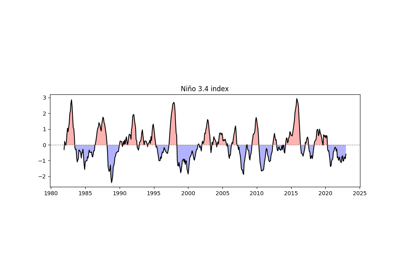
scipy.stats.pearsonr: The underlying correlation function used for calculations.Example(s) related to the function
- data_input
- easyclimate.core.stat.calc_leadlag_corr_spatial(data_input: xarray.DataArray, x: xarray.DataArray | numpy.ndarray, leadlag_array: numpy.array | List[int], time_dim: str = 'time', method: Literal['scipy', 'xarray'] = 'xarray')
Calculate Pearson correlation coefficients and corresponding p-values between spatial data and a time series with specified lead or lag shifts, using
scipy.stats.pearsonror xarray methods.Parameters
- data_input
xarray.DataArray Input spatial data with dimensions
(time, ...)representing spatial fields over time.Note
NaN values are automatically skipped in calculations.
- x
xarray.DataArrayornumpy.ndarray Time series data with dimension
(time,). Must have the same length asdata_input’s time dimension.Note
NaN values are automatically skipped in calculations.
- leadlag_array
numpy.ndarrayorList[int] Array or list of integers specifying the lead or lag shifts (in time steps) to apply to the time series x relative to data_input.
Positive values indicate a lag: the time series x is shifted forward in time (e.g., a value of +2 means x is delayed by 2 time steps relative to data_input).
Negative values indicate a lead: the time series x is shifted backward in time (e.g., a value of -2 means x leads data_input by 2 time steps).
A value of 0 means no shift (synchronous correlation).
Example: If
leadlag_array = [-2, 0, 2], correlations are computed for \(x\) leading by 2 time steps, no shift, and lagging by 2 time steps, respectively.- time_dim
str Name of the time dimension in data_input and x. Default is “time”.
- method{‘scipy’, ‘xarray’}, optional
Method used to compute correlations:
‘scipy’: Uses
scipy.stats.pearsonrfor direct calculation, which may be more precise but slower.‘xarray’: Uses xarray’s built-in correlation function with t-test conversion, which is typically faster.
Default is ‘xarray’.
Returns
- result
xarray.Dataset Dataset containing two variables:
- corr
xarray.DataArray Pearson correlation coefficients with dimensions
(leadlag, ...). Values range from -1 to 1, where: - 1 indicates a perfect positive correlation. - -1 indicates a perfect negative correlation. - 0 indicates no correlation.
- corr
- pvalue
xarray.DataArray Two-tailed p-values with dimensions
(leadlag, ...). Small p-values (<0.05) indicate statistically significant correlations.
- pvalue
Notes
The function iterates over each lead/lag value in leadlag_array, computes the correlation between the shifted x and data_input, and concatenates results along a new leadlag dimension.
Shifting x may introduce NaN values at the edges of the time series, which are handled automatically during correlation calculations.
Ensure data_input and x have compatible time dimensions to avoid errors.
Examples
>>> import xarray as xr
>>> import numpy as np
>>> data = xr.DataArray(np.random.rand(100, 10, 10), dims=["time", "lat", "lon"])
>>> ts = xr.DataArray(np.random.rand(100), dims=["time"])
>>> leadlag = [-2, 0, 2]
>>> result = calc_leadlag_corr_spatial(data, ts, leadlag, time_dim="time", method="xarray")
>>> print(result)
Processing leadlag: 2 ━━━━━━━━━━━━━━━━━━━━━━━━━━━━━━━━━━━━━━━━ 100% 0:00:00
<xarray.Dataset> Size: 7kB
Dimensions:    (leadlag: 3, lat: 10, lon: 10)
Coordinates:
* leadlag    (leadlag) int64 24B -2 0 2
Dimensions without coordinates: lat, lon
Data variables:
    reg_coeff  (leadlag, lat, lon) float64 2kB 0.006322 0.002647 ... -0.02781
    corr       (leadlag, lat, lon) float64 2kB 0.02141 0.00894 ... -0.09169
    pvalue     (leadlag, lat, lon) float64 2kB 0.8326 0.9297 ... 0.3053 0.3643
- data_input
- easyclimate.core.stat.calc_multiple_linear_regression_spatial(y_data: xarray.DataArray, x_datas: List[xarray.DataArray], dim='time') xarray.Dataset
Apply multiple linear regression to dataset across spatial dimensions.
\[y = a_1 x_1 + a_2 x_2 + \cdots\]Parameters
- y_data
xarray.DataArray Dependent variable with dimensions, each with dimensions
(time,).- x_datas
listofxarray.DataArray List of independent variables, each with dimensions
(time,).- dim
str, optional Time dimension name (default:
'time')
Returns
xarray.Datasetxarray.Datasetcontaining regression results with:slopes: slope coefficients for each predictor
(coef, lat, lon)intercept: intercept values
(lat, lon)r_squared: coefficient of determination
(lat, lon)slopes_p: p-values for slope coefficients
(coef, lat, lon)intercept_p: p-values for intercept
(lat, lon)
Raises
- ValueError
If the time coordinates of input variables don’t match.
Notes
NaN and Inf values are omitted independently at each spatial point. If the remaining samples are insufficient for the requested predictors, the corresponding regression results are returned as NaN.
- y_data
- easyclimate.core.stat.calc_ttestSpatialPattern_spatial(data_input1: xarray.DataArray, data_input2: xarray.DataArray, dim: str = 'time', equal_var: bool = True, alternative: Literal['two-sided', 'less', 'greater'] = 'two-sided', method: Literal['scipy', 'xarray'] = 'xarray') xarray.Dataset
Calculate the T-test for the means of two independent sptial samples along with other axis (i.e. ‘time’) of scores.
Parameters
- data_input1:
xarray.DataArray The first spatio-temporal data of xarray DataArray to be calculated.
- data_input2:
xarray.DataArray The second spatio-temporal data of xarray DataArray to be calculated.
Note
The order of data_input1 and data_input2 has no effect on the calculation result.
The non-time dimensions of the two data sets must be exactly the same, and the dimensionality values must be arranged in the same order (ascending or descending).
- dim:
str Dimension(s) over which to apply the test. By default the test is applied over the time dimension.
- equal_var:
bool If True (default), perform a standard independent 2 sample test that assumes equal population variances (see https://en.wikipedia.org/wiki/T-test#Independent_two-sample_t-test). If False, perform Welch’s t-test, which does not assume equal population variance (see https://en.wikipedia.org/wiki/Welch%27s_t-test).
- alternative{‘two-sided’, ‘less’, ‘greater’}, optional
Defines the alternative hypothesis. The following options are available (default is ‘two-sided’):
‘two-sided’: the means of the distributions underlying the samples are unequal.
‘less’: the mean of the distribution underlying the first sample is less than the mean of the distribution underlying the second sample.
‘greater’: the mean of the distribution underlying the first sample is greater than the mean of the distribution underlying the second sample.
- method{‘scipy’, ‘xarray’}, optional
Method used to compute correlations:
‘scipy’: Uses
scipy.stats.ttest_indfor direct calculation‘xarray’: Uses xarray’s built-in method to calculate (faster)
Default is ‘xarray’.
Returns
statistic, pvalue:
xarray.Dataset.
See also
- data_input1:
- easyclimate.core.stat.calc_windmask_ttestSpatialPattern_spatial(data_input1: xarray.Dataset, data_input2: xarray.Dataset, dim: str = 'time', u_dim: str = 'u', v_dim: str = 'v', mask_method: Literal['or', 'and'] = 'or', thresh: float = 0.05, equal_var: bool = True, alternative: Literal['two-sided', 'less', 'greater'] = 'two-sided', method: Literal['scipy', 'xarray'] = 'xarray')
Generate a significance mask for T-tests on the means of two independent spatial zonal (u) and meridional (v) wind samples, aggregated over the specified dimension (default ‘time’).
Parameters
- data_input1
xarray.Dataset The first spatio-temporal data of xarray Dataset to be calculated. It is necessary to include the zonal wind component (u_dim) and the meridional wind component (v_dim).
- data_input2
xarray.Dataset The second spatio-temporal data of xarray Dataset to be calculated. It is necessary to include the zonal wind component (u_dim) and the meridional wind component (v_dim).
Note
The order of data_input1 and data_input2 has no effect on the calculation result.
The non-time dimensions of the two data sets must be exactly the same, and the dimensionality values must be arranged in the same order (ascending or descending).
- dim
str, default: time Dimension(s) over which to apply the test. By default the test is applied over the time dimension.
- u_dim
str, default: u Variable name for the u velocity (zonal wind, in x direction).
- v_dim
str, default: v Variable name for the v velocity (meridional wind, in y direction).
- mask_methodLiteral[“or”, “and”], default: “or”
Method to combine the significance masks for u and v components:
“or”: A grid point is considered significant if either the u or v component is significant (p <= thresh).
“and”: A grid point is considered significant if both the u and v components are significant (p <= thresh).
- thresh
float, default: 0.05 The significance level (alpha) for the p-value threshold used to create the mask.
- equal_var
bool, default: True If True (default), perform a standard independent 2 sample test that assumes equal population variances (see https://en.wikipedia.org/wiki/T-test#Independent_two-sample_t-test). If False, perform Welch’s t-test, which does not assume equal population variance (see https://en.wikipedia.org/wiki/Welch%27s_t-test).
- alternative{‘two-sided’, ‘less’, ‘greater’}, optional=
Defines the alternative hypothesis. The following options are available (default is ‘two-sided’):
‘two-sided’: the means of the distributions underlying the samples are unequal.
‘less’: the mean of the distribution underlying the first sample is less than the mean of the distribution underlying the second sample.
‘greater’: the mean of the distribution underlying the first sample is greater than the mean of the distribution underlying the second sample.
- method{‘scipy’, ‘xarray’}, optional
Method used to compute t-tests:
‘scipy’: Uses
scipy.stats.ttest_indfor direct calculation‘xarray’: Uses xarray’s built-in method to calculate (faster)
Default is ‘xarray’.
Returns
- masked_pvalue
xarray.DataArray A boolean mask indicating significant regions (True where p <= thresh, combined via mask_method for u and v).
See also
- data_input1
- easyclimate.core.stat.calc_levenetestSpatialPattern_spatial(data_input1: xarray.DataArray, data_input2: xarray.DataArray, dim: str = 'time', center: {'mean', 'median', 'trimmed'} = 'median', proportiontocut: float = 0.05) xarray.Dataset
Perform Levene test for equal variances of two independent sptial samples along with other axis (i.e. ‘time’) of scores.
The Levene test tests the null hypothesis that all input samples are from populations with equal variances. Levene’s test is an alternative to Bartlett’s test in the case where there are significant deviations from normality.
Parameters
- data_input1:
xarray.DataArray. The first spatio-temporal data of xarray DataArray to be calculated.
- data_input2:
xarray.DataArray. The second spatio-temporal data of xarray DataArray to be calculated.
Note
The order of data_input1 and data_input2 has no effect on the calculation result.
The non-time dimensions of the two data sets must be exactly the same, and the dimensionality values must be arranged in the same order (ascending or descending).
- dim:
str. Dimension(s) over which to apply the test. By default the test is applied over the time dimension.
- center: {‘mean’, ‘median’, ‘trimmed’}, default ‘median’.
Which function of the data to use in the test.
Note
Three variations of Levene’s test are possible. The possibilities and their recommended usages are:
median: Recommended for skewed (non-normal) distributions.
mean: Recommended for symmetric, moderate-tailed distributions.
trimmed: Recommended for heavy-tailed distributions.
The test version using the mean was proposed in the original article of Levene (Levene, H., 1960) while the median and trimmed mean have been studied by Brown and Forsythe (Brown, M. B. and Forsythe, A. B., 1974), sometimes also referred to as Brown-Forsythe test.
- proportiontocut:
float, default 0.05. When center is ‘trimmed’, this gives the proportion of data points to cut from each end (See
scipy.stats.trim_mean).
Returns
statistic, pvalue:
xarray.Dataset.
Reference
Levene, H. (1960). In Contributions to Probability and Statistics: Essays in Honor of Harold Hotelling, I. Olkin et al. eds., Stanford University Press, pp. 278-292.
Morton B. Brown & Alan B. Forsythe (1974) Robust Tests for the Equality of Variances, Journal of the American Statistical Association, 69:346, 364-367, DOI: https://doi.org/10.1080/01621459.1974.10482955
See also
- data_input1:
- easyclimate.core.stat.calc_levenetestSpatialPattern_spatial(data_input1: xarray.DataArray, data_input2: xarray.DataArray, dim: str = 'time', center: {'mean', 'median', 'trimmed'} = 'median', proportiontocut: float = 0.05) xarray.Dataset
Perform Levene test for equal variances of two independent sptial samples along with other axis (i.e. ‘time’) of scores.
The Levene test tests the null hypothesis that all input samples are from populations with equal variances. Levene’s test is an alternative to Bartlett’s test in the case where there are significant deviations from normality.
Parameters
- data_input1:
xarray.DataArray. The first spatio-temporal data of xarray DataArray to be calculated.
- data_input2:
xarray.DataArray. The second spatio-temporal data of xarray DataArray to be calculated.
Note
The order of data_input1 and data_input2 has no effect on the calculation result.
The non-time dimensions of the two data sets must be exactly the same, and the dimensionality values must be arranged in the same order (ascending or descending).
- dim:
str. Dimension(s) over which to apply the test. By default the test is applied over the time dimension.
- center: {‘mean’, ‘median’, ‘trimmed’}, default ‘median’.
Which function of the data to use in the test.
Note
Three variations of Levene’s test are possible. The possibilities and their recommended usages are:
median: Recommended for skewed (non-normal) distributions.
mean: Recommended for symmetric, moderate-tailed distributions.
trimmed: Recommended for heavy-tailed distributions.
The test version using the mean was proposed in the original article of Levene (Levene, H., 1960) while the median and trimmed mean have been studied by Brown and Forsythe (Brown, M. B. and Forsythe, A. B., 1974), sometimes also referred to as Brown-Forsythe test.
- proportiontocut:
float, default 0.05. When center is ‘trimmed’, this gives the proportion of data points to cut from each end (See
scipy.stats.trim_mean).
Returns
statistic, pvalue:
xarray.Dataset.
Reference
Levene, H. (1960). In Contributions to Probability and Statistics: Essays in Honor of Harold Hotelling, I. Olkin et al. eds., Stanford University Press, pp. 278-292.
Morton B. Brown & Alan B. Forsythe (1974) Robust Tests for the Equality of Variances, Journal of the American Statistical Association, 69:346, 364-367, DOI: https://doi.org/10.1080/01621459.1974.10482955
See also
- data_input1:
- easyclimate.core.stat.calc_skewness_spatial(data_input: xarray.DataArray | xarray.Dataset, dim: str = 'time') xarray.Dataset | xarray.DataTree
Calculate the skewness of the spatial field on the time axis and its significance test.
The \(k\) th statistical moment about the mean is given by
\[m_k = \sum_{i=1}^{N} \frac{(x_i-\bar{x})^k}{N}\]where \(x_i\) is the \(i\) th observation, \(\bar{x}\) the mean and \(N\) the number of observations.
One definition of the coefficient of skewness is
\[a_3 = \frac{m_3}{(m_2)^{3/2}}\]Skewness is a measure of the asymmetry of a distribution and is zero for a normal distribution. If the longer wing of a distribution occurs for values of \(x\) higher than the mean, that distribution is said to have positive skewness. If thelonger wing occurs for values of \(x\) lower than the mean, the distribution is said to have negative skewness.
Parameters
- data_input:
xarray.DataArray The spatio-temporal data of xarray DataArray to be calculated.
- dim:
str Dimension(s) over which to apply skewness. By default skewness is applied over the time dimension.
Returns
skewness, pvalue:
xarray.Dataset.
Reference
White, G. H. (1980). Skewness, Kurtosis and Extreme Values of Northern Hemisphere Geopotential Heights, Monthly Weather Review, 108(9), 1446-1455. Website: https://journals.ametsoc.org/view/journals/mwre/108/9/1520-0493_1980_108_1446_skaevo_2_0_co_2.xml
See also
- data_input:
- easyclimate.core.stat.calc_kurtosis_spatial(data_input: xarray.DataArray | xarray.Dataset, dim: str = 'time') xarray.DataArray | xarray.DataTree
Calculate the kurtosis of the spatial field on the time axis and its significance test.
The \(k\) th statistical moment about the mean is given by
\[m_k = \sum_{i=1}^{N} \frac{(x_i-\bar{x})^k}{N}\]where \(x_i\) is the \(i\) th observation, \(\bar{x}\) the mean and \(N\) the number of observations.
The coefficient of kurtosis is defined by
\[a_4 = \frac{m_4}{(m_2)^{2}}\]The kurtosis of a normal distribution is 3. If a distribution has a large central region which is flatter than a normal distribution with the same mean and variance, it has a kurtosis of less than 3. If the distribution has a central maximum more peaked and with longer wings than the equivalent normal distribution, its kurtosis is higher than 3 (Brooks and Carruthers, 1954). Extreme departures from the mean will cause very high values of kurtosis. Consequently, high kurtosis has been used as an indicator of bad data (Craddock and Flood, 1969). For the same reason, high values of kurtosis can be a result of one or two extreme events in a period of several years.
Parameters
- data_input:
xarray.DataArray The spatio-temporal data of xarray DataArray to be calculated.
- dim:
str Dimension(s) over which to apply kurtosis. By default kurtosis is applied over the time dimension.
Returns
kurtosis:
xarray.DataArray.
Reference
White, G. H. (1980). Skewness, Kurtosis and Extreme Values of Northern Hemisphere Geopotential Heights, Monthly Weather Review, 108(9), 1446-1455. Website: https://journals.ametsoc.org/view/journals/mwre/108/9/1520-0493_1980_108_1446_skaevo_2_0_co_2.xml
Køie, M., Brooks, C.E., & Carruthers, N. (1954). Handbook of Statistical Methods in Meteorology. Oikos, 4, 202.
Craddock, J.M. and Flood, C.R. (1969), Eigenvectors for representing the 500 mb geopotential surface over the Northern Hemisphere. Q.J.R. Meteorol. Soc., 95: 576-593. doi: https://doi.org/10.1002/qj.49709540510
See also
- data_input:
- easyclimate.core.stat.calc_theilslopes_spatial(data_input: xarray.DataArray | xarray.Dataset, dim: str = 'time', x=None, alpha: float = 0.95, method: {'joint', 'separate'} = 'separate', returns_type: {'dataset_returns', 'dataset_vars'} = 'dataset_returns') xarray.Dataset | xarray.DataTree
Computes the Theil-Sen estimator.
Theilslopes implements a method for robust linear regression. It computes the slope as the median of all slopes between paired values.
Parameters
- data_input
xarray.DataArrayorxarray.Dataset xarray.DataArrayorxarray.Datasetto be regression.- dim:
str, default time. Dimension(s) over which to apply linregress. By default linregress is applied over the time dimension.
- x:
numpy.array Independent variable. If None, use np.arange(len(data_input[‘time’].shape[0])) instead.
- alpha:
float, default 0.95. Confidence degree between 0 and 1. Default is 95% confidence. Note that alpha is symmetric around 0.5, i.e. both 0.1 and 0.9 are interpreted as “find the 90% confidence interval”.
- method: {‘joint’, ‘separate’}, default ‘separate’.
Method to be used for computing estimate for intercept. Following methods are supported,
joint: Uses np.median(y - slope * x) as intercept.
separate: Uses np.median(y) - slope * np.median(x) as intercept.
- returns_type:
str, default ‘dataset_returns’. Return data type.
Returns
- result
TheilslopesResultDataset The return Dataset have following data_var:
See also
- data_input
- easyclimate.core.stat.calc_lead_lag_correlation_coefficients(pcs: dict, pairs: List[tuple], max_lag: int) xarray.Dataset
Compute lead-lag correlation coefficients for specified pairs of indexes.
This function calculates the cross-correlation between pairs of time series (e.g., MJO/BSISO principal components PC1 vs. PC2) to determine their lead-lag relationships. The correlation coefficients are computed for a range of lags, and the maximum correlation and corresponding lag are stored as attributes in the output dataset.
Parameters
- pcspy:class:dict <dict>
Dictionary mapping PC names (e.g., ‘PC1’, ‘PC2’) to
xarray.DataArrayobjects, where each DataArray represents a principal component time series with a'time'dimension.- pairspy:class:list <list> of tuples
List of tuples, where each tuple contains (pair_name, pc_name1, pc_name2). For example, [(‘PC1_vs_PC2’, ‘PC1’, ‘PC2’), (‘PC3_vs_PC4’, ‘PC3’, ‘PC4’)].
- max_lagpy:class:int <int>
Maximum lag (in time steps) to consider for the cross-correlation. The function computes correlations for lags from
-max_lagto+max_lag.
Returns
- corr_da
xarray.Dataset Dataset containing correlation coefficients for each pair, with a ‘lag’ dimension. Each variable (e.g., ‘PC1_vs_PC2’) has attributes
'max_correlation' (float)and'lag_at_max_correlation' (int)indicating the maximum correlation and the lag at which it occurs.
Notes
Positive lags indicate that the first PC leads the second; negative lags indicate the opposite.
The input PCs should have no missing values. Use
fillnaorinterpolate_naif needed.The correlation coefficients are normalized to range between \(-1\) and \(1\).
- easyclimate.core.stat.calc_timeseries_correlations(da: dict[str, xarray.DataArray] | list[xarray.DataArray], dim: str = 'time') xarray.DataArray
Calculate the correlation matrix between multiple DataArray time series.
This function calculates pairwise correlations between time series in the input DataArrays using the specified correlation method along the given dimension. The output is a symmetric correlation matrix stored as an xarray DataArray with dimensions (var1, var2).
Parameters
- da
dict[str, xarray.DataArray<xarray.DataArray>]orlist[xarray.DataArray<xarray.DataArray>]. A dictionary with names as keys and DataArrays as values, or a list of DataArrays. Each DataArray must contain the specified dimension.
- dim
str, default: time. The dimension along which to compute correlations. All DataArrays must have this dimension.
Returns
xarray.DataArray.A DataArray containing the correlation matrix with dimensions (var1, var2). Coordinates are set to the names of the input time series.
Examples
>>> time = pd.date_range('2020-01-01', '2020-12-31', freq='D')
>>> da1 = xr.DataArray(np.random.randn(len(time)), dims='time', coords={'time': time}, name='series1')
>>> da2 = xr.DataArray(da1 * 0.5 + np.random.randn(len(time)) * 0.5, dims='time', coords={'time': time}, name='series2')
>>> data = {'series1': da1, 'series2': da2}
>>> corr_matrix = calc_timeseries_correlations(data, method='pearson')
>>> print(corr_matrix)
- da
- easyclimate.core.stat.calc_non_centered_corr(data_input1, data_input2, dim=None)
Compute the non-centered (uncentered) correlation coefficient between two xarray DataArrays. This is equivalent to the cosine similarity, calculated as the sum of the product of the two arrays divided by the product of their L2 norms (Euclidean norms), without subtracting the means.
The formula is:
\[r = \frac{\sum (x \cdot y)}{\sqrt{\sum x^2} \cdot \sqrt{\sum y^2}}\]Parameters
- data_input1
xarray.DataArray The first input data array to be correlated.
- data_input2
xarray.DataArray The second input data array to be correlated.
Note
Both inputs must be xarray DataArray objects.
The arrays must have compatible shapes: if dim is specified, it must be a shared dimension; if dim is None, all dimensions are flattened into a single vector for computation.
The result is set to 0 where the denominator (product of norms) is zero to avoid division by zero.
- dim
stror None, optional Dimension(s) over which to compute the correlation. If None (default), the arrays are flattened across all dimensions into a single vector before computation. If a string, the correlation is computed along the specified dimension, preserving other dimensions.
Returns
- corr
xarray.DataArray The non-centered correlation coefficient, with the same dimensions as the input arrays (or broadcasted appropriately).
See also
scipy.spatial.distance.cosine(for the related cosine distance metric).Examples
Compute correlation along a dimension:
>>> import xarray as xr
>>> import numpy as np
>>> import easyclimate as ecl
>>> da1 = xr.DataArray(np.array([[1, 2], [3, 4]]), dims=['x', 'y'])
>>> da2 = xr.DataArray(np.array([[2, 3], [4, 5]]), dims=['x', 'y'])
>>> corr = ecl.calc_non_centered_corr(da1, da2, dim='y')
>>> print(corr)
<xarray.DataArray (x: 2)> Size: 16B
array([0.99227788, 0.99951208])
Flatten and compute scalar correlation:
>>> corr_flat = calc_non_centered_corr(da1, da2)
>>> print(corr_flat)
Dimensions without coordinates: x
<xarray.DataArray ()> Size: 8B
array(0.99380799)
- data_input1
- easyclimate.core.stat.calc_pattern_corr(data_input1: xarray.DataArray, data_input2: xarray.DataArray, time_dim: str = 'time')
Compute the pattern correlation (non-centered) between two xarray DataArrays over their common spatial dimensions. This is useful for comparing spatial patterns, such as in climate data.
It uses the non-centered correlation formula:
\[r = \frac{\sum (x \cdot y)}{\sqrt{\sum x^2} \cdot \sqrt{\sum y^2}}\]where the summation is over the stacked spatial (pattern) dimensions.
The spatial pattern dimensions are automatically detected as the intersection of the input dimensions, excluding ‘time’ (if present). Both inputs are stacked along these pattern dimensions into a temporary ‘pattern’ dimension, and the non-centered correlation is computed along it.
If both inputs lack ‘time’, the result is a scalar.
If one input has ‘time’ and the other does not, the result preserves the ‘time’ dimension from the timed input.
Broadcasting occurs automatically for compatible shapes.
Parameters
- data_input1
xarray.DataArray The first input data array (e.g., spatial pattern or time series of patterns).
- data_input2
xarray.DataArray The second input data array (must have compatible spatial dimensions).
- time_dim:
str, default: time. The time coordinate dimension name.
Returns
- corr
xarray.DataArrayor scalar The pattern correlation coefficient(s). Dimensions match the non-spatial dimensions of the inputs (e.g., ‘time’ if present in one input).
Note
Assumes inputs have compatible shapes and the only differing dimension is ‘time’.
Equivalent to cosine similarity over the spatial pattern.
For zero-norm cases, correlation is set to 0.
See also
Examples
Scalar correlation between two spatial patterns:
>>> import xarray as xr
>>> import numpy as np
>>> import easyclimate as ecl
>>> # Create a random number generator with a fixed seed.
>>> rng = np.random.default_rng(42)
>>> pat1 = xr.DataArray(rng.random((2, 3)), dims=['lat', 'lon'])
>>> pat2 = xr.DataArray(rng.random((2, 3)), dims=['lat', 'lon'])
>>> pcc = ecl.calc_pattern_corr(pat1, pat2)
>>> print(pcc)
<xarray.DataArray 'pcc' ()> Size: 8B
array(0.85730639)
Attributes:
    long_name:  Pattern Correlation Coefficient (non-centered)
    units:      dimensionless
Time series correlation (one with time):
>>> # Create a random number generator with a fixed seed.
>>> rng = np.random.default_rng(42)
>>> time = xr.DataArray(np.arange(4), dims=['time'])
>>> timed_pat = xr.DataArray(rng.random((4, 2, 3)), dims=['time', 'lat', 'lon'])
>>> pcc_time = ecl.calc_pattern_corr(timed_pat, pat2)
>>> print(pcc_time)
<xarray.DataArray 'pcc' (time: 4)> Size: 32B
array([0.85730639, 1.        , 0.78188174, 0.88162673])
Dimensions without coordinates: time
Attributes:
    long_name:  Pattern Correlation Coefficient (non-centered)
    units:      dimensionless
- easyclimate.core.stat.remove_sst_trend(ssta: xarray.DataArray, spatial_dims: list[str] = ['lat', 'lon']) xarray.DataArray
Remove the global mean SST anomaly trend from the SST anomaly field for EOF/PC analysis and so on.
This function computes the deviation of the SST anomaly at each grid point \((x, y)\) from the global-mean SST anomaly for the same time step \(t\), following the approach described in Zhang et al. (1997). The resulting field is:
\[\mathrm{SSTA}^*_{x,y,t} = \mathrm{SSTA}_{x,y,t} - [\mathrm{SSTA}]_t\]where \([\mathrm{SSTA}]_t\) is the spatial mean over the specified dimensions for time \(t\). This removes the dominant global warming mode trend, avoiding unrealistic orthogonality constraints in subsequent PC analysis.
Parameters
- ssta
xarray.DataArray The SST anomaly field with dimensions including ‘time’ and the spatial dimensions (e.g., ‘lat’, ‘lon’).
- spatial_dims
listofstr, optional The spatial dimensions over which to compute the global mean. Default: [‘lat’, ‘lon’].
Returns
xarray.DataArrayThe deviation SST anomaly field with the same shape and coordinates as the input.
Reference
Zhang, Y., Wallace, J. M., & Battisti, D. S. (1997). ENSO-like Interdecadal Variability: 1900-93. Journal of Climate, 10(5), 1004-1020. https://journals.ametsoc.org/view/journals/clim/10/5/1520-0442_1997_010_1004_eliv_2.0.co_2.xml
Examples
>>> import xarray as xr
>>> # Load or create an xarray Dataset with SST anomalies
>>> ds = xr.open_dataset('path_to_sst_data.nc')
>>> # Assume 'ssta' is the variable name for SST anomalies
>>> ssta_dev = remove_sst_tendency(ds['ssta'])
>>> print(ssta_dev)
<xarray.DataArray 'ssta' (time: 120, lat: 180, lon: 360)>
Coordinates:
  * time     (time) datetime64[ns] 1940-01-01 ... 2024-12-01
  * lat      (lat) float32 -89.5 -88.5 -87.5 ... 87.5 88.5 89.5
  * lon      (lon) float32 0.5 1.5 2.5 ... 357.5 358.5 359.5
- ssta